Remote Credential Guard double-hop issue after server 2022 upgrade

Robert Ro 36 Reputation points
2022-02-21T23:03:25.583+00:00

we upgraded two of our jump/admin servers from server 2019 to server 2022. one was installed fresh, the other one was upgraded via inplace upgrade.

now mstsc /remoteguard no longer works correctly, we seem to run into a kerberos double-hop issue.

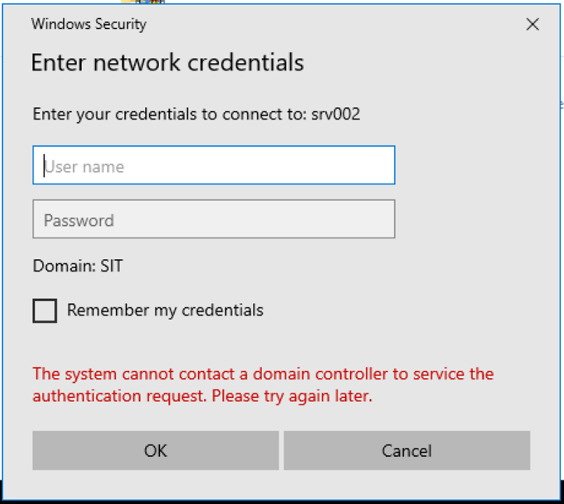
what we do is, we logon to the admin server as usual with credentials. then from the admin server we use mstsc /remoteguard to jump to a different machine. on the destination machine, upon opening network shares we receive the message:

"The system cannot contact a domain controller to service the authentication reuqest. Please try again later."
176535-image.png

this did not happen before the upgrade. everything still works fine when starting from a server 2019 admin server.
no group policies, security settings or other modifications were done the infrastructure.
anyone else experiencing this?

Windows for business | Windows Client for IT Pros | User experience | Remote desktop services and terminal services
Windows for business | Windows Server | User experience | Other
Windows for business | Windows Server | Devices and deployment | Configure application groups
0 comments No comments

14 answers

Sort by: Newest
  1. SIMONS Philippe 1 Reputation point
    2022-04-27T05:31:32.123+00:00

    @Robert Ro ,
    we also have Credential Guard / Virtualization Based Security enabled on our VMs - on purpose.
    We knew at the opening of the case that disabling it 'fixes' the issue - but this is not a valid option !
    And again, for us, installing KB5011831 on the 'source' machine fixes the issue.

    Was this answer helpful?

    0 comments No comments

  2. Robert Ro 36 Reputation points
    2022-04-26T22:44:31.097+00:00

    found the issue.
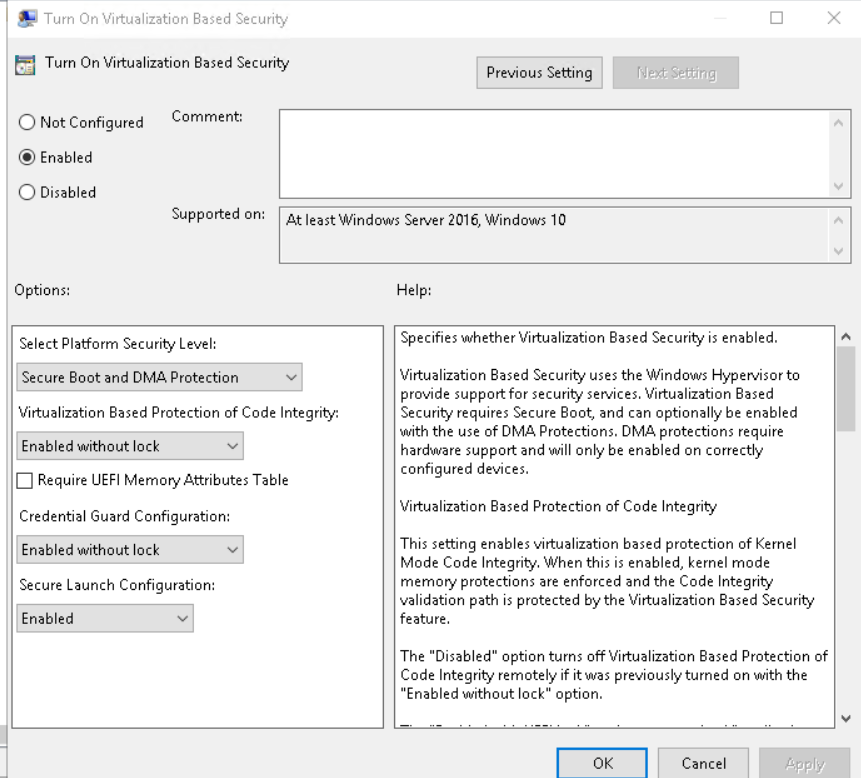
    additionally to RCG we have Credential Guard / VBS enabled on all our systems as well.

    196752-image.png

    while this is fine on hardware boxes (e.g. Win10->Win10), on virtualized servers it still causes the problem as described in the first post. disabling Virtualization Based Security "fixes" it. both confirmed in lab and in prod environment. i'll update the MS support case.

    Was this answer helpful?

    0 comments No comments

  3. SIMONS Philippe 1 Reputation point
    2022-04-26T19:14:36.21+00:00

    Yes we tested it, yes it fixes the issue for us.
    The patch has to be installed on the Client machine (the one you are launching mstsc on) not the Server (machine that you RDP to)

    Was this answer helpful?

    0 comments No comments

  4. Robert Ro 36 Reputation points
    2022-04-26T15:45:04.657+00:00

    did you test it?
    we're still investigating but so far the patch doesn't fix the issue.

    Was this answer helpful?

    0 comments No comments

  5. SIMONS Philippe 1 Reputation point
    2022-04-26T15:05:55.483+00:00

    Good news,
    Preview update (4C) is available, and addresses the issue

    Windows Server 2022 - KB5012637 ,Windows 11 (SV) - KB5012643 , Windows 10 2004 \ 20H1 \ 20H2 \ 21H1 \21H2 -KB5011831

    “Addresses an issue that causes Kerberos authentication to fail, and the error is “0xc0030009 (RPC_NT_NULL_REF_POINTER)”. This occurs when a client machine attempts to use the Remote Desktop Protocol (RDP) to connect to another machine while Remote Credential Guard is enabled.”

    Was this answer helpful?


Your answer

Answers can be marked as 'Accepted' by the question author and 'Recommended' by moderators, which helps users know the answer solved the author's problem.