How to activete virtual machine with Widows Server 2019 Standard ?

Jacek Osiński 31 Reputation points
2022-01-26T07:53:00.843+00:00

Hi
I bought Windows Server 2019 Standard with HP DL380 machine (OEM)
Then I install it physically and activate on this machine and install Hyper-V funcion (this is server with only Hyper-V role)

Next I configure it and install as a first VM - Windows Server 2019 Standard Evaluation (I have to use the evaluation ISO because I can't install it from my ISO made from the original DVD, I can't boot from it)

Now I'd like to activate the OS on this VM (my license allow for two virtual OSE if the physical one is only Hyper-V role) but I don't know how.
What is the procedure in that enoirement?
Is VMA also works for this screnario?

Thanks
Jacek

Windows for business | Windows Server | User experience | Other
0 comments No comments

Answer accepted by question author
Anonymous
2022-01-28T14:12:15.633+00:00

The mail question was "How to activate VM with the same key as a host OSE?"

Since you have already converted the evaluation to full you can do
slmgr /ipk xxxxx-xxxxx-xxxxx-xxxxx-xxxxx
slmgr /ato

With the Windows Server 2019 Stadard license I bought 25 User CAL licenses.

The windows CALs do not get installed anywhere, just hang on to the documentation for record keeping / audit purpose. CALs are required for each instance of windows server.
A Windows Server CAL is a license that grants access Windows Server. CALs are used in conjunction with Microsoft Windows Server OS licenses to allow Users and/or Devices to access and utilize the services of that windows server

  • User CALs allow a single user access to Windows Server from an unlimited number of devices
  • Device CALs allow an unlimited number of users to access Windows Server from a single device

--please don't forget to upvote and Accept as answer if the reply is helpful--

Was this answer helpful?

1 person found this answer helpful.

5 additional answers

Sort by: Oldest
  1. Jacek Osiński 31 Reputation points
    2022-01-26T12:47:02.573+00:00

    I found a way for solve this but myselve just let me know that is correct:

    1. Activate host with a retail key
    2. On virtual machine set up host as a KMS server via Windows PowerShell command: slmgr /skms hostIP When done it will be confirmed by popup box
    3. Then change Evaluatin to Standard with the same Key like for host via command: DISM /online /Set-Edition:ServerStandard /ProductKey:xxxxx-xxxxx-xxxxx-xxxxx-xxxxx /AcceptEula
    4. Reboot virtual machine

    Best

    Was this answer helpful?

    2 people found this answer helpful.

  2. Anonymous
    2022-01-27T15:38:01.913+00:00

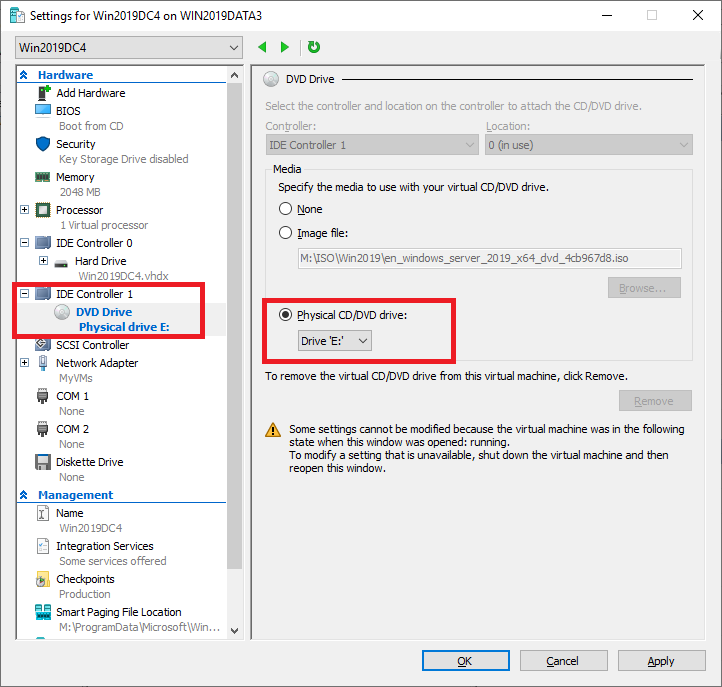
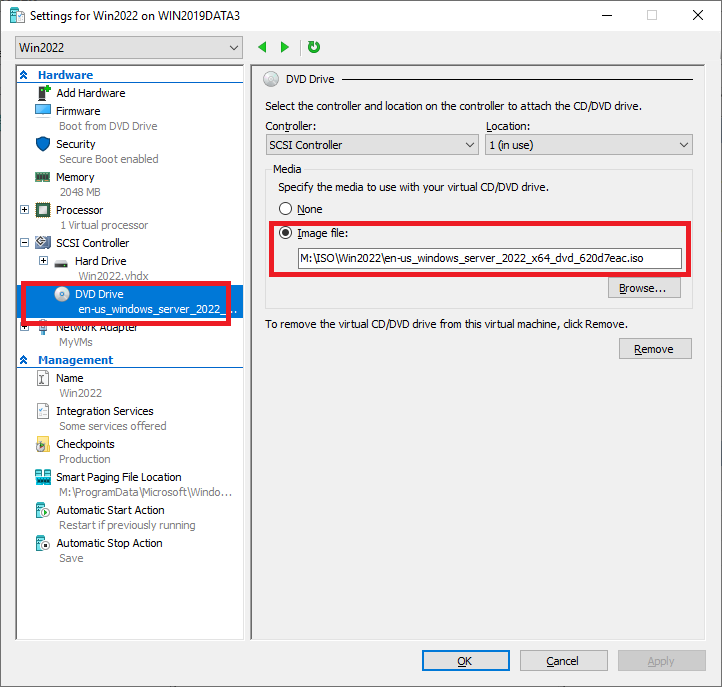
    The simplest solution would have been to pass the host's DVD drive to the VM as a boot device.

    --please don't forget to upvote and Accept as answer if the reply is helpful--

    Gen 1
    169010-image.png

    Gen 2
    169134-image.png

    Was this answer helpful?

    0 comments No comments

  3. Jacek Osiński 31 Reputation points
    2022-01-28T08:29:05.217+00:00

    Hi @Anonymous
    Thanks In case of installation your way is simplest but Image which I made from may DVD wasn't bootable on VM (I dont know why, because when I meve it to the USB it was bootable on a physical machine)
    The mail question was "How to activate VM with the same key as a host OSE?"

    So now I know when I set KMS server for hostIP then I can activete the VM - is that correct way for this envoirement?

    The second question is related with User CAL licenses.
    With the Windows Server 2019 Stadard license I bought 25 User CAL licenses.
    Is those licenses should be install on a host OSE or I have to have separate for each VM OSE?
    First VM will be used as a Active Directory Domain Controller (15 user accounts), and IIS sever,
    Second is an app server for 10 users works remotelly via client apps.

    Thank you
    Jacek

    Was this answer helpful?

    0 comments No comments

  4. Jacek Osiński 1 Reputation point
    2022-01-29T13:53:52.157+00:00

    Hi @Anonymous everything works fine now.
    Thanks for the help.

    Was this answer helpful?


Your answer

Answers can be marked as 'Accepted' by the question author and 'Recommended' by moderators, which helps users know the answer solved the author's problem.