Outlook | Windows | Classic Outlook for Windows | For business
Using classic Outlook for Windows in business environments

This browser is no longer supported.
Upgrade to Microsoft Edge to take advantage of the latest features, security updates, and technical support.
' cx='32' cy='32' r='32' /%3E%3Ctext x='50%25' y='55%25' dominant-baseline='middle' text-anchor='middle' fill='%23FFF' %3EA%3C/text%3E%3C/svg%3E)
Outlook now automatically adds a Teams Meeting link to any meeting I schedule using Outlook - I would like to permanently disable this for my Outlook as my team only uses Zoom for meetings. There does not seem to be any documentation about this and I have been unable to find anything in preferences that changes it permanently.
Using classic Outlook for Windows in business environments
Additional features, settings, or issues not covered by specific Microsoft Teams categories

' cx='32' cy='32' r='32' /%3E%3Ctext x='50%25' y='55%25' dominant-baseline='middle' text-anchor='middle' fill='%23FFF' %3EJM%3C/text%3E%3C/svg%3E)
Hi @Anonymous
Outlook now automatically adds a Teams Meeting link to any meeting I schedule using Outlook
How did you schedule meeting in Outlook client? Do you mean if you schedule "Any meeting" in Outlook, it will add Teams meeting link?
Based on my knowledge, if you don't want to schedule Teams meeting in Outlook client, you could try to disable it by following these steps:
It has been a while, how is everything going?
If you have any update about this issue, please feel free to post back.
' cx='32' cy='32' r='32' /%3E%3Ctext x='50%25' y='55%25' dominant-baseline='middle' text-anchor='middle' fill='%23FFF' %3EDM%3C/text%3E%3C/svg%3E)
I find it disturbing that MS just went ahead and started assuming that I would use MS Teams for all of my meetings. Believe it or not, people still have face-to-face meetings and use other online meeting software products. This feature turning on by default caused a lot of confusion. The solution below completely disables MS Teams in Outlook. I would still like it as an option, but don't assume that every meeting I schedule will use MS Teams. It's a big overstep.
' cx='32' cy='32' r='32' /%3E%3Ctext x='50%25' y='55%25' dominant-baseline='middle' text-anchor='middle' fill='%23FFF' %3ESR%3C/text%3E%3C/svg%3E)
I couldnt agree more. This is very poor product management.
' cx='32' cy='32' r='32' /%3E%3Ctext x='50%25' y='55%25' dominant-baseline='middle' text-anchor='middle' fill='%23FFF' %3ECM%3C/text%3E%3C/svg%3E)
Didn't this sort of anti-competitive behavior already cost Microsoft a boat load of money 20 years ago? Its exactly what is in their DNA.
' cx='32' cy='32' r='32' /%3E%3Ctext x='50%25' y='55%25' dominant-baseline='middle' text-anchor='middle' fill='%23FFF' %3EGE%3C/text%3E%3C/svg%3E)
First thing I tried before coming here was disabling the add-in but Teams re-enables it automatically the next time you launch a Teams meeting.
' cx='32' cy='32' r='32' /%3E%3Ctext x='50%25' y='55%25' dominant-baseline='middle' text-anchor='middle' fill='%23FFF' %3ETT%3C/text%3E%3C/svg%3E)
Can someone help me find this setting on the Mac version of Outlook?
Mac Outlook is doing the same now.
' cx='32' cy='32' r='32' /%3E%3Ctext x='50%25' y='55%25' dominant-baseline='middle' text-anchor='middle' fill='%23FFF' %3EDS%3C/text%3E%3C/svg%3E)
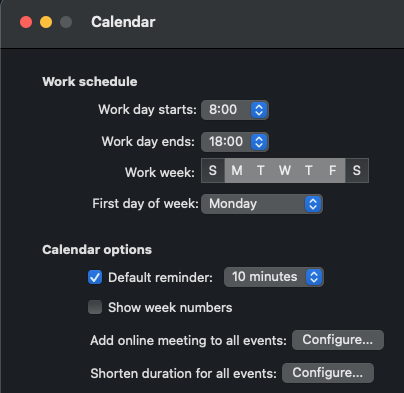
It looks like MS finally added it to the New Outlook for Mac's settings.
I hate that I cannot pick to have a Teams meeting or not. I would like to send meeting request and be able to either ADD a Teams meeting. I do NOT want all of my meeting invites to have a Teams meeting. Disabling this means it is totally disabled. JUNK!
' cx='32' cy='32' r='32' /%3E%3Ctext x='50%25' y='55%25' dominant-baseline='middle' text-anchor='middle' fill='%23FFF' %3ESS%3C/text%3E%3C/svg%3E)
' cx='32' cy='32' r='32' /%3E%3Ctext x='50%25' y='55%25' dominant-baseline='middle' text-anchor='middle' fill='%23FFF' %3EMT%3C/text%3E%3C/svg%3E)
The first recommendation not works for me, and I found below way through a PDF from Uni of Maryland.
Turning Off the Addition of MS Teams Meeting From the Outlook client:
' cx='32' cy='32' r='32' /%3E%3Ctext x='50%25' y='55%25' dominant-baseline='middle' text-anchor='middle' fill='%23FFF' %3EJL%3C/text%3E%3C/svg%3E)
Three things:
What an arrogant, self-serving approach to customers!
Found it for Mac in May 2023 update, no thanks to Jimmy Yang.
Select "Outlook" in upper left top menu
Select "Preferences"
Select "Other, subitem "Calendar"
Look under "Calendar Options" for "Add online meeting to all events"
Click the "Configure" button
Uncheck "Add online meetings to all meetings"
You're welcome.
' cx='32' cy='32' r='32' /%3E%3Ctext x='50%25' y='55%25' dominant-baseline='middle' text-anchor='middle' fill='%23FFF' %3EDG%3C/text%3E%3C/svg%3E)
We're running Office LTSC Pro Plus 2021 and its version is 2108 and I think that's before the "Add online meeting to all events" option was introduced. So I'm finding we have to disable the Teams Add-in in Outlook to stop the behavior but of course that removes all ability in Outlook to schedule a Teams meeting. Any suggestions?
' cx='32' cy='32' r='32' /%3E%3Ctext x='50%25' y='55%25' dominant-baseline='middle' text-anchor='middle' fill='%23FFF' %3EEA%3C/text%3E%3C/svg%3E)
How do we disable automatic Teams meetings in duplicated meeting invitations on Outlook OWA? In my settings, I've unchecked the "automatically add online meeting to all meetings" (seriously do you not employ any copy editors?), but every time I duplicate a meeting invitation, it overrides the existing zoom links and attaches Teams links within the body, along with a "join Teams meeting" button. Even after I once again switch off the "add Teams meeting" button in the Duplication dialog box. Please make it stop.
' cx='32' cy='32' r='32' /%3E%3Ctext x='50%25' y='55%25' dominant-baseline='middle' text-anchor='middle' fill='%23FFF' %3EW%3C/text%3E%3C/svg%3E)
For those of you looking to push a fix to all users via GPO. Put in a Group Policy preference for a delete and change to the HKCU and have the users log off then back on again after running GPUpdate.
Delete the key below from the users registry HKCU(AS THE USER)
HKEY_CURRENT_USER\SOFTWARE\Microsoft\Office\16.0\Outlook\Addins\TeamsAddin.FastConnect
Edit the following key to a value of 1 from 3
HKEY_CURRENT_USER\SOFTWARE\Microsoft\Office\Outlook\Addins\TeamsAddin.FastConnect
' cx='32' cy='32' r='32' /%3E%3Ctext x='50%25' y='55%25' dominant-baseline='middle' text-anchor='middle' fill='%23FFF' %3EKH%3C/text%3E%3C/svg%3E)
Hi Will, sure that will fix the issue because you deactivate the Teams Plugin. But I still wanna use Teams and only don't want to create the meetings automatically

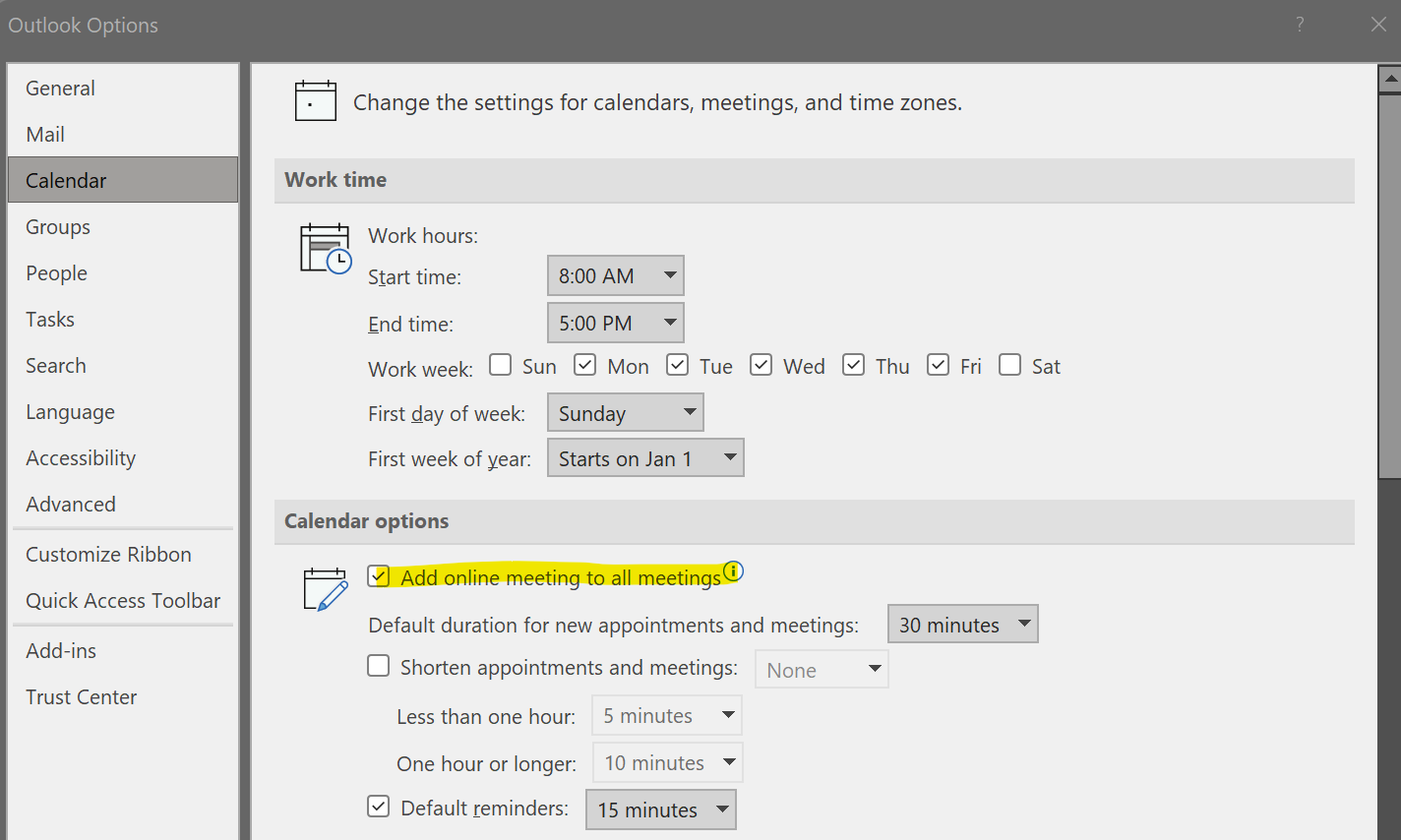
Uncheck this option:
' cx='32' cy='32' r='32' /%3E%3Ctext x='50%25' y='55%25' dominant-baseline='middle' text-anchor='middle' fill='%23FFF' %3EM%3C/text%3E%3C/svg%3E)
Yes! This worked! I think it's better than disabling the whole add in
' cx='32' cy='32' r='32' /%3E%3Ctext x='50%25' y='55%25' dominant-baseline='middle' text-anchor='middle' fill='%23FFF' %3EMM%3C/text%3E%3C/svg%3E)
Can this be done by the organization level from O365 admin panel?
Thanks
' cx='32' cy='32' r='32' /%3E%3Ctext x='50%25' y='55%25' dominant-baseline='middle' text-anchor='middle' fill='%23FFF' %3ELW%3C/text%3E%3C/svg%3E)
Yeah i would like to know this as well. It's pretty annoying that MS would randomly enforce this. We don't want users using Teams meetings for compliance reasons and now every meeting produces a Teams video call? Users are very confused.
' cx='32' cy='32' r='32' /%3E%3Ctext x='50%25' y='55%25' dominant-baseline='middle' text-anchor='middle' fill='%23FFF' %3ERE%3C/text%3E%3C/svg%3E)
' cx='32' cy='32' r='32' /%3E%3Ctext x='50%25' y='55%25' dominant-baseline='middle' text-anchor='middle' fill='%23FFF' %3ED%3C/text%3E%3C/svg%3E)
This was driving me crazy too!
And that option line (Add online meeting to all meetings) wasn't visible on my desktop version of Outlook, but I was able to see it and UNCHECK in my online version of Outlook.
If you don't use Outlook online very often, just open your internet browser and enter office.com in the URL, then login, if necessary.
Select the Outlook app from the menu on left
Select settings (cog wheel)
Select View all Outlook settings (at the bottom)
Select Calendar, then Events and invitations
Uncheck Add online meeting to all meetings
Select Save
Thank you Andy!
' cx='32' cy='32' r='32' /%3E%3Ctext x='50%25' y='55%25' dominant-baseline='middle' text-anchor='middle' fill='%23FFF' %3EMP%3C/text%3E%3C/svg%3E)
Thanks to @Andy David - MVP for finding this. It was driving me nuts. :) Others mentioned they couldn't find this in their desktop version of Outlook. I found it but it was slightly different for me. I am using the latest version of Outlook O365 (installed, not web) and have both the Teams and Zoom plug-ins enabled so my option was hidden inside another option. Here is my option screen, similar to @Andy David - MVP .
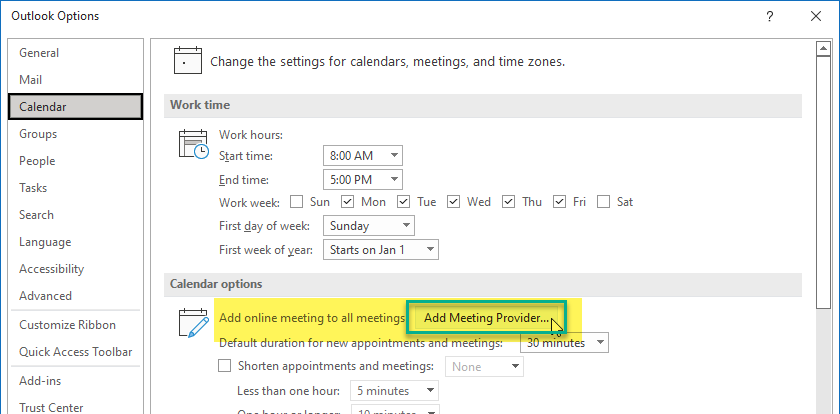
I suspect I don't see the checkbox right off because I have multiple meeting providers. Even though I have both Teams and Zoom already enabled, the dialog has the button to Add Meeting Provider. One might think it would state Add/Update or something else. I almost didn't click on it because I didn't want to Add a provider.
When I clicked on the button I got the familiar setting inside another window:
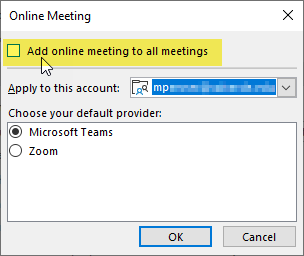
Hope this helps others.
' cx='32' cy='32' r='32' /%3E%3Ctext x='50%25' y='55%25' dominant-baseline='middle' text-anchor='middle' fill='%23FFF' %3EFT%3C/text%3E%3C/svg%3E)
Genius, worked like a charm! THANK YOU!!!
This option is Unchecked.
' cx='32' cy='32' r='32' /%3E%3Ctext x='50%25' y='55%25' dominant-baseline='middle' text-anchor='middle' fill='%23FFF' %3EAR%3C/text%3E%3C/svg%3E)
Thanks! I think this option should not be enabled by default
' cx='32' cy='32' r='32' /%3E%3Ctext x='50%25' y='55%25' dominant-baseline='middle' text-anchor='middle' fill='%23FFF' %3EHN%3C/text%3E%3C/svg%3E)
Your solution was by far the quickest and most helpful solution to this problem driving us crazy. THANK YOU.
' cx='32' cy='32' r='32' /%3E%3Ctext x='50%25' y='55%25' dominant-baseline='middle' text-anchor='middle' fill='%23FFF' %3EAC%3C/text%3E%3C/svg%3E)
' cx='32' cy='32' r='32' /%3E%3Ctext x='50%25' y='55%25' dominant-baseline='middle' text-anchor='middle' fill='%23FFF' %3EJA%3C/text%3E%3C/svg%3E)
' cx='32' cy='32' r='32' /%3E%3Ctext x='50%25' y='55%25' dominant-baseline='middle' text-anchor='middle' fill='%23FFF' %3EEC%3C/text%3E%3C/svg%3E)
I'm suddenly having the same problem, it just started within the past week and I have no idea why. There is no setting in my options for "add online meeting to all meetings". When I logged in to Outlook online, I do see the option there - but it was already not checked and I am still having this problem. Can anyone help?
' cx='32' cy='32' r='32' /%3E%3Ctext x='50%25' y='55%25' dominant-baseline='middle' text-anchor='middle' fill='%23FFF' %3EDW%3C/text%3E%3C/svg%3E)
That box doesn't exist in my Outlook calendar options. How else can I disable the auto meeting creation? I am on a PC.
' cx='32' cy='32' r='32' /%3E%3Ctext x='50%25' y='55%25' dominant-baseline='middle' text-anchor='middle' fill='%23FFF' %3EJM%3C/text%3E%3C/svg%3E)
This totally worked!! Thank you so much Deona!
' cx='32' cy='32' r='32' /%3E%3Ctext x='50%25' y='55%25' dominant-baseline='middle' text-anchor='middle' fill='%23FFF' %3EWK%3C/text%3E%3C/svg%3E)
This option does not exist in Outlook 2016, for Outlook 2016 where can this be disabled? I want the Teams integration to be an option but every time I click "Invite Attendees" a MS Teams meeting is configured and added, I would like this to stop.
' cx='32' cy='32' r='32' /%3E%3Ctext x='50%25' y='55%25' dominant-baseline='middle' text-anchor='middle' fill='%23FFF' %3ER%3C/text%3E%3C/svg%3E)
its neither available in Office 2021 LTSC Current Version 2108. how can this be disabled?
' cx='32' cy='32' r='32' /%3E%3Ctext x='50%25' y='55%25' dominant-baseline='middle' text-anchor='middle' fill='%23FFF' %3EKA%3C/text%3E%3C/svg%3E)
I use office 2021 LTSC, I haven't this option.
' cx='32' cy='32' r='32' /%3E%3Ctext x='50%25' y='55%25' dominant-baseline='middle' text-anchor='middle' fill='%23FFF' %3EBS%3C/text%3E%3C/svg%3E)
' cx='32' cy='32' r='32' /%3E%3Ctext x='50%25' y='55%25' dominant-baseline='middle' text-anchor='middle' fill='%23FFF' %3EAF%3C/text%3E%3C/svg%3E)
Is there a way to disable it in Outlook 2019? I don't see the option to uncheck "Add online meeting to all meetings."
' cx='32' cy='32' r='32' /%3E%3Ctext x='50%25' y='55%25' dominant-baseline='middle' text-anchor='middle' fill='%23FFF' %3EHJ%3C/text%3E%3C/svg%3E)
I don't have this option on my outlook-is there a way to turn this off without this option?
tried the suggestion using 365 and the box unchecked. I restarted Outlook and it's still putting the MS Teams as the default when i schedule a meeting
' cx='32' cy='32' r='32' /%3E%3Ctext x='50%25' y='55%25' dominant-baseline='middle' text-anchor='middle' fill='%23FFF' %3EC%3C/text%3E%3C/svg%3E)
' cx='32' cy='32' r='32' /%3E%3Ctext x='50%25' y='55%25' dominant-baseline='middle' text-anchor='middle' fill='%23FFF' %3EBB%3C/text%3E%3C/svg%3E)
Right on point. Solved problem with one click. Thank you.
20240617: Thank you, Andy David.
When I went to uncheck that option, I noticed that to the right of it I could select a different meeting provider to use instead of Teams. (I only have Teams so none others were available.)
I'm using an Enterprise MS 365 version of Outlook, so others may not have that option, but it shouldn't hurt to check.
' cx='32' cy='32' r='32' /%3E%3Ctext x='50%25' y='55%25' dominant-baseline='middle' text-anchor='middle' fill='%23FFF' %3ERR%3C/text%3E%3C/svg%3E)
You, Sir, are my hero. THANK YOU SO MUCH!!! :)
' cx='32' cy='32' r='32' /%3E%3Ctext x='50%25' y='55%25' dominant-baseline='middle' text-anchor='middle' fill='%23FFF' %3EB%3C/text%3E%3C/svg%3E)
FOR MAC USERS..
I was able to solve it, NOT thru the local client because I already tried that, but by logging into office365.com and changing the calendar preferences THERE. It was a bit frustrating that the Mac App does not talk to O365 for us, so the button there “serves no purpose”.
SO. Follow this:
Yes, thanks Microsoft. You put a soft barrier there to push teams out everywhere, to everyone. I have just torn down that barrier for me and everybody else.
Have a nice day
' cx='32' cy='32' r='32' /%3E%3Ctext x='50%25' y='55%25' dominant-baseline='middle' text-anchor='middle' fill='%23FFF' %3EML%3C/text%3E%3C/svg%3E)
Super helpful screenshot!
On iOS, it’s in Settings > Calendar > Online Meetings