Outlook | Windows | Classic Outlook for Windows | For business
Using classic Outlook for Windows in business environments

This browser is no longer supported.
Upgrade to Microsoft Edge to take advantage of the latest features, security updates, and technical support.
' cx='32' cy='32' r='32' /%3E%3Ctext x='50%25' y='55%25' dominant-baseline='middle' text-anchor='middle' fill='%23FFF' %3EA%3C/text%3E%3C/svg%3E)
Outlook now automatically adds a Teams Meeting link to any meeting I schedule using Outlook - I would like to permanently disable this for my Outlook as my team only uses Zoom for meetings. There does not seem to be any documentation about this and I have been unable to find anything in preferences that changes it permanently.
Using classic Outlook for Windows in business environments
Additional features, settings, or issues not covered by specific Microsoft Teams categories

' cx='32' cy='32' r='32' /%3E%3Ctext x='50%25' y='55%25' dominant-baseline='middle' text-anchor='middle' fill='%23FFF' %3EJM%3C/text%3E%3C/svg%3E)
Hi @Anonymous
Outlook now automatically adds a Teams Meeting link to any meeting I schedule using Outlook
How did you schedule meeting in Outlook client? Do you mean if you schedule "Any meeting" in Outlook, it will add Teams meeting link?
Based on my knowledge, if you don't want to schedule Teams meeting in Outlook client, you could try to disable it by following these steps:
It has been a while, how is everything going?
If you have any update about this issue, please feel free to post back.
' cx='32' cy='32' r='32' /%3E%3Ctext x='50%25' y='55%25' dominant-baseline='middle' text-anchor='middle' fill='%23FFF' %3EDM%3C/text%3E%3C/svg%3E)
I find it disturbing that MS just went ahead and started assuming that I would use MS Teams for all of my meetings. Believe it or not, people still have face-to-face meetings and use other online meeting software products. This feature turning on by default caused a lot of confusion. The solution below completely disables MS Teams in Outlook. I would still like it as an option, but don't assume that every meeting I schedule will use MS Teams. It's a big overstep.
' cx='32' cy='32' r='32' /%3E%3Ctext x='50%25' y='55%25' dominant-baseline='middle' text-anchor='middle' fill='%23FFF' %3ESR%3C/text%3E%3C/svg%3E)
I couldnt agree more. This is very poor product management.
' cx='32' cy='32' r='32' /%3E%3Ctext x='50%25' y='55%25' dominant-baseline='middle' text-anchor='middle' fill='%23FFF' %3ECM%3C/text%3E%3C/svg%3E)
Didn't this sort of anti-competitive behavior already cost Microsoft a boat load of money 20 years ago? Its exactly what is in their DNA.
' cx='32' cy='32' r='32' /%3E%3Ctext x='50%25' y='55%25' dominant-baseline='middle' text-anchor='middle' fill='%23FFF' %3EGE%3C/text%3E%3C/svg%3E)
First thing I tried before coming here was disabling the add-in but Teams re-enables it automatically the next time you launch a Teams meeting.
' cx='32' cy='32' r='32' /%3E%3Ctext x='50%25' y='55%25' dominant-baseline='middle' text-anchor='middle' fill='%23FFF' %3ETT%3C/text%3E%3C/svg%3E)
Can someone help me find this setting on the Mac version of Outlook?
Mac Outlook is doing the same now.
' cx='32' cy='32' r='32' /%3E%3Ctext x='50%25' y='55%25' dominant-baseline='middle' text-anchor='middle' fill='%23FFF' %3EDS%3C/text%3E%3C/svg%3E)
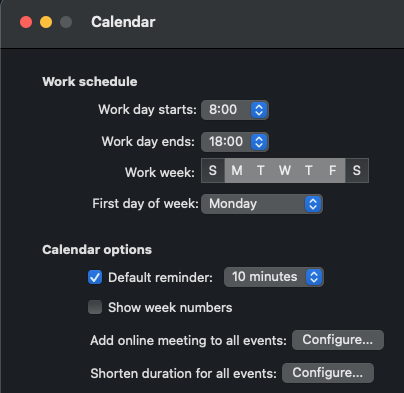
It looks like MS finally added it to the New Outlook for Mac's settings.
I hate that I cannot pick to have a Teams meeting or not. I would like to send meeting request and be able to either ADD a Teams meeting. I do NOT want all of my meeting invites to have a Teams meeting. Disabling this means it is totally disabled. JUNK!
' cx='32' cy='32' r='32' /%3E%3Ctext x='50%25' y='55%25' dominant-baseline='middle' text-anchor='middle' fill='%23FFF' %3ESS%3C/text%3E%3C/svg%3E)
' cx='32' cy='32' r='32' /%3E%3Ctext x='50%25' y='55%25' dominant-baseline='middle' text-anchor='middle' fill='%23FFF' %3EMT%3C/text%3E%3C/svg%3E)
The first recommendation not works for me, and I found below way through a PDF from Uni of Maryland.
Turning Off the Addition of MS Teams Meeting From the Outlook client:
' cx='32' cy='32' r='32' /%3E%3Ctext x='50%25' y='55%25' dominant-baseline='middle' text-anchor='middle' fill='%23FFF' %3EJL%3C/text%3E%3C/svg%3E)
Three things:
What an arrogant, self-serving approach to customers!
Found it for Mac in May 2023 update, no thanks to Jimmy Yang.
Select "Outlook" in upper left top menu
Select "Preferences"
Select "Other, subitem "Calendar"
Look under "Calendar Options" for "Add online meeting to all events"
Click the "Configure" button
Uncheck "Add online meetings to all meetings"
You're welcome.
' cx='32' cy='32' r='32' /%3E%3Ctext x='50%25' y='55%25' dominant-baseline='middle' text-anchor='middle' fill='%23FFF' %3EDG%3C/text%3E%3C/svg%3E)
We're running Office LTSC Pro Plus 2021 and its version is 2108 and I think that's before the "Add online meeting to all events" option was introduced. So I'm finding we have to disable the Teams Add-in in Outlook to stop the behavior but of course that removes all ability in Outlook to schedule a Teams meeting. Any suggestions?
' cx='32' cy='32' r='32' /%3E%3Ctext x='50%25' y='55%25' dominant-baseline='middle' text-anchor='middle' fill='%23FFF' %3EEA%3C/text%3E%3C/svg%3E)
How do we disable automatic Teams meetings in duplicated meeting invitations on Outlook OWA? In my settings, I've unchecked the "automatically add online meeting to all meetings" (seriously do you not employ any copy editors?), but every time I duplicate a meeting invitation, it overrides the existing zoom links and attaches Teams links within the body, along with a "join Teams meeting" button. Even after I once again switch off the "add Teams meeting" button in the Duplication dialog box. Please make it stop.
' cx='32' cy='32' r='32' /%3E%3Ctext x='50%25' y='55%25' dominant-baseline='middle' text-anchor='middle' fill='%23FFF' %3EW%3C/text%3E%3C/svg%3E)
For those of you looking to push a fix to all users via GPO. Put in a Group Policy preference for a delete and change to the HKCU and have the users log off then back on again after running GPUpdate.
Delete the key below from the users registry HKCU(AS THE USER)
HKEY_CURRENT_USER\SOFTWARE\Microsoft\Office\16.0\Outlook\Addins\TeamsAddin.FastConnect
Edit the following key to a value of 1 from 3
HKEY_CURRENT_USER\SOFTWARE\Microsoft\Office\Outlook\Addins\TeamsAddin.FastConnect
' cx='32' cy='32' r='32' /%3E%3Ctext x='50%25' y='55%25' dominant-baseline='middle' text-anchor='middle' fill='%23FFF' %3EKH%3C/text%3E%3C/svg%3E)
Hi Will, sure that will fix the issue because you deactivate the Teams Plugin. But I still wanna use Teams and only don't want to create the meetings automatically
' cx='32' cy='32' r='32' /%3E%3Ctext x='50%25' y='55%25' dominant-baseline='middle' text-anchor='middle' fill='%23FFF' %3EAS%3C/text%3E%3C/svg%3E)
Same problem here, Outlook 2019 or 2021, Exchange 2016 hybrid environment and on-premise mailboxes.
Since Teams Addin Version updated to 1.0.23125.1 we're experiencing the issue.
This is a problem, please help
Thanks
We got exactly the same issue with Office 2016 and an On-Premise Exchange 2019. The issue started on 17th July but I cannot say with which Addin Version.
I tried to contact support already but that wasn't really helpful so far.
In Outlook 2016 there is no option to disable the online meeting, so the solution provided by @Andy David - MVP does not work here.
' cx='32' cy='32' r='32' /%3E%3Ctext x='50%25' y='55%25' dominant-baseline='middle' text-anchor='middle' fill='%23FFF' %3EAA%3C/text%3E%3C/svg%3E)
following up
' cx='32' cy='32' r='32' /%3E%3Ctext x='50%25' y='55%25' dominant-baseline='middle' text-anchor='middle' fill='%23FFF' %3EBM%3C/text%3E%3C/svg%3E)
Same issue here - Office 2016, Exchange 2016 Hybrid - Teams add-in in versions 1.0.23125.1 and 1.0.23117.3 - unclear when it started
' cx='32' cy='32' r='32' /%3E%3Ctext x='50%25' y='55%25' dominant-baseline='middle' text-anchor='middle' fill='%23FFF' %3ESF%3C/text%3E%3C/svg%3E)
Our tenants are experienced this problem after update. Microsoft Support asked me to contact Product group. Hope we can get help there.
All MSI OUTLOOK version: OUTLOOK 2016/2019/2021 LTSC.
' cx='32' cy='32' r='32' /%3E%3Ctext x='50%25' y='55%25' dominant-baseline='middle' text-anchor='middle' fill='%23FFF' %3EKC%3C/text%3E%3C/svg%3E)
Add us to this list.
We are seeing this as well with Outlook 2016 16.0.5404.1000 (July Patch)
And Teams 1.0.21264 and higher.
We are Exchange 2016 On-Prem in Full Hybrid.
We tried adding the Registry Key manually that Outlook 365 creates, but that did not work for Outlook 2016.
' cx='32' cy='32' r='32' /%3E%3Ctext x='50%25' y='55%25' dominant-baseline='middle' text-anchor='middle' fill='%23FFF' %3EAB%3C/text%3E%3C/svg%3E)
We have the same issue as well.
We have Outlook 2016 (16.0.5404.1000)
And Teams version 1.6.00.20074 and Addin 1.0.23125.
We are Exchange 2016 On-Prem in Full Hybrid.
' cx='32' cy='32' r='32' /%3E%3Ctext x='50%25' y='55%25' dominant-baseline='middle' text-anchor='middle' fill='%23FFF' %3EHR%3C/text%3E%3C/svg%3E)
Same issue here. Office LTSC Std 2021 & Exchange 2016 on prem.
Any news about a fix yet?
' cx='32' cy='32' r='32' /%3E%3Ctext x='50%25' y='55%25' dominant-baseline='middle' text-anchor='middle' fill='%23FFF' %3EDL%3C/text%3E%3C/svg%3E)
With version 1.6.00.22378, the Teams meeting problem appeared again, as written above. However, in the meantime, a preview version was released, with which - thank God - the problem no longer occurred.
Version number: 1.6.00.24078
Download: https://statics.teams.cdn.office.net/production-windows-x64/1.6.00.24078/Teams_windows_x64.exe
' cx='32' cy='32' r='32' /%3E%3Ctext x='50%25' y='55%25' dominant-baseline='middle' text-anchor='middle' fill='%23FFF' %3ER%3C/text%3E%3C/svg%3E)
How can this be disabeld for Office 2021 LTSC Version?
The Option "Add online Meetings to all Meetings" ist not available in the Options Menue there!
' cx='32' cy='32' r='32' /%3E%3Ctext x='50%25' y='55%25' dominant-baseline='middle' text-anchor='middle' fill='%23FFF' %3EGH%3C/text%3E%3C/svg%3E)
We are having the same issue with Office 2019 Pro deployed in a large enterprise environment. The option is unchecked in our O365 webmail settings. The option does not exist in the Outlook 2019 Client Options. Yet, teams meeting are being appended to all meetings by default. Is there a registry edit that could be made for this?
' cx='32' cy='32' r='32' /%3E%3Ctext x='50%25' y='55%25' dominant-baseline='middle' text-anchor='middle' fill='%23FFF' %3EAF%3C/text%3E%3C/svg%3E)
Same problem here with Office 2016. It seems it started with version 1.0.23125.1 of the add-in.
' cx='32' cy='32' r='32' /%3E%3Ctext x='50%25' y='55%25' dominant-baseline='middle' text-anchor='middle' fill='%23FFF' %3EPP%3C/text%3E%3C/svg%3E)
Have the Same thing using Office 2021, haven`t found anyway to disable it yet
' cx='32' cy='32' r='32' /%3E%3Ctext x='50%25' y='55%25' dominant-baseline='middle' text-anchor='middle' fill='%23FFF' %3EJ%3C/text%3E%3C/svg%3E)
could those recently with this issue be related to this service health from MS?
Some users' new meetings created on the Outlook desktop client may automatically include Microsoft Teams meetings
EX649338, Last updated: July 18, 2023 at 6:56 PM EDT
Estimated start time: July 18, 2023 at 11:17 AM EDT
Title: Some users' new meetings created on the Outlook desktop client may automatically include Microsoft Teams meetings User impact: Users' new meetings created on the Outlook desktop client may automatically include Microsoft Teams meetings. More info: Impact occurs despite users unchecking "Add online meeting to all meetings" in Outlook calendar settings. This issue only affects those who are on an older version of Outlook. The following delineate which versions are impacted, depending on which release option your users are on: For Monthly / Monthly Enterprise Channel (MEC) builds: On versions older than 16.0.14701.20124. For First Release for Deferred Channel (FRDC) / Semi-Annual Channel (SAC) builds: On versions older than 16.0.15513.10000. Current status: Our investigation revealed that some recent changes intended to optimize the Microsoft Teams meeting add-in for the Outlook desktop client interacted negatively with the code path leveraged in some older Outlook desktop versions, subsequently resulting in impact. We're developing a fix to address this discrepancy; however, this is expected to take some time. We'll aim to provide more details regarding its development and estimated time to deployment in our next scheduled update. Admins and users can validate if they’re affected by this specific event by reviewing the build versions to check in the More info section. Scope of impact: Users who are on the build versions older than the ones listed in the More info section, leveraging the Microsoft Teams meeting add-in for the Outlook desktop client, and attempting to create new meetings in the Outlook desktop client may be affected. Start time: Monday, May 8, 2023 at 5:52 PM EDT Root cause: Some recent changes intended to optimize the Microsoft Teams meeting add-in for the Outlook desktop client interacted negatively with the code path leveraged in specific older Outlook desktop versions, subsequently resulting in impact. Next update by: Wednesday, July 19, 2023 at 5:30 PM EDT
' cx='32' cy='32' r='32' /%3E%3Ctext x='50%25' y='55%25' dominant-baseline='middle' text-anchor='middle' fill='%23FFF' %3EN%3C/text%3E%3C/svg%3E)
Same issues happening here. Using Office Outlook LTSC Standard 2021. End users get Teams meeting invite even though most end-users only want a in-person face to face meeting. There is no way to disable this from happening. I contaced Microsoft and they want us to pay $499 for support. We are a non-profit charity organization and using charity volume licensing. Seems almost criminal to pay $499 just to report a bug to Microsoft.

' cx='32' cy='32' r='32' /%3E%3Ctext x='50%25' y='55%25' dominant-baseline='middle' text-anchor='middle' fill='%23FFF' %3EBS%3C/text%3E%3C/svg%3E)
This is exactly what I needed for Outlook 2019. Thank you!
Looks like you would have to do this every time you invite someone to an event.
' cx='32' cy='32' r='32' /%3E%3Ctext x='50%25' y='55%25' dominant-baseline='middle' text-anchor='middle' fill='%23FFF' %3EZK%3C/text%3E%3C/svg%3E)
My Teams Meeting add in does not look like that. Also I do not want to completely disable the add in, I just don't want the invite attendees button to automatically turn an in person meeting into a virtual meeting either.
' cx='32' cy='32' r='32' /%3E%3Ctext x='50%25' y='55%25' dominant-baseline='middle' text-anchor='middle' fill='%23FFF' %3EJM%3C/text%3E%3C/svg%3E)
This was posted previously and 100% worked for me....
If you don't use Outlook online very often, just open your internet browser and enter office.com in the URL, then login, if necessary.
Select the Outlook app from the menu on left
Select settings (cog wheel)
Select View all Outlook settings (at the bottom)
Select Calendar, then Events and invitations
Uncheck Add online meeting to all meetings
Select Save
' cx='32' cy='32' r='32' /%3E%3Ctext x='50%25' y='55%25' dominant-baseline='middle' text-anchor='middle' fill='%23FFF' %3ETE%3C/text%3E%3C/svg%3E)
This has suddenly started to be an issue for me on my work's Office 2019 account. I've unchecked this box as suggested via Office online, but the problem still persists when I try to add a meeting via Outlook on my desktop.
I often use the new meeting option to create a meeting in one of the meeting rooms of the office. Or if not, I'll add a Zoom meeting via the plugin. This new forced Teams feature is incredibly annoying and counter-productive.
' cx='32' cy='32' r='32' /%3E%3Ctext x='50%25' y='55%25' dominant-baseline='middle' text-anchor='middle' fill='%23FFF' %3ERJ%3C/text%3E%3C/svg%3E)
I'm having the same issue as Toby Evans. I'm using Outlook 2019 and I do not have an option to uncheck 'add online meeting to add meetings'.
Tried doing this but didnt affect outlook in office 2021
This problem seems to have been resolved for me today.
' cx='32' cy='32' r='32' /%3E%3Ctext x='50%25' y='55%25' dominant-baseline='middle' text-anchor='middle' fill='%23FFF' %3EKM%3C/text%3E%3C/svg%3E)
My problem is a client has on-prem Exchange for their mailboxes, but uses Teams as well. So we can't go into OWA or anything and change this.
I tried the Set-OrganizationConfig cmdlet mentioned earlier in this thread... not 100% sure if that'll work since their mailboxes are on-prem... guess we'll see tomorrow after some time for it to take effect...
' cx='32' cy='32' r='32' /%3E%3Ctext x='50%25' y='55%25' dominant-baseline='middle' text-anchor='middle' fill='%23FFF' %3EGL%3C/text%3E%3C/svg%3E)
' cx='32' cy='32' r='32' /%3E%3Ctext x='50%25' y='55%25' dominant-baseline='middle' text-anchor='middle' fill='%23FFF' %3EGW%3C/text%3E%3C/svg%3E)
No go for me. Already unchecked but my 'helpful' company configuration pushes teams into desktop Outlook regardless.
' cx='32' cy='32' r='32' /%3E%3Ctext x='50%25' y='55%25' dominant-baseline='middle' text-anchor='middle' fill='%23FFF' %3EHM%3C/text%3E%3C/svg%3E)
Found a way to remove at the org Level for 365 Users.
Powershell exchange online
EDIT
Misstyped the order of the command, is actually -OnlineMeetingsByDefaultEnabled
**
Set-OrganizationConfig -OnlineMeetingsByDefaultEnabled $False
' cx='32' cy='32' r='32' /%3E%3Ctext x='50%25' y='55%25' dominant-baseline='middle' text-anchor='middle' fill='%23FFF' %3ESB%3C/text%3E%3C/svg%3E)
Which version of ExchangeOnlineManagement allows you to use the parameter -OnlineMeetingsEnabledByDefault? I am using 2.0.05 and it tells me that parameter is not present for Set-OrganizationConfig.
https://www.powershellgallery.com/packages/ExchangeOnlineManagement/2.0.5
I am using the latest version 2.0.5 of EXOV2 module.
I apologize for the typo. I am using 2.0.5 and this is what I see:
A parameter cannot be found that matches parameter name 'OnlineMeetingsEnabledByDefault'
My bad, got the order mixed up!
-OnlineMeetingsByDefaultEnabled
' cx='32' cy='32' r='32' /%3E%3Ctext x='50%25' y='55%25' dominant-baseline='middle' text-anchor='middle' fill='%23FFF' %3EIS%3C/text%3E%3C/svg%3E)
I'm facing the same issue, checked all permissions assigned. Any clue what could be the reason?
I think this worked. Thank you!!
Dears
Should we run this command on our Exchange Infrastructure (On-prem Hybrid 2016)?
Set-OrganizationConfig -OnlineMeetingsByDefaultEnabled $False
Is there any collateral damage?
' cx='32' cy='32' r='32' /%3E%3Ctext x='50%25' y='55%25' dominant-baseline='middle' text-anchor='middle' fill='%23FFF' %3EDW%3C/text%3E%3C/svg%3E)
This issue is still happening for me, and the option is turned OFF in the Outlook app (macOS)., also its whereabouts in no way matches the instructions for finding the option above. I am using the web version for mail, but even though I uncheck the option, it reappears when I reopen the Calendar, and is showing in the day entry. Cannot upload screenshot of the issue because the Add image button is greyed out. I HATE it when mega companies like Microsoft decide for me what I want instead of allowing me to do it, and then send me on a wild goose chase for the next hour googling for how to turn the damn thing off, and when I follow their instructions, it doesn't work. So far, staff at my uni have had three edit emails with no change after each.
Another gripe: when setting up my profile to respond here, I couldn't add my credentials without agreeing to by spammed by Microsoft, but when I clicked the Add link, it said, "you must agree to the Privacy agreement to proceed", so I clicked Privacy agreement. However there was no button to agree, meaning that they have bundled privacy with the right to spam you.