Microsoft Security | Intune | Configuration
Setting up and managing device configurations using Intune

This browser is no longer supported.
Upgrade to Microsoft Edge to take advantage of the latest features, security updates, and technical support.

Win10 cloud-only Intune managed, 1909 and 2004 devices. I get:
"Firewall Error -2016345612"
ERROR CODE
0x87d101f4
ERROR DETAILS
Syncml(500): The recipient encountered an unexpected condition which prevented it from fulfilling the request
I noticed that first when I create the compliance policy, it is green but after some usage, it turns to error. Seems like a bug. I use only Win10 protection, no 3rd party and Firewall is own and Security Center is green in Win10.
Setting up and managing device configurations using Intune
Other Intune-related topics, including unsupported scenarios and platform-specific behaviors
' cx='32' cy='32' r='32' /%3E%3Ctext x='50%25' y='55%25' dominant-baseline='middle' text-anchor='middle' fill='%23FFF' %3EJH%3C/text%3E%3C/svg%3E)
Hi, I had the same issue with device compliance and the same error code. The way i fixed this was by pushing all updates and re-syncing from the user side. Settings > Accounts > access work or school > info button on your tenant > sync.

Facing the same issue with our tenant too. Has anyone able to find the reason and fix for this please?
Regards
Aravinth M
' cx='32' cy='32' r='32' /%3E%3Ctext x='50%25' y='55%25' dominant-baseline='middle' text-anchor='middle' fill='%23FFF' %3EEM%3C/text%3E%3C/svg%3E)
' cx='32' cy='32' r='32' /%3E%3Ctext x='50%25' y='55%25' dominant-baseline='middle' text-anchor='middle' fill='%23FFF' %3EES%3C/text%3E%3C/svg%3E)
We have the same issue only on Win11 devices, done all that users suggest no luck.
' cx='32' cy='32' r='32' /%3E%3Ctext x='50%25' y='55%25' dominant-baseline='middle' text-anchor='middle' fill='%23FFF' %3EMJ%3C/text%3E%3C/svg%3E)
The sync from the client PC worked for me.
"Settings > Accounts > access work or school > info button on your tenant > sync."
Didn't do a push of anything. Only the sync. Weird problem.
One of my specialist - collegue is complainging about the same issue.
' cx='32' cy='32' r='32' /%3E%3Ctext x='50%25' y='55%25' dominant-baseline='middle' text-anchor='middle' fill='%23FFF' %3EEZ%3C/text%3E%3C/svg%3E)
Since a few days, we have a few devices too, which are not compliant because of AV and firewall. The devices "say" all is ok.

Hi,
Is there a way to identify this that the device is not getting compliant because of Antivirus and Firewall.
' cx='32' cy='32' r='32' /%3E%3Ctext x='50%25' y='55%25' dominant-baseline='middle' text-anchor='middle' fill='%23FFF' %3ESK%3C/text%3E%3C/svg%3E)
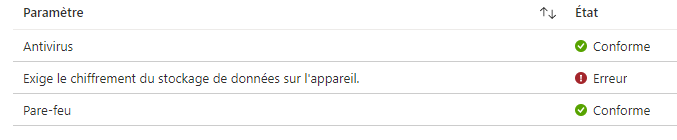
Yes, under Enpoint Manager (endpoint.microsoft.com), under devices, Windows, select your non-compliant device, then under device compliance, it will display which rule trigger the non-compliant state, and when you click on it, it will display which component of the rule is non-compliant. Example here:
In our tenant, the device shows compliant however the built-in compliance policy is still failing.
Due to this the Corporate VPN is not visible on the device.
I have tried syncing the device via the Company portal but still the same.
Any help would be appreciated.
Regards,
Ashish Arya

The following has solved the issue for us, on the devices where to problem occured.

But?
disable the Firewall from the device.
That doesn't sound like an option for me - tbh. :(
it's only for a few seconds.
When disabled, directly do the manual sync.
The sync forces the firewall to go on directly and within 5 minutes the device is compliance aigan.