Microsoft Edge | Microsoft Edge development
Developing and testing features or extensions for Microsoft Edge

This browser is no longer supported.
Upgrade to Microsoft Edge to take advantage of the latest features, security updates, and technical support.
' cx='32' cy='32' r='32' /%3E%3Ctext x='50%25' y='55%25' dominant-baseline='middle' text-anchor='middle' fill='%23FFF' %3EKY%3C/text%3E%3C/svg%3E)
We are in the process of transitioning from IE11 to the Edge browser.
Our company's Internet network is a closed network.
We have been issued a valid SSL certificate. Therefore, the main site is normally accessed through HTTPS.
The main site screen did not appear normally because there were resources and links that were loaded via HTTP from the main site.
So I allowed insecure content (mixed content) in Edge browser settings.
When we did that, the address bar at the top was showing a "Not secure" message.
We must remove the "not secure" sign.
For some reason, it is not possible to change all linked resources to HTTPS.
I tried various settings in the registry referring to MS Docs, but I couldn't find the setting.
When using IE compatibility mode, the "Not secure" message was not displayed,
I don't want to use IE compatibility mode.
In the current state, there is no way to suppress the "not secure" message with registry settings or other settings.
Ask if there is. Thanks for reading.
Developing and testing features or extensions for Microsoft Edge
' cx='32' cy='32' r='32' /%3E%3Ctext x='50%25' y='55%25' dominant-baseline='middle' text-anchor='middle' fill='%23FFF' %3ETF%3C/text%3E%3C/svg%3E)
First of all, I'm using Windows 11 and my "Microsoft Edge" setting is under Computer Configuration->Administrative Templates->Windows Components. Secondly, I cannot find the entry "Control where security restrictions on insecure origins apply" (or anything similar to the spellings). Below is the picture.
So what should I do? Please help!!
BTW, I don't think it is Edge or any browsers for that matter. I installed Chrome and Firefox and both did not work on my laptop; however, I have another computer running Windows 11 and the web site opened fine on any of the browsers (Edge, Chrome, Firefox) on that computer. Therefore, it must be something else that affected the outcomes.
' cx='32' cy='32' r='32' /%3E%3Ctext x='50%25' y='55%25' dominant-baseline='middle' text-anchor='middle' fill='%23FFF' %3EMD%3C/text%3E%3C/svg%3E)
To get the Administrative Template for Edge you need to:
But that wont get rid of the "Not secure" message.
' cx='32' cy='32' r='32' /%3E%3Ctext x='50%25' y='55%25' dominant-baseline='middle' text-anchor='middle' fill='%23FFF' %3EA%3C/text%3E%3C/svg%3E)
There're two ways you can choose to suppress the "Not secure" message. Please refer to the following and choose one which fits you:
This policy can specify a list of origins (URLs) or hostname patterns (like "*.contoso.com") for which security restrictions on insecure origins don't apply.
This policy also prevents the origin from being labeled "Not Secure" in the omnibox.
Computer Configuration/Administrative Templates/Microsoft Edge.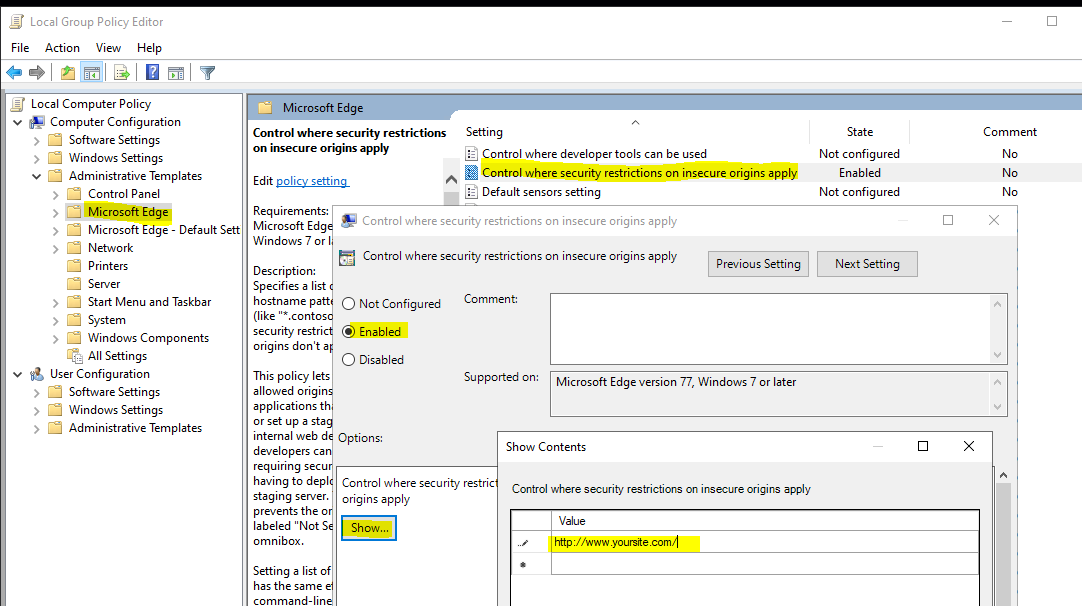
edge://flags in the address bar, then press Enter.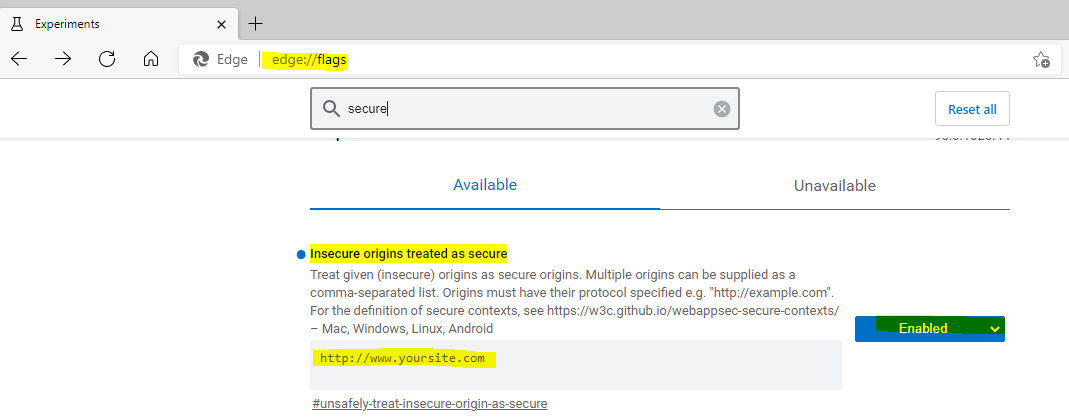
If the answer is the right solution, please click "Accept Answer" and kindly upvote it. If you have extra questions about this answer, please click "Comment".
Note: Please follow the steps in our documentation to enable e-mail notifications if you want to receive the related email notification for this thread.
Regards,
Yu Zhou
May I know whether your issue has been solved or not? If not, please share it here. We can work together to figure it out.

Hello @Anonymous
I just wanted to let you know I ran into this issue as well and used option 2 as a remedy. It solved the issue immediately and was super easy to manage.
Thank you for the clear instructions, it made for a very quick solve to this rather annoying little problem.
Best,
Bog Boi
' cx='32' cy='32' r='32' /%3E%3Ctext x='50%25' y='55%25' dominant-baseline='middle' text-anchor='middle' fill='%23FFF' %3ETM%3C/text%3E%3C/svg%3E)
hi Yu,
Thanks for providing this helpful solution.
Can you please share though, is there an end-of-life date for this flag. if yes, what can be an alternate solution to this flag.
thanks ..
' cx='32' cy='32' r='32' /%3E%3Ctext x='50%25' y='55%25' dominant-baseline='middle' text-anchor='middle' fill='%23FFF' %3EGS%3C/text%3E%3C/svg%3E)
Explain better please.
Thank you
Hi,
Does this work for an acer laptop as well?
Thanks