Microsoft Family Safety returns error when permission via email is requested

Kasper 0 Reputation points
2026-10-27T17:12:08.13+00:00

I have been guided to this place by Microsoft Support who, after a lengthy session of trial and error, has determined that it is not the setup on the device nor the setup of Microsoft Family Safety it is wrong with.

I have been setting up a child account on a laptop and added said child account to a family with my account as Organiser.

The child account is working, and Microsoft Family Safety prevents it from installing, accessing and openening apps as expected. However, when I tried to open Minecraft or the Xbox App I was prompted to ask an Adult.
User's image

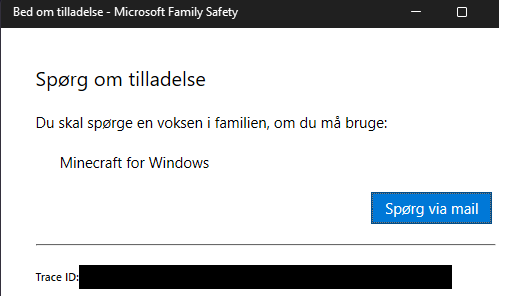
It says: "Ask for permission. You need to ask an adult in the family if you can use: Minecraft for Windows" the blue button says: "Ask via email"

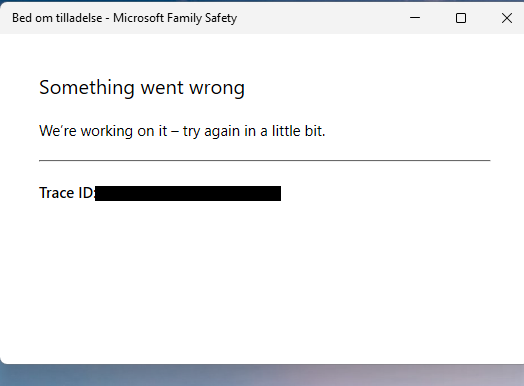
If I click the button, I without fail, get this error message:
User's image

If I set the age of the child to "21" I can open Minecraft, but even if I run it, I do not see the App "Minecraft for Windows" in the list of Apps the child has been playing, only Minecraft Launcher. Whether that is significant I don't know. If I set it back to follow the age of the child, same prompt and error message.

I have updated Windows, gone through the Microsoft Store and ensured all apps are updated there as well and no luck. I have removed the Child (many times) from Microsoft Family Center and added it again. I have confirmed that the status of the child account is not pending or something similar. I can see that Microsoft Family Safety does engage with the child account. I have verified system files to ensure it is not on the system on the laptop. I have waiting more than a little bit, it's been several days in fact.

Microsoft Support concluded that it seems to be the permission flow that goes wrong and asked me to write in here.

the case number for the Microsoft Support case is: [Moderator Note: Personal Info Removed] 

Microsoft 365 and Office | Microsoft Family Safety | For home | Windows
0 comments No comments

3 answers

Sort by: Most helpful
  1. Xavier-D 14,270 Reputation points Microsoft External Staff Moderator
    2026-10-28T00:17:38.1533333+00:00

    Since this is a public forum, we will hide your personal identifiable information, and I have sent that image of yours containing your personal identifiable information in a private message so we can work together to resolve the issue. 


    Hello Kasper,

    Thank you for the detailed information.

    Since Microsoft Support has already checked the device and family configuration, and the restriction itself is working, this appears to be a failure in the permission-request flow rather than a general Family Safety setup issue.

    Instead of using Ask via email, please try approving Minecraft directly from the organizer account:

    1. Sign in to the Microsoft Family page using the organizer account.
    2. Open the child’s profile and select the Windows platform.
    3. Open Apps, features, and games.
    4. Check whether Minecraft for Windows is listed as blocked and select Unblock app if available.
    5. Also review the child’s app and game content filter and confirm that its permitted age rating includes Minecraft.

    If only Minecraft Launcher appears, temporarily open Minecraft again from the child’s Windows account, then refresh the Family page and check the app list once more.

    Because the email request consistently returns a trace ID, please also provide Microsoft Support with the trace ID shown in the error and your existing support case number. The trace ID may help the appropriate support team investigate the failed permission request, as contributors in this user-to-user forum cannot inspect the underlying service request.

    Please let us know whether Minecraft appears under Apps, features, and games after trying the direct approval method.

    Feel free leave a reply to this post and let us know the details regarding the issue.

    I would be happy to help.

    Was this answer helpful?

    1 person found this answer helpful.

  2. Deleted

    This answer has been deleted due to a violation of our Code of Conduct. The answer was manually reported or identified through automated detection before action was taken. Please refer to our Code of Conduct for more information.


    Comments have been turned off. Learn more

  3. Kasper 0 Reputation points
    2026-10-28T06:51:59.9+00:00

    Thank you for removing personal information, I didn't think that those pieces of information was in fact personal.

    "Minecraft for Windows" does not appear in the the list of Apps and Games under Microsoft Family Safety, even if I run it after having set the child account to 21 years old. I can only see "Minecraft Launcher", which is not blocked and also ask prompts for permission and gives the error message. Also the Xbox App appears there which is also not blocked though both that App and "Minecraft for Windows" gives the error message.

    I am not sure I understand where to view that filter you mention in point 5. Should that filter not update based on what the adult in the family gives permission to?

    The TraceID in the messages are not consistent only the error itself is. The IDs will change every time I try again.

    Was this answer helpful?


Your answer

Answers can be marked as 'Accepted' by the question author and 'Recommended' by moderators, which helps users know the answer solved the author's problem.