Hi @Art Hansen ,
Your first Select(index + 1, selLen) call already calculates the correct range. The likely missing step is giving ArgCodeTBX input focus. Select(start, length) selects characters; the parameterless Select() activates the control. With the default HideSelection = true, selected text is not highlighted when the textbox does not have focus. See TextBoxBase.Select and HideSelection.
Keep your existing checkbox check and panel positioning. Replace the code from UseArgPNL.Visible = true through the two selection attempts with:
UseArgPNL.Visible = true;
ArgCodeTBX.Text = cValue;

int equalsIndex = ArgCodeTBX.Text.IndexOf('=');
if (equalsIndex >= 0)
{
    ArgCodeTBX.Select(); // Give the textbox input focus first.

    int start = equalsIndex + 1;
    ArgCodeTBX.Select(start, ArgCodeTBX.TextLength - start);
}
In a small WinForms test targeting .NET Framework 4.8, running on .NET Framework 4.8.1, the original range selection returned SelectionStart = 16, SelectionLength = 5, and SelectedText = "value" while no highlight was visible. Adding the parameterless Select() made the textbox focused and the selection visible.
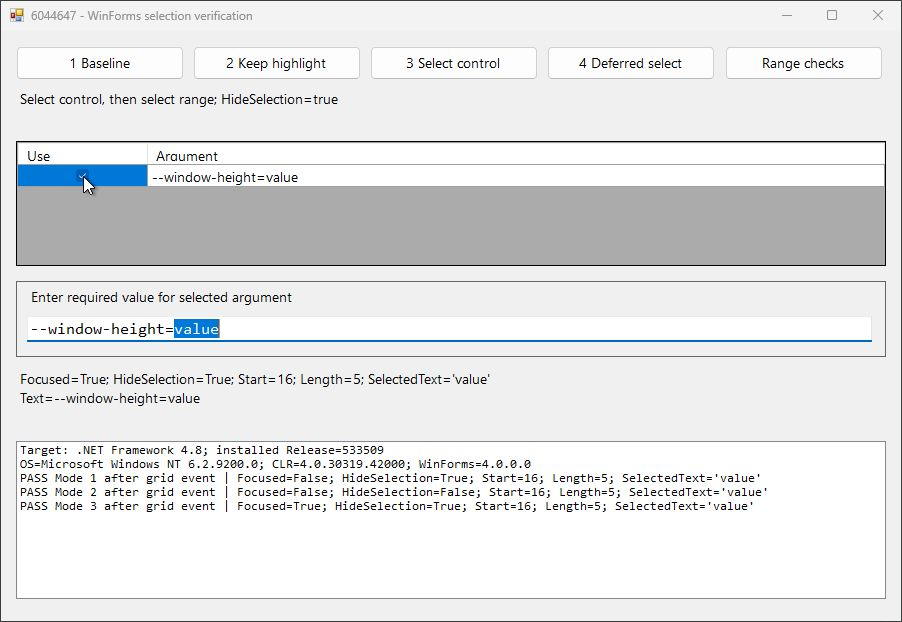
If you also want the selection to remain visible when another control receives focus, set ArgCodeTBX.HideSelection = false once in the constructor after InitializeComponent(), or in the Designer. That changes highlight visibility; it does not move keyboard input into the textbox.
Your second attempt requests one character too many. The correct length is TextLength - SelectionStart. WinForms clamps the extra character at the end of the text, so that arithmetic difference did not explain the missing highlight.
If the selection disappears again after the grid event finishes, please share which DataGridView event contains this code and whether ArgCodeTBX.Focused is still true and ArgCodeTBX.SelectedText is still "value" at that point. That will help distinguish focus returning to the grid from another handler changing the selection.
If you found my response helpful or informative, I would greatly appreciate it if you could follow this guidance. It also helps other community members who run into a similar issue find the solution more easily.
Thank you.


' cx='32' cy='32' r='32' /%3E%3Ctext x='50%25' y='55%25' dominant-baseline='middle' text-anchor='middle' fill='%23FFF' %3EH%3C/text%3E%3C/svg%3E)
' cx='32' cy='32' r='32' /%3E%3Ctext x='50%25' y='55%25' dominant-baseline='middle' text-anchor='middle' fill='%23FFF' %3EGL%3C/text%3E%3C/svg%3E)