' cx='32' cy='32' r='32' /%3E%3Ctext x='50%25' y='55%25' dominant-baseline='middle' text-anchor='middle' fill='%23FFF' %3ENT%3C/text%3E%3C/svg%3E)

' cx='32' cy='32' r='32' /%3E%3Ctext x='50%25' y='55%25' dominant-baseline='middle' text-anchor='middle' fill='%23FFF' %3EAP%3C/text%3E%3C/svg%3E)
Thanks for the detailed repro. I checked the current Microsoft Copilot Studio documentation, and File inputs are supported for Power Automate/agent flows used as tools. Microsoft currently documents passing a user file to a flow tool using the System.Activity.Attachments context and mapping the file content and name through Power Fx Custom values. Therefore, this does not appear to be a general limitation that File inputs are unsupported.
The documented pattern is to map the attachment content and name using:
First(System.Activity.Attachments).Content
and
First(System.Activity.Attachments).Name
File inputs must be configured using a Custom Power Fx value rather than “Dynamically fill with AI.”
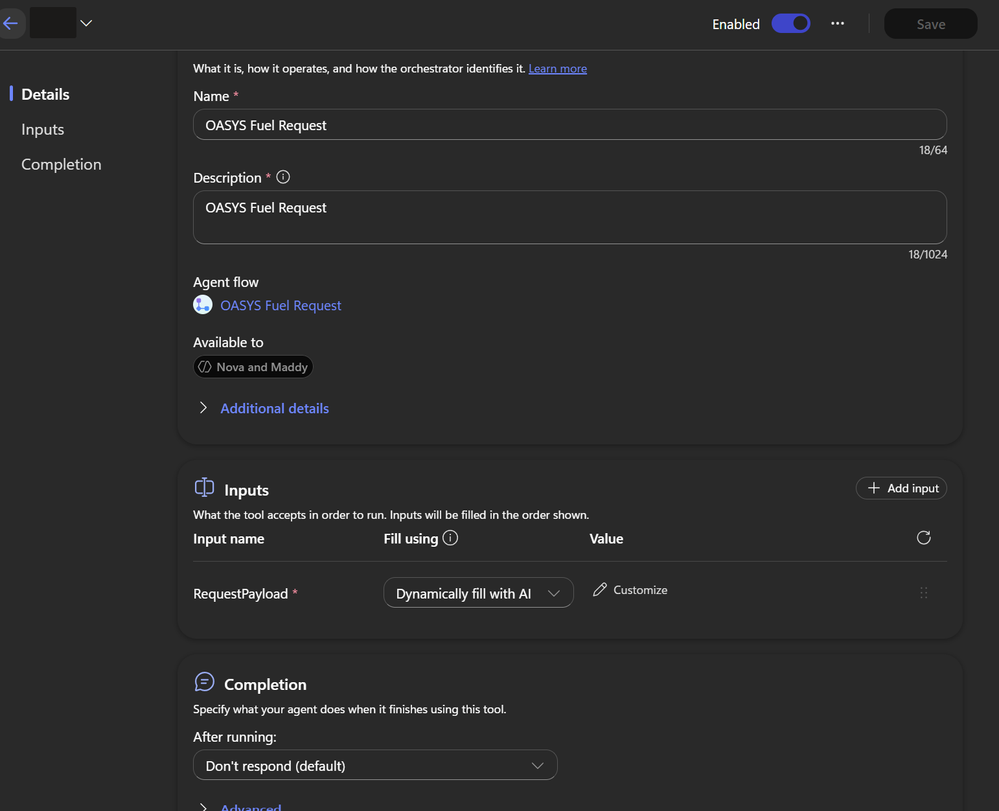
In your case, however, the fact that the File parameter is completely missing from the Tool Inputs UI while manually adding the same parameter returns DuplicateItem is not the expected documented experience. This may indicate that the File parameter exists in the underlying tool schema but is not being rendered correctly in the current Copilot Studio experience.
There have also been recent community reports of similar File-input/tool-panel behavior in the newer Copilot Studio experience.
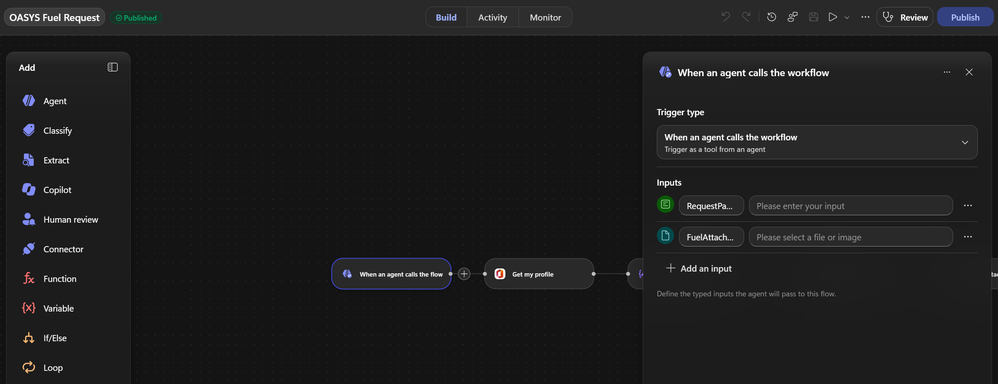
As a next step, we recommend testing with a minimal flow containing only a Text input, a File input, and a Respond to the agent action, then publishing it and adding it as a tool. Please also provide the Copilot Studio UX/version, environment region, screenshots of the trigger input configuration and Tool Inputs panel, and the full DuplicateItem error details.
If the File input is still absent in that minimal repro while the backend reports it as a duplicate when manually added, we can investigate this as a potential Copilot Studio tool-schema/UI issue rather than a limitation of File inputs.