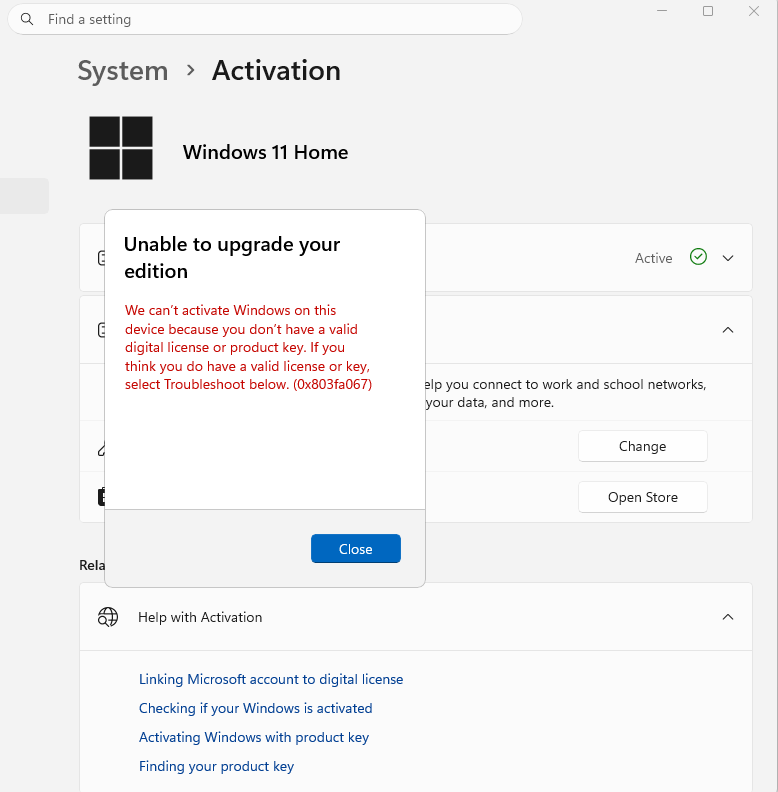
I'm trying to upgrade my Windows 11 Home to Education edition with a key offered in Microsoft Azure to students at my college and yet I'm having no luck. When I try to change it in Settings > System > Activation I get an error regarding "can't upgrade your edition of Windows". (Image 1)
image.png
Upon research I try to use a generic Windows 11 Pro key first to upgrade then afterward switch from Pro to Education but have no luck with a error of an invalid code. (Also tried with the wifi off as suggested). (Image 2)
Then using some command prompts (admin mode) I saw the Current Edition and Target Editions (Image 3)
image.png
Finally I also tried to follow steps in forum:
Cleaning up the component store should resolve the problem in most cases. From an admin command prompt, please run: "DISM /Online /Cleanup-Image /StartComponentCleanup" then run: "DISM /Online /Cleanup-Image /RestoreHealth"
Which resulted in a non-completion for the first command and the second command says it completed but strangely the completion bar only ever got to 84.9%. (Image 4)
image.png
I tried reaching out to my schools IT with a zoom call and a ticket but they weren't able to help and recommened going to Microsoft support. (Also which isn't allowed on a school email and tells me to contact my school's IT) Which leaves me here confused and spirit broken.
' cx='32' cy='32' r='32' /%3E%3Ctext x='50%25' y='55%25' dominant-baseline='middle' text-anchor='middle' fill='%23FFF' %3EER%3C/text%3E%3C/svg%3E)

