Cannot transfer file to External Harddrive despite it having enough Free Space [Windows 10]

JSK 5 Reputation points
2026-09-26T01:35:18.4233333+00:00

I have had this trouble for some time, whenever I want to transfer files to my other harddrive, it sometimes just refuses. I am trying to transfer a 14,4GB mp4 file, yet is just refuses despite there being 15GB of free space. I have Defragmented the drive, made sure the drive is formatted to NTFS, yet it still refuses to work. And since it is a single file I can't really split it up like I have seen suggested on other parts of the internet.
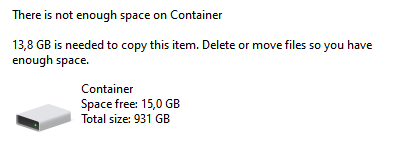
Screenshot_1

Potentially useful info:
I am transfering an mp4 file from one external drive (D:) to another (F:), both drives are formatted to NTFS
I am using Windows 10 Home Version 22H2 (OS Build: 19045.7725)

Genuinely have no idea what to do. Please help!

Windows for home | Windows 10 | Files, folders, and storage
0 comments No comments

3 answers

Sort by: Oldest
  1. Ivan B 124.8K Reputation points Independent Advisor
    2026-09-26T02:10:50.3833333+00:00

    Hi,

    Just to be sure, check the file properties and look at the total size; if it is under 14 GB, open the Command Prompt (as administrator) and try using robocopy:

    robocopy "d:\example.mp4" "f:\" "c:\test.txt"
    

    See if that works—remember, the file cannot be currently in use by any program.

    Thanks.

    Was this answer helpful?


  2. Old observer 240 Reputation points Volunteer Moderator
    2026-09-26T22:22:15.9866667+00:00

    JSK,

    could it be that compression on F: disk is turned on? Please check disk's properties.

    Was this answer helpful?


  3. Old observer 240 Reputation points Volunteer Moderator
    2026-09-27T15:29:17.6433333+00:00

    When compression is turned on, system suppose that files can be compressed so shows larger size of free space, appr. twice as large. I.e., you have ~7.5 GB free disk space.

    But mp4 files are compressed already and cannot be compressed additionally. So, your file requires 14.4 GB real size or ~29 GB "compressed" space.

    Was this answer helpful?

    0 comments No comments

Your answer

Answers can be marked as 'Accepted' by the question author and 'Recommended' by moderators, which helps users know the answer solved the author's problem.