Cannot transfer file to External Harddrive despite it having enough Free Space [Windows 10]

JSK 5 Reputation points
2026-09-26T01:35:18.4233333+00:00

I have had this trouble for some time, whenever I want to transfer files to my other harddrive, it sometimes just refuses. I am trying to transfer a 14,4GB mp4 file, yet is just refuses despite there being 15GB of free space. I have Defragmented the drive, made sure the drive is formatted to NTFS, yet it still refuses to work. And since it is a single file I can't really split it up like I have seen suggested on other parts of the internet.
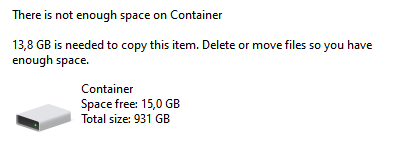
Screenshot_1

Potentially useful info:
I am transfering an mp4 file from one external drive (D:) to another (F:), both drives are formatted to NTFS
I am using Windows 10 Home Version 22H2 (OS Build: 19045.7725)

Genuinely have no idea what to do. Please help!

Windows for home | Windows 10 | Files, folders, and storage
0 comments No comments

3 answers

Sort by: Most helpful
  1. Old observer 240 Reputation points Volunteer Moderator
    2026-09-27T15:29:17.6433333+00:00

    When compression is turned on, system suppose that files can be compressed so shows larger size of free space, appr. twice as large. I.e., you have ~7.5 GB free disk space.

    But mp4 files are compressed already and cannot be compressed additionally. So, your file requires 14.4 GB real size or ~29 GB "compressed" space.

    Was this answer helpful?

    0 comments No comments

  2. Old observer 240 Reputation points Volunteer Moderator
    2026-09-26T22:22:15.9866667+00:00

    JSK,

    could it be that compression on F: disk is turned on? Please check disk's properties.

    Was this answer helpful?


  3. Ivan B 124.7K Reputation points Independent Advisor
    2026-09-26T02:10:50.3833333+00:00

    Hi,

    Just to be sure, check the file properties and look at the total size; if it is under 14 GB, open the Command Prompt (as administrator) and try using robocopy:

    robocopy "d:\example.mp4" "f:\" "c:\test.txt"
    

    See if that works—remember, the file cannot be currently in use by any program.

    Thanks.

    Was this answer helpful?


Your answer

Answers can be marked as 'Accepted' by the question author and 'Recommended' by moderators, which helps users know the answer solved the author's problem.