
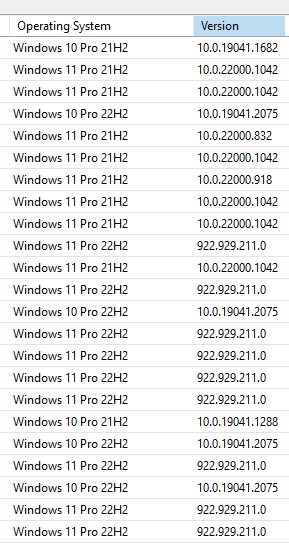
After the upgrade to Windows 11 22H2, their version in WSUS is 922.812.111.0 which is weird.
Thankfully this number does not affect my WMI filtering by os version "10.0.2%"
This browser is no longer supported.
Upgrade to Microsoft Edge to take advantage of the latest features, security updates, and technical support.
' cx='32' cy='32' r='32' /%3E%3Ctext x='50%25' y='55%25' dominant-baseline='middle' text-anchor='middle' fill='%23FFF' %3ENI%3C/text%3E%3C/svg%3E)
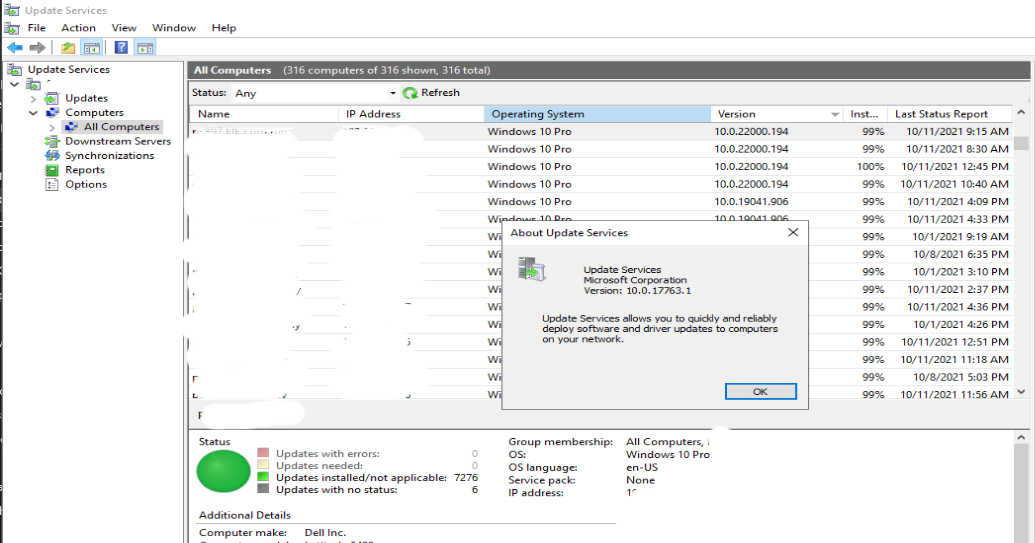
WSUS Win 2019 not showing client OS install with Windows 11 correctly. it shows Windows 10 Pro version 10.0.22000.194
' cx='32' cy='32' r='32' /%3E%3Ctext x='50%25' y='55%25' dominant-baseline='middle' text-anchor='middle' fill='%23FFF' %3EA%3C/text%3E%3C/svg%3E)
If you search Registry Editor on Windows 11, you would see that the term "Windows 11" is no where to be found, all references still named "Windows 10"
so it's not WSUS fault
' cx='32' cy='32' r='32' /%3E%3Ctext x='50%25' y='55%25' dominant-baseline='middle' text-anchor='middle' fill='%23FFF' %3ERA%3C/text%3E%3C/svg%3E)
What version of Windows Server are you using?
Have you download and installed all updates?
Windows Server 2019 Standard with all the latest updates installed.
' cx='32' cy='32' r='32' /%3E%3Ctext x='50%25' y='55%25' dominant-baseline='middle' text-anchor='middle' fill='%23FFF' %3EJI%3C/text%3E%3C/svg%3E)
Did anybody already found a solution?
' cx='32' cy='32' r='32' /%3E%3Ctext x='50%25' y='55%25' dominant-baseline='middle' text-anchor='middle' fill='%23FFF' %3EM%3C/text%3E%3C/svg%3E)

You can change this in the registry of the client under HKEY_LOCAL_MACHINE\SOFTWARE\Microsoft\Windows NT\CurrentVersion.
It's simple as changing a character and you're all good
' cx='32' cy='32' r='32' /%3E%3Ctext x='50%25' y='55%25' dominant-baseline='middle' text-anchor='middle' fill='%23FFF' %3EJP%3C/text%3E%3C/svg%3E)
Hi,
im seeing this across all pc's and laptops and is now becoming a pian to update each one manually from the Cloud.
Microsoft what are you doing to resolve this?
i will not be updating these computers or laptops manually! what is the point of having WSUS when Microsoft cannot even sort this little thing out.
if you change the registry setting, on reboot it reverts back to windows 10
has anyone managed to resolve this?
if not what is Microsoft doing about this?
now saying the above, im thinking of moving over to linux, at least we dont have any issues with updating linux, but Microsoft, i will hand it to you! all money no work and screwed up software coming out of Microsoft! test your software first thoroughly!!!!
' cx='32' cy='32' r='32' /%3E%3Ctext x='50%25' y='55%25' dominant-baseline='middle' text-anchor='middle' fill='%23FFF' %3EDC%3C/text%3E%3C/svg%3E)
I have tried to change the value under HKEY_LOCAL_MACHINE\SOFTWARE\Microsoft\Windows NT\CurrentVersion.
WSUS recognise the Windows 11 value but restarting the client the value came back in Windows 10.
How can I proceed?
' cx='32' cy='32' r='32' /%3E%3Ctext x='50%25' y='55%25' dominant-baseline='middle' text-anchor='middle' fill='%23FFF' %3EG%3C/text%3E%3C/svg%3E)
Yeah i'm getting the same thing. I change the regkey only to have it revert back to Windows 10.
' cx='32' cy='32' r='32' /%3E%3Ctext x='50%25' y='55%25' dominant-baseline='middle' text-anchor='middle' fill='%23FFF' %3ECK%3C/text%3E%3C/svg%3E)
Did anybody already found a solution to fix it ?

Again, this is Microsoft "BY DESIGN". The "Version" is not the OPERATING SYSTEM version - it's the Windows Update Agent version on the client machine.
If you are subscribed to WSUS Automated Maintenance (WAM), then you would be having your Windows 11 Machines be renamed properly as of 2022.01.
Full disclosure - WAM is our software.
' cx='32' cy='32' r='32' /%3E%3Ctext x='50%25' y='55%25' dominant-baseline='middle' text-anchor='middle' fill='%23FFF' %3EKD%3C/text%3E%3C/svg%3E)
we also facing the same issue, if any body found the solution kindly share us. Thanks
' cx='32' cy='32' r='32' /%3E%3Ctext x='50%25' y='55%25' dominant-baseline='middle' text-anchor='middle' fill='%23FFF' %3ECP%3C/text%3E%3C/svg%3E)
After the upgrade to Windows 11 22H2, their version in WSUS is 922.812.111.0 which is weird.
Thankfully this number does not affect my WMI filtering by os version "10.0.2%"
' cx='32' cy='32' r='32' /%3E%3Ctext x='50%25' y='55%25' dominant-baseline='middle' text-anchor='middle' fill='%23FFF' %3EPB%3C/text%3E%3C/svg%3E)
Hello.
I confirm the same situation:
This is all very strange considering that windows 11 came out 1 year ago.
Again, this is Microsoft "BY DESIGN". The "Version" is not the OPERATING SYSTEM version - it's the Windows Update Agent version on the client machine.
WAM renames them properly.
I AJtek,
I don't know WSUS Automated Maintenance, but i see that is a your product?
So it isn't a Microsoft product, it is true?
That is correct. I forgot to add my 'full disclosure' piece... it is our product.
Below change in the client registry , able to solve this issue.
Looks like it's Windows 11 at fault and not WSUS, which is simply relaying the "ProductName" value under HKEY_LOCAL_MACHINE\SOFTWARE\Microsoft\Windows NT\CurrentVersion. This is currently "Windows 10 [edition]" on Windows 11, even the latest Insider builds. Change the string & check into WSUS, and that's what will show up.
' cx='32' cy='32' r='32' /%3E%3Ctext x='50%25' y='55%25' dominant-baseline='middle' text-anchor='middle' fill='%23FFF' %3EAA%3C/text%3E%3C/svg%3E)
it will change back to windows 10 pro if your client sync to wsus server
' cx='32' cy='32' r='32' /%3E%3Ctext x='50%25' y='55%25' dominant-baseline='middle' text-anchor='middle' fill='%23FFF' %3EMA%3C/text%3E%3C/svg%3E)
in my Win11 client and WSUS Win2022 happen the same - reg key back to Win10
This is expected behaviour by Microsoft. They don't plan on changing it.
If you had a licence to WAM (full disclosure: our product), then you would see the computers as what they are with more descriptive descriptions.
