Developer technologies | ASP.NET Core | Other
A set of technologies in .NET for building web applications and web services. Miscellaneous topics that do not fit into specific categories.
This browser is no longer supported.
Upgrade to Microsoft Edge to take advantage of the latest features, security updates, and technical support.
' cx='32' cy='32' r='32' /%3E%3Ctext x='50%25' y='55%25' dominant-baseline='middle' text-anchor='middle' fill='%23FFF' %3EWH%3C/text%3E%3C/svg%3E)
Hello
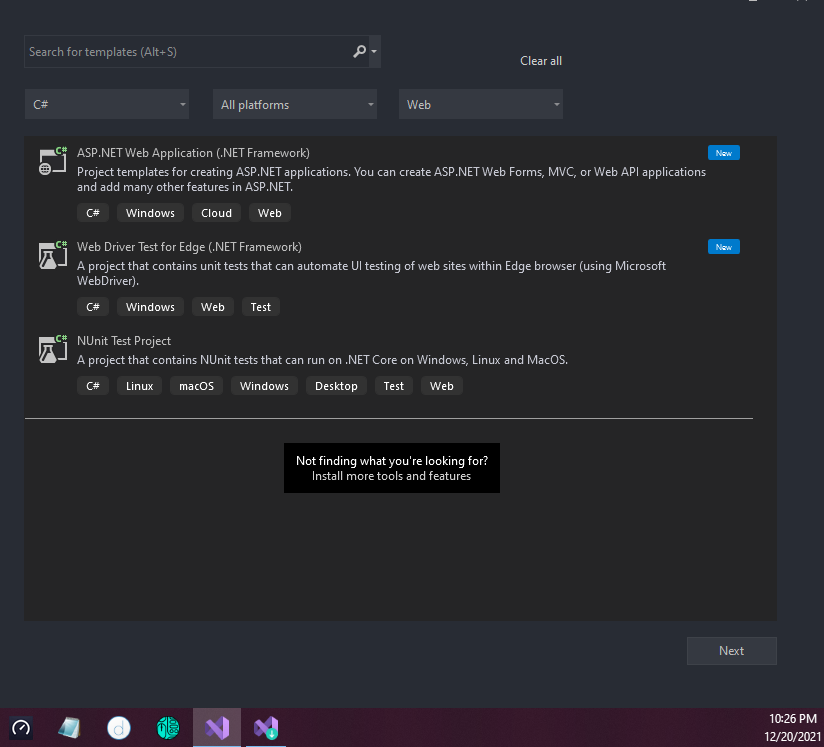
I want to use ASP.NET Web Application (.NET Framework), and I have downloaded Visual Studio Community 2019 v16.11.3, and i have clicked the ASP.NET and web devleopment before i download it
but I can't find the one i needed, I don't want the 'core' one,
does anyone know how to solve it?
A set of technologies in .NET for building web applications and web services. Miscellaneous topics that do not fit into specific categories.
Locked Question. You can vote on whether it's helpful, but you can't add comments or replies or follow the question.
' cx='32' cy='32' r='32' /%3E%3Ctext x='50%25' y='55%25' dominant-baseline='middle' text-anchor='middle' fill='%23FFF' %3ELA%3C/text%3E%3C/svg%3E)
Thank you very much, it was a great help.

Are you talking about the template of the Web Site Project for the ASP.NET Web Forms project?
' cx='32' cy='32' r='32' /%3E%3Ctext x='50%25' y='55%25' dominant-baseline='middle' text-anchor='middle' fill='%23FFF' %3ESP%3C/text%3E%3C/svg%3E)
If someone can help me, I opened an ASP.NET Web Application (.NET Framework) and removed HTTPS from it, I go to the right click on the visaul studio name as I called it and go to the add form, write its name and from the options I have only design and split, I miss source. It also won't let me add anything to the form, no button, text box or anything, if anyone knows please help me. I am sending a picture.
' cx='32' cy='32' r='32' /%3E%3Ctext x='50%25' y='55%25' dominant-baseline='middle' text-anchor='middle' fill='%23FFF' %3EAK%3C/text%3E%3C/svg%3E)
They have a new live preview (and I really, but really wish it would have allowed drag + drop of controls into the design area. So, you want to turn back on the older legacy designer.
Tools->options-> web forms designer.
Change to this setting:
' cx='32' cy='32' r='32' /%3E%3Ctext x='50%25' y='55%25' dominant-baseline='middle' text-anchor='middle' fill='%23FFF' %3EK%3C/text%3E%3C/svg%3E)
When you Create New Project, use the search box and type "web application". Among the ones listed, find ASP.NET Web Application (.Net Framework), and pick the one with C# listed at the bottom.
Once you've used a project template, it appears in your "Recent project templates" list on the side of the Create a new project box, and you won't have to search for it again.
When you step through creating your project with that template, it will ask you to select Empty, Web Forms, MVC, Web API, or Single Page Application. Pick your preferred flavor.
' cx='32' cy='32' r='32' /%3E%3Ctext x='50%25' y='55%25' dominant-baseline='middle' text-anchor='middle' fill='%23FFF' %3EYS%3C/text%3E%3C/svg%3E)
Hi @WEI HAN TAN ,
Did you select "ASPNET and web development" when you install the visual stuido? If you installed it, you only search "Web application". If you didn't install,you must to install the sdk.
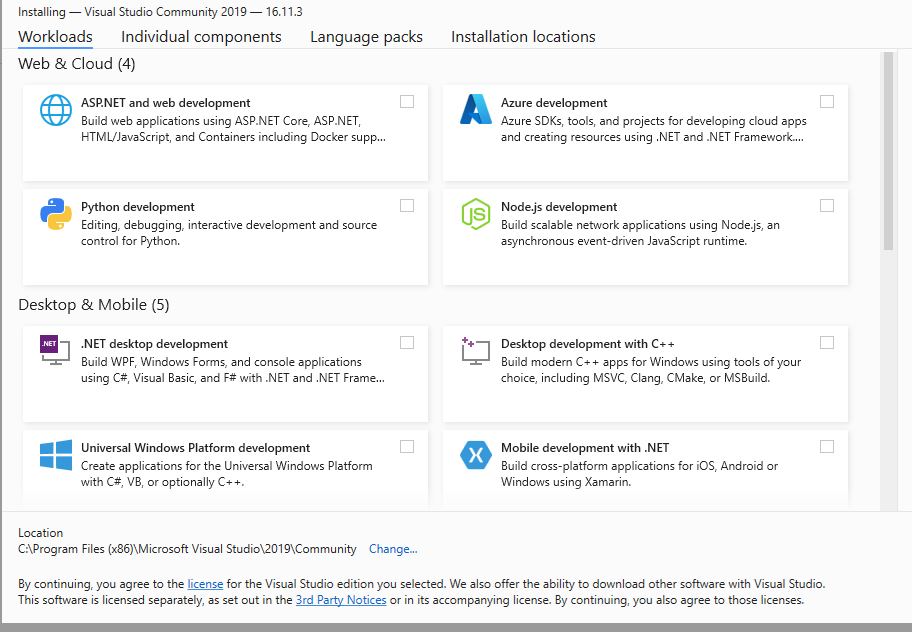
Best regards,
Yijing Sun
If the answer is helpful, please click "Accept Answer" and upvote it.
Note: Please follow the steps in our documentation to enable e-mail notifications if you want to receive the related email notification for this thread.
Presento el mismo problema y ya instale todo los componentes de ASP.NET
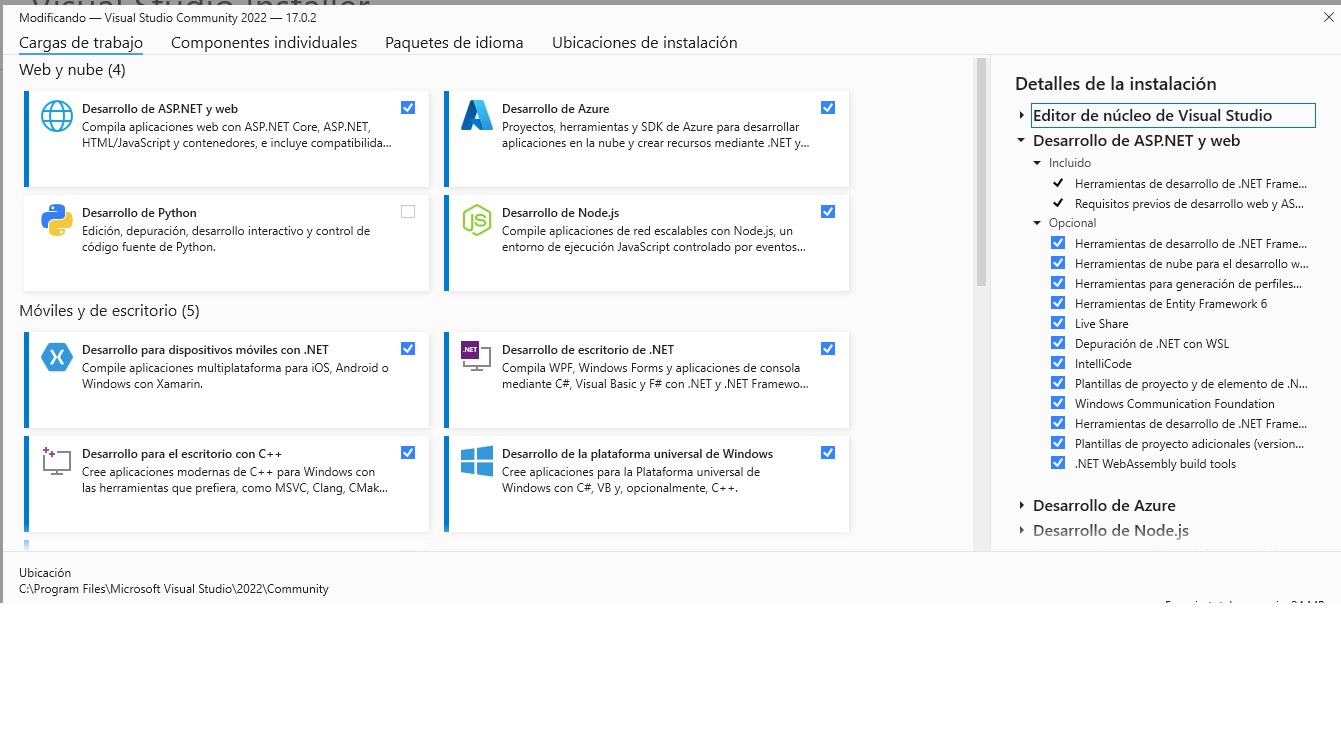
Esta desde visual studio 2022
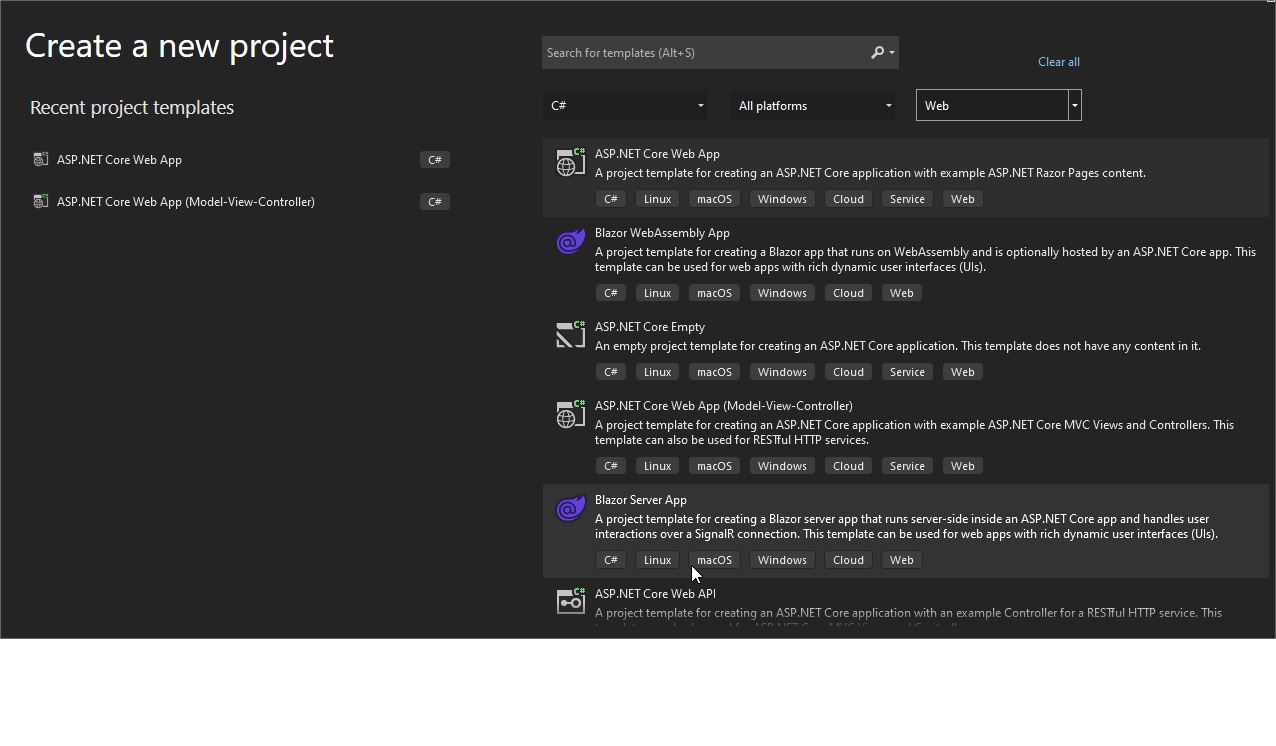
' cx='32' cy='32' r='32' /%3E%3Ctext x='50%25' y='55%25' dominant-baseline='middle' text-anchor='middle' fill='%23FFF' %3EU%3C/text%3E%3C/svg%3E)
Open 'visual studio installer' from start menu.

Click on 'modify' :
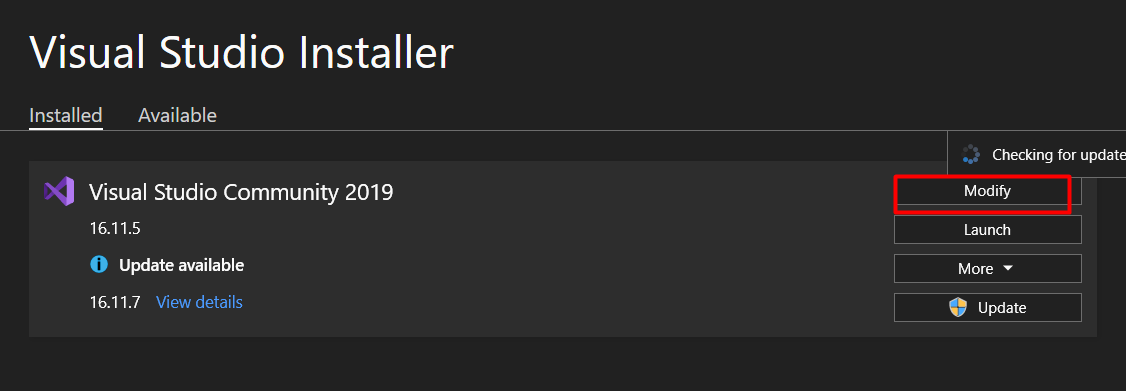
Select 'ASP.net and web development':

' cx='32' cy='32' r='32' /%3E%3Ctext x='50%25' y='55%25' dominant-baseline='middle' text-anchor='middle' fill='%23FFF' %3ESH%3C/text%3E%3C/svg%3E)
I am having the issue even though i have already installed it.. 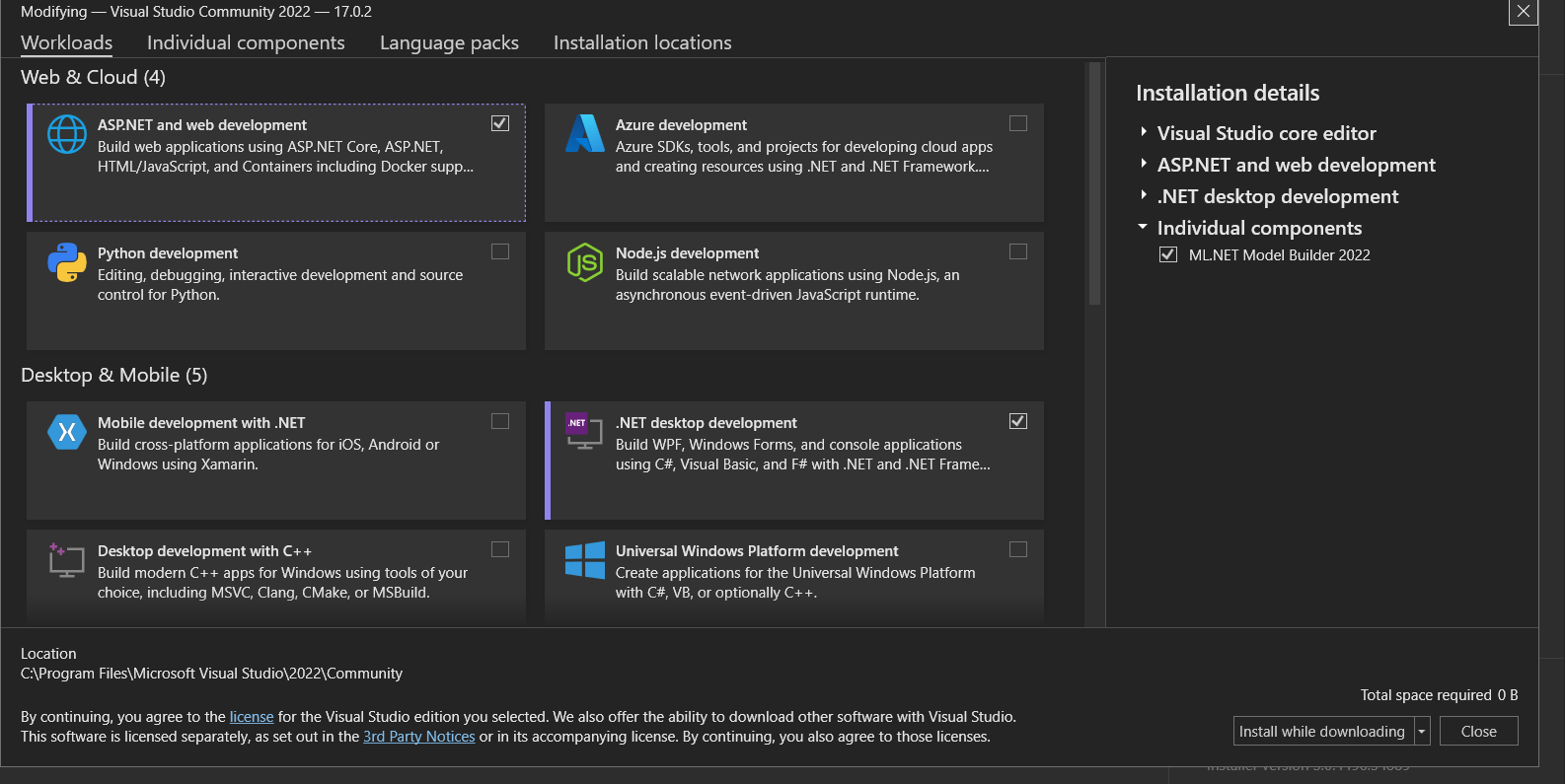
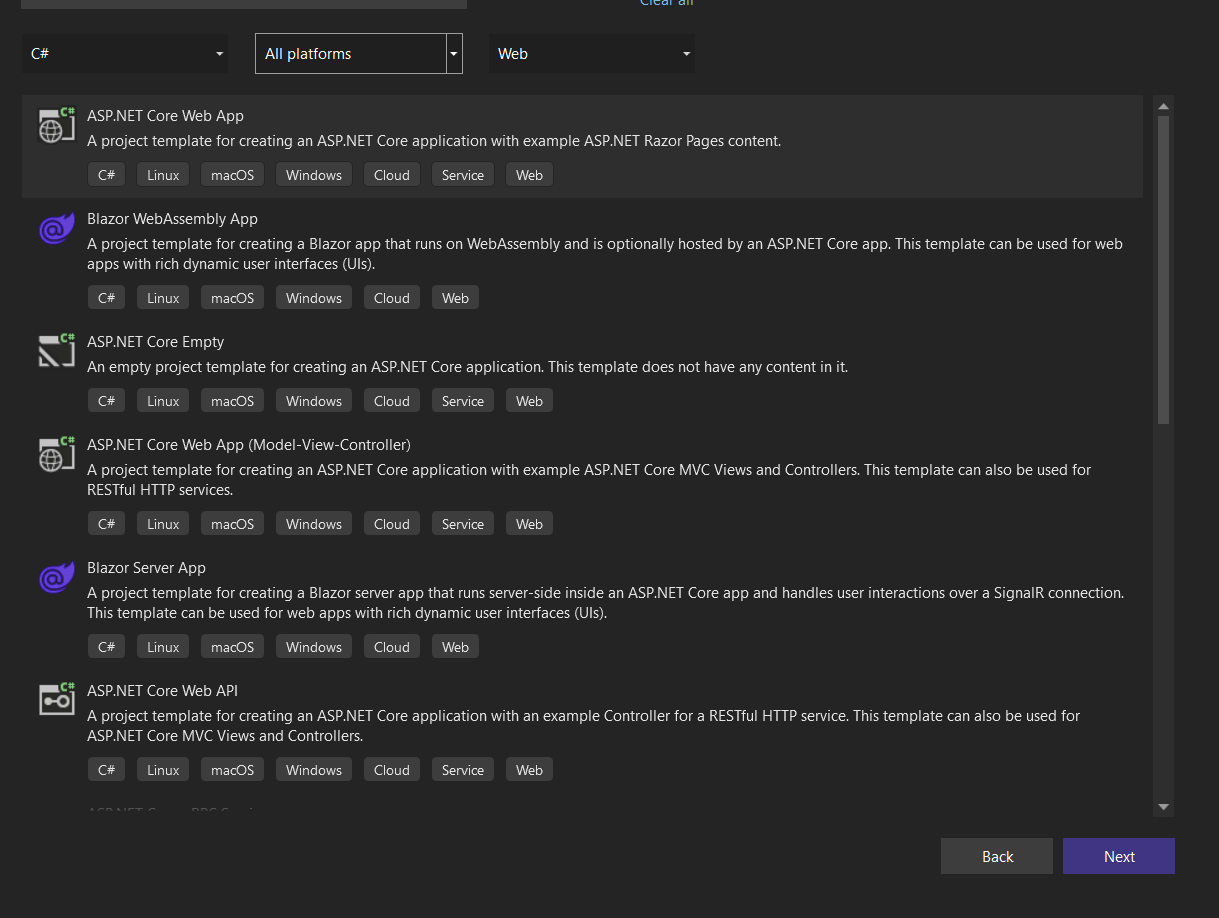 Can anybody help me out with this pls
' cx='32' cy='32' r='32' /%3E%3Ctext x='50%25' y='55%25' dominant-baseline='middle' text-anchor='middle' fill='%23FFF' %3EA%3C/text%3E%3C/svg%3E)
See this link! Worked for me.
' cx='32' cy='32' r='32' /%3E%3Ctext x='50%25' y='55%25' dominant-baseline='middle' text-anchor='middle' fill='%23FFF' %3EHS%3C/text%3E%3C/svg%3E)
' cx='32' cy='32' r='32' /%3E%3Ctext x='50%25' y='55%25' dominant-baseline='middle' text-anchor='middle' fill='%23FFF' %3EES%3C/text%3E%3C/svg%3E)

This is exactly what I was looking for, thanks Andres
' cx='32' cy='32' r='32' /%3E%3Ctext x='50%25' y='55%25' dominant-baseline='middle' text-anchor='middle' fill='%23FFF' %3ENT%3C/text%3E%3C/svg%3E)

Hi @WEI HAN TAN
You can add ASP.NET and web Development workload and .NET framework components as shown:

However, we can install individual components, as illustrated below. In my case, I have selected 4.x .Net frameworks and .Net core 3.1, .NET 5, and .NET 6 likewise we can select previous versions based on our need.
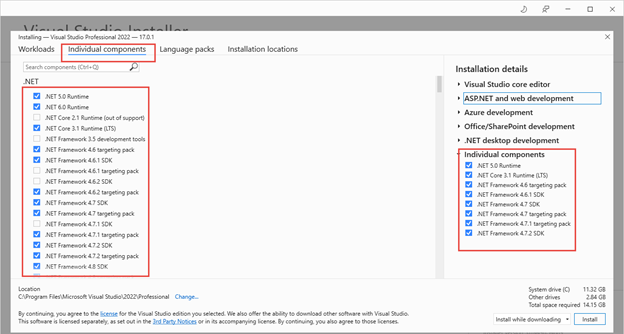
Check this link for more detail
https://rijsat.com/2021/11/18/step-by-step-installation-visual-studio-2022/