I’ve had update KB5068164 (2025-10 security update for WinRE) available since last October, but it always failed to install with an "internal error” message, so I gave up. But now I’m tired of ignoring it, so I’d like to get it installed once and for all.
I found this thread with what appears to be the same issue and tried following the LLM-generated instructions therein, but the update still failed to install. Rather than tinkering blindly, I reverted the steps.
I suspect the issue may be related to the fact that I had to manually create (and then update) my recovery partition after reimaging my system drive with Acronis last summer. However, given that the instructions in that thread were specific to my setup at the time, I’m not comfortable trying to guess at which commands to run and in which order to run them (since most of these commands are gobbledygook to me anyway), so I’d much prefer of someone could assist me presently.
As previously, below is some info that was requested in another thread with a similar issue, in case it helps.
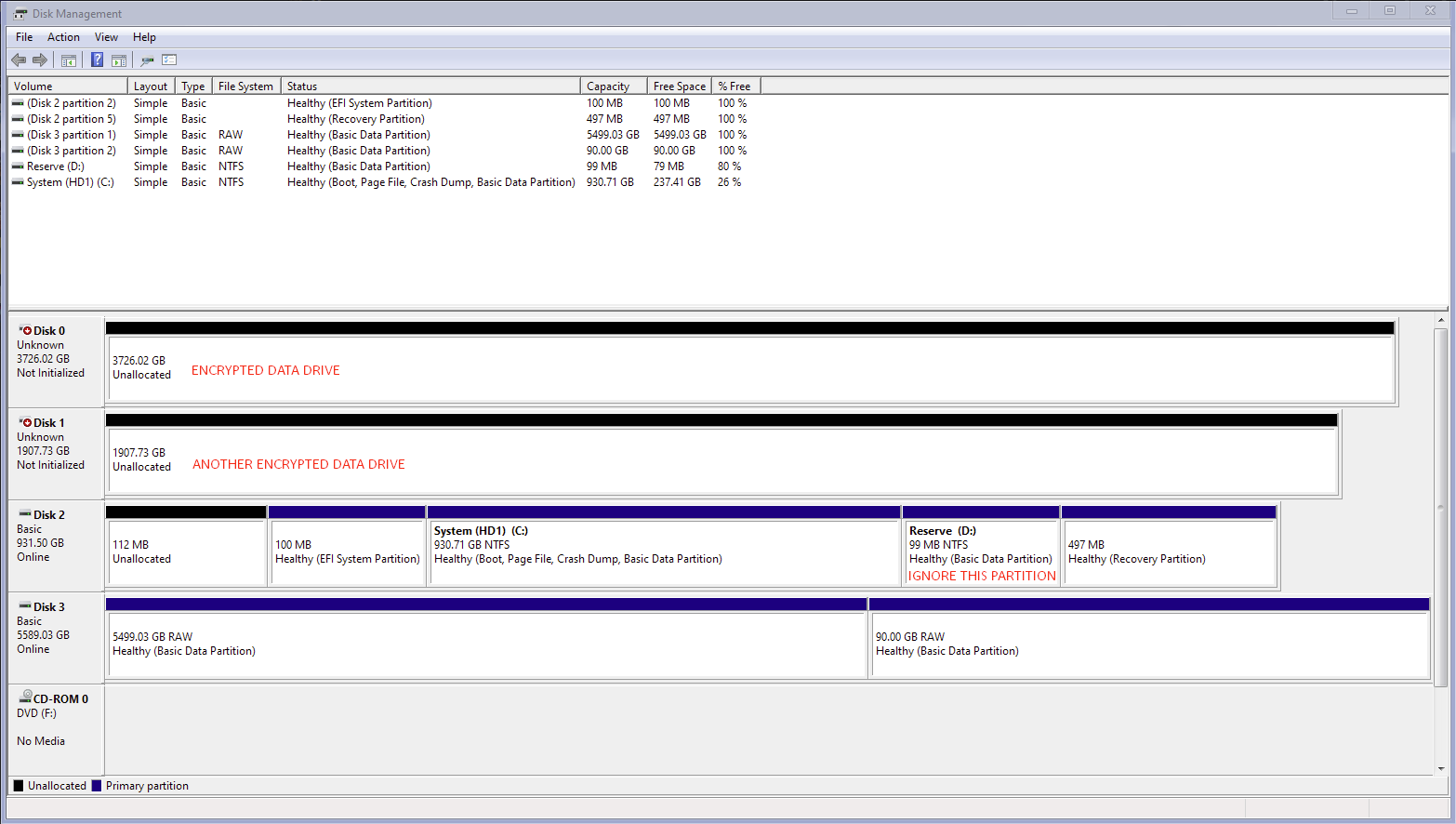
Microsoft Windows [Version 10.0.19045.6809]
(c) Microsoft Corporation. All rights reserved.

C:\Windows\system32>reagentc /info
Windows Recovery Environment (Windows RE) and system reset configuration
Information:
    Windows RE status:         Enabled
    Windows RE location:       \\?\GLOBALROOT\device\harddisk2\partition5\Recovery\WindowsRE
    Boot Configuration Data (BCD) identifier: ac6d8543-f2bf-11f0-bd8a-401c83cf49bd
    Recovery image location:
    Recovery image index:      0
    Custom image location:
    Custom image index:        0

REAGENTC.EXE: Operation Successful.


C:\Windows\system32>dir c:\windows\system32\recovery /a
 Volume in drive C is System (HD1)
 Volume Serial Number is FA7B-E6ED

 Directory of c:\windows\system32\recovery

01/16/2026  04:42    <DIR>          .
01/16/2026  04:42    <DIR>          ..
01/16/2026  04:50             1,139 ReAgent.xml
12/03/2023  21:36       466,404,365 winre.wim.old
               2 File(s)    466,405,504 bytes
               2 Dir(s)  254,898,348,032 bytes free
“winre.wim.old” was created on August 27, 2025 (despite the modification date reading 2023), during the troubleshooting detailed in my previous thread, linked above.
Any help would be appreciated.
' cx='32' cy='32' r='32' /%3E%3Ctext x='50%25' y='55%25' dominant-baseline='middle' text-anchor='middle' fill='%23FFF' %3EJ9%3C/text%3E%3C/svg%3E)

