(Inglês abaixo)
Ola @DANIEL DA SILVA NERY,
Obrigado por postar sua pergunta no fórum de Perguntas e Respostas da Microsoft. Entendo que você não consegue acessar o PowerPoint Online e está recebendo o erro: “A credencial é inválida. Substatus inesperado (6008)”.
Esse erro geralmente ocorre quando as informações de login armazenadas em seu dispositivo ficam desatualizadas ou corrompidas, mesmo que seu nome de usuário e senha estejam corretos. O PowerPoint Online não consegue validar suas credenciais e bloqueia o login.
Para melhor ajudá-lo(a), por favor, confirme o seguinte:
Você consegue entrar com sucesso em https://www.office.com usando a mesma conta?
Esse problema ocorre apenas no PowerPoint Online ou também em outros aplicativos, como Teams, Outlook ou Word Online?
Você está usando uma conta corporativa/escolar ou uma conta pessoal da Microsoft?
Você alterou sua senha recentemente ou trocou de dispositivo?
O problema ocorre em todos os navegadores ou apenas em um (por exemplo, Chrome/Edge)?
Enquanto isso, recomendo os seguintes passos:
1/ Saia de todos os aplicativos do Office/PowerPoint/Teams.
2/ Limpe os dados de autenticação em cache:
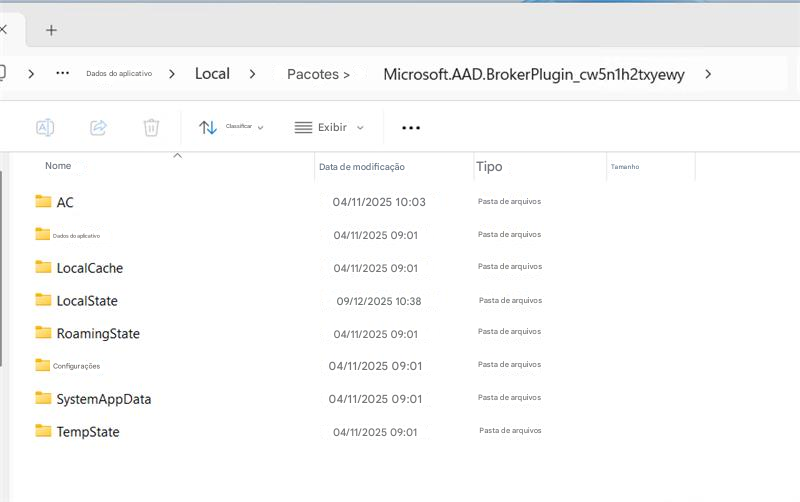
- Exclua o conteúdo desta pasta: %localappdata%\Packages\Microsoft.AAD.BrokerPlugin_cw5n1h2txyewy
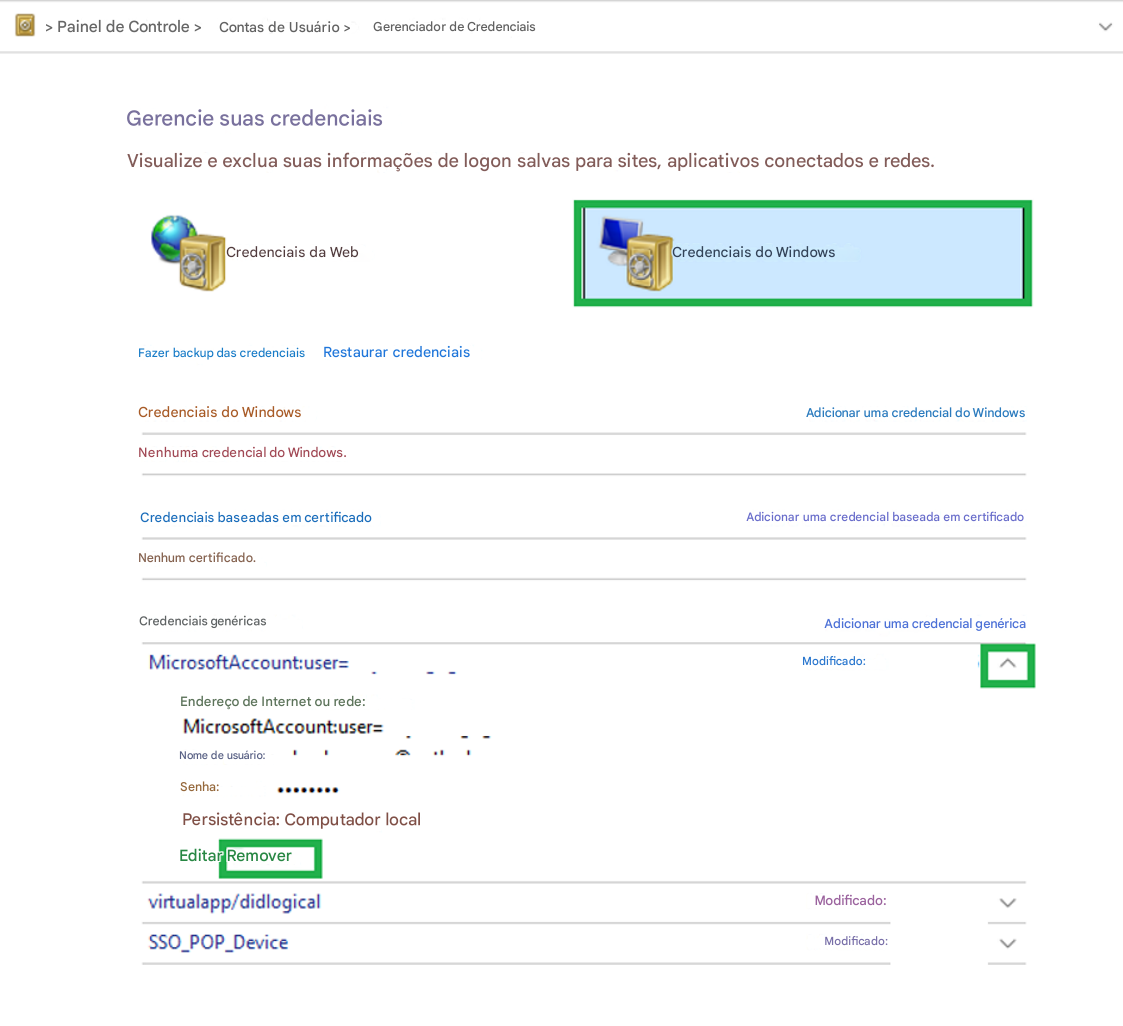
- Abra o Painel de Controle > Gerenciador de Credenciais > Credenciais do Windows e remova quaisquer credenciais relacionadas à Microsoft/Office.
3/ Acesse Configurações > Contas > Acessar trabalho ou escola, desconecte sua conta corporativa/escolar, reinicie o dispositivo e reconecte-a.
4/ Tente entrar novamente pelo site https://office.com para confirmar se as credenciais são válidas.
entenda que nossa resposta inicial nem sempre resolve o problema imediatamente. No entanto, com sua ajuda e informações mais detalhadas, podemos trabalhar juntos para encontrar uma solução. ua resposta detalhada nos ajudará a diagnosticar e investigar o problema com mais eficiência.
Se eu não entendi o que você procura, sinta-se à vontade para me avisar ou compartilhar uma captura de tela. Terei prazer em ajudar!
Agradecemos sua cooperação. Aguardo sua resposta.
(English version)
Hello @DANIEL DA SILVA NERY,
Thank you for posting your question in the Microsoft Q&A forum. I understand you're unable to access PowerPoint Online and are receiving the error: “The credential is invalid. Unexpected sub status (6008)”.
This error usually happens when the sign‑in information stored on your device becomes outdated or corrupted, even if your username and password are correct. PowerPoint Online cannot validate your credentials and blocks the login.
To better assistance, could you please confirm the following:
Are you able to sign in successfully at https://www.office.com using the same account?
Does this issue occur only in PowerPoint Online, or also in other apps such as Teams, Outlook, or Word Online?
Are you using a work/school account or a personal Microsoft account?
Have you recently changed your password or switched devices?
Does the issue happen in all browsers or only one (e.g., Chrome / Edge)?
In the meantime, I recommend following steps below:
1/ Sign out of all Office/PowerPoint/Teams apps.
2/ Clear cached authentication data:
- Delete contents of this folder: %localappdata%\Packages\Microsoft.AAD.BrokerPlugin_cw5n1h2txyewy

- Open Control Panel > Credential Manager > Windows Credentials and remove any Microsoft/Office‑related credentials.

3/ Go to Settings > Accounts > Access work or school, disconnect your work/school account, restart the device, and reconnect it.
4/ Try signing in again via https://office.com to confirm credentials are valid.
Please understand that our initial response does not always resolve the issue immediately. However, with your help and more detailed information, we can work together to find a solution. Your detailed response will help us diagnose and investigate the issue more efficiently.
I truly appreciate your patience and understanding. If I misunderstood what you’re looking for, feel free to let me know or share a screenshot. I’d be happy to help further!
I'm looking forward for your reply. Thank you for your cooperation.
Se a resposta for útil, clique em "Aceitar Resposta" e, por favor, vote positivamente. Se tiver mais perguntas sobre esta resposta, clique em "Comentar".
Observação: siga as etapas em nossa documentação para ativar as notificações por e-mail se desejar receber notificações por e-mail relacionadas a este tópico.
If the answer is helpful, please click "Accept Answer" and kindly upvote it. If you have extra questions about this answer, please click "Comment".
Note: Please follow the steps in our documentation to enable e-mail notifications if you want to receive the related email notification for this thread.
' cx='32' cy='32' r='32' /%3E%3Ctext x='50%25' y='55%25' dominant-baseline='middle' text-anchor='middle' fill='%23FFF' %3EDD%3C/text%3E%3C/svg%3E)

' cx='32' cy='32' r='32' /%3E%3Ctext x='50%25' y='55%25' dominant-baseline='middle' text-anchor='middle' fill='%23FFF' %3EA%3C/text%3E%3C/svg%3E)