Hello,
I’m having a serious issue with my Microsoft account and Minecraft. Every time I try to sign in anywhere — whether it’s Minecraft, account settings, or family settings — the system says:
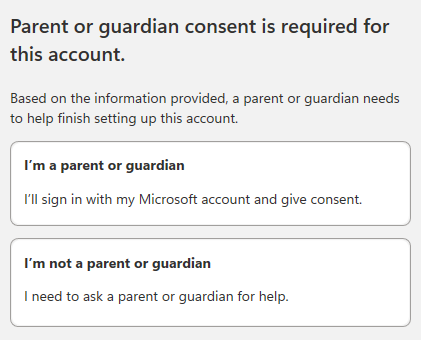
“Parent or guardian consent is required for this account.”
It keeps looping back to the same page, so I can’t go anywhere or finish the setup.
Here’s what’s happening:
I’m not sure what date of birth I originally set on my Microsoft account.
I also don’t know if I’m currently in a Microsoft Family group or not.
I tried following the “Learn more about parental consent” link to the Managing Parental Consent page, but every time I try to sign in, it just redirects me back to the consent page again.
I also tried opening the direct page to change my birth date, but it gives this error:
“This page isn’t working right now – HTTP ERROR 401.”
I’ve already cleared cache/cookies, used incognito mode, and tried different browsers and devices, but nothing helps.
Basically, the parental consent screen appears every single time I try to log in anywhere that requires Microsoft sign-in, so I can’t access any part of my account — not profile settings, not family settings, not even the support or verification pages.
It looks like the Microsoft account or profile servers (account.live.com / family.microsoft.com) might be down or bugged, because the consent system keeps looping without letting me reach any settings page.
Could someone from Microsoft please help me remove this parental consent block or reset my account age so I can log in normally again?
Thank you very much for your help.
Region: Thailand
Moved from: Community Center | Not monitored
' cx='32' cy='32' r='32' /%3E%3Ctext x='50%25' y='55%25' dominant-baseline='middle' text-anchor='middle' fill='%23FFF' %3EWJ%3C/text%3E%3C/svg%3E)

' cx='32' cy='32' r='32' /%3E%3Ctext x='50%25' y='55%25' dominant-baseline='middle' text-anchor='middle' fill='%23FFF' %3EDA%3C/text%3E%3C/svg%3E)
' cx='32' cy='32' r='32' /%3E%3Ctext x='50%25' y='55%25' dominant-baseline='middle' text-anchor='middle' fill='%23FFF' %3ET%3C/text%3E%3C/svg%3E)