
Removing the computer from the domain may help.
Make sure you have local admin credentials.
This browser is no longer supported.
Upgrade to Microsoft Edge to take advantage of the latest features, security updates, and technical support.
' cx='32' cy='32' r='32' /%3E%3Ctext x='50%25' y='55%25' dominant-baseline='middle' text-anchor='middle' fill='%23FFF' %3ET0%3C/text%3E%3C/svg%3E)
I have an issue when I try to do an in-place upgrade from Windows Server 2019 to Windows Server 2022. Installation itself starts, run okay but after restarting, system reverts to older version of Windows and I got the following errors:
0x800F081E-0x2003
The installation failed in the SAFE_OS phase with an error during INSTALL_UPDATES operation
' cx='32' cy='32' r='32' /%3E%3Ctext x='50%25' y='55%25' dominant-baseline='middle' text-anchor='middle' fill='%23FFF' %3EBH%3C/text%3E%3C/svg%3E)
The final answer for me was an updated ISO. I was told by a MSFT person that this was a bug fixed in November update. I got the latest ISO (Feb 2023 at the time) and was able to do in place upgrade on all my remaining servers.
' cx='32' cy='32' r='32' /%3E%3Ctext x='50%25' y='55%25' dominant-baseline='middle' text-anchor='middle' fill='%23FFF' %3ERS%3C/text%3E%3C/svg%3E)
The Feb 2023 ISO will not work if you have applied VMware Tools 12.2.0 first. A Windows Server 2019 running VMware Tools 12.1.5 (and never previously upgraded to VMware Tools 12.2.0) will upgrade using the Feb 2023 ISO. If the Windows Server 2019 guest has been upgraded to the 12.2.0 VMware Tools, you will not be able to upgrade 2019 to 2022 for the time being.
' cx='32' cy='32' r='32' /%3E%3Ctext x='50%25' y='55%25' dominant-baseline='middle' text-anchor='middle' fill='%23FFF' %3ED%3C/text%3E%3C/svg%3E)
Presumably you could uninstall the VMWare tools, do the upgrade then reinstall the tools?
Removing or downgrading the VMware Tools has no effect. I did have success by using the Windows Server 2022 initial ISO released from Microsoft. Others have reported the same but using an ISO from 2021. I have not tested the latter.
Solution: If you have already installed VMware Tools 12.2.0, you must use an older Windows 2022 ISO to perform an upgrade. I can confirm that the initial Windows Server 2022 release ISO works for the upgrade. Others have reported success with year 2021 ISO releases.
' cx='32' cy='32' r='32' /%3E%3Ctext x='50%25' y='55%25' dominant-baseline='middle' text-anchor='middle' fill='%23FFF' %3ECF%3C/text%3E%3C/svg%3E)
Experience date: April 2023, running VMware Tools version 12.1.0, Server 2019 with 23-04 Windows updates.
Using SW_DVD9_Win_Server_STD_CORE_2022_2108.11_64Bit_English_DC_STD_MLF_X23-17134.ISO failed with and without disabled update check.
Using SW_DVD9_Win_Server_STD_CORE_2022_2108.19_64Bit_English_DC_STD_MLF_X23-40586.ISO succeeded but only with disabled update check.
The subsequent check for Windows updates found 23-04 Cumulative and 22-08 Security for 21H2.
I can confirm that the May 2023 version of the Windows Server 2022 ISO works for upgrades regardless of the situations outlined above,
' cx='32' cy='32' r='32' /%3E%3Ctext x='50%25' y='55%25' dominant-baseline='middle' text-anchor='middle' fill='%23FFF' %3EA%3C/text%3E%3C/svg%3E)
Hi Robert Sandri, Can you please post the May 2023 version of the Windows Server 2022 ISO full file name with prefix number part of it? e.g. SW_DVD9_Win_Server_STD_CORE_2022_2108.23_64BitEnglish_DC_STD_MLFX23-50413.ISO
As i am facing the issue with "The installation failed in the SAFE_OS phase" but it does not say : "INSTALL_UPDATES operation" for me but fails with: The installation failed in the SAFE_OS phase
I am trying to upgrade from Windows Server 2016 Standard(Desktop) to Windows Server 2022 (Desktop)
My VM is running on VMware Tools version is on: version:12384 as my ESXi hosts are running on ESXi version 8
' cx='32' cy='32' r='32' /%3E%3Ctext x='50%25' y='55%25' dominant-baseline='middle' text-anchor='middle' fill='%23FFF' %3EMC%3C/text%3E%3C/svg%3E)
I was having the same problem with the Feb 2023 ISO. I happened to check and saw that there is a March 2025 ISO. I used the March 2025 ISO and was able to upgrade successfully without issue.
' cx='32' cy='32' r='32' /%3E%3Ctext x='50%25' y='55%25' dominant-baseline='middle' text-anchor='middle' fill='%23FFF' %3EV%3C/text%3E%3C/svg%3E)
Removing the computer from the domain may help.
Make sure you have local admin credentials.
' cx='32' cy='32' r='32' /%3E%3Ctext x='50%25' y='55%25' dominant-baseline='middle' text-anchor='middle' fill='%23FFF' %3EAG%3C/text%3E%3C/svg%3E)
I have been running into the same thing with most of my Windows Servers I have tried to upgrade. I tried just about everything else everyone mentioned. I finally tried using the original ISO form Microsoft and not the latest updated one they have. Seems to be working fine now for in place upgrade. Just have to do more windows updates afterwards.
SW_DVD9_Win_Server_STD_CORE_2022__64Bit_English_DC_STD_MLF_X22-74290.ISO
' cx='32' cy='32' r='32' /%3E%3Ctext x='50%25' y='55%25' dominant-baseline='middle' text-anchor='middle' fill='%23FFF' %3EUI%3C/text%3E%3C/svg%3E)
Hello,
I can also confirm that SW_DVD9_Win_Server_STD_CORE_2022__64Bit_English_DC_STD_MLF_X22-74290.ISO works.
I was using the updated one for weeks now but didn't have any success, tried the older ISO and works perfectly.
Even though not perfect as i still need to perform some updates, it helps me to perform in place upgrades where possible than a complete system rebuild.
Thanks for the suggestion.
' cx='32' cy='32' r='32' /%3E%3Ctext x='50%25' y='55%25' dominant-baseline='middle' text-anchor='middle' fill='%23FFF' %3EJN%3C/text%3E%3C/svg%3E)
I just tried with 74290 and it still failed for me :(
Wonder what is different about our situations.
' cx='32' cy='32' r='32' /%3E%3Ctext x='50%25' y='55%25' dominant-baseline='middle' text-anchor='middle' fill='%23FFF' %3ECA%3C/text%3E%3C/svg%3E)
For me, the trick was disabling the Hyper-V virtual adapter with Device Manager inside of the VM and then doing the upgrade with this ISO. Otherwise, it would always fail at the SAFE_OS issue. I've completed in-place upgrades on multiple VMs in the last couple of days this way that failed with everything else I'd tried.
I am on VMware, but tried with the older iso mentioned and with the NIC disabled in ncpa.cpl . I just confirmed that disables the device in devmgmt.msc also so sadly that doesn't look to be it for me. Going to try another NIC type maybe
That did it!
adjusted the VM from e1000 NIC to VMXnet 3.
Disabled during install, the upgrade completed.
' cx='32' cy='32' r='32' /%3E%3Ctext x='50%25' y='55%25' dominant-baseline='middle' text-anchor='middle' fill='%23FFF' %3EJK%3C/text%3E%3C/svg%3E)
Yes, when I disabled it our NIC was already set to VMXnet3. Glad that worked for you!
' cx='32' cy='32' r='32' /%3E%3Ctext x='50%25' y='55%25' dominant-baseline='middle' text-anchor='middle' fill='%23FFF' %3EKL%3C/text%3E%3C/svg%3E)
That did the trick for me aswell! Just spend the last 4 hours trying with the newest ISO from MS, and uninstalled AV, debugged logfiles, ran SFC, etc.
But switching to the old ISO worked - thanks for sharing!

You should really upvote the ANSWER itself if it helped you! That helps even more people
Where are you getting the original 74290.iso from?
I only get offered that latest July and August release.
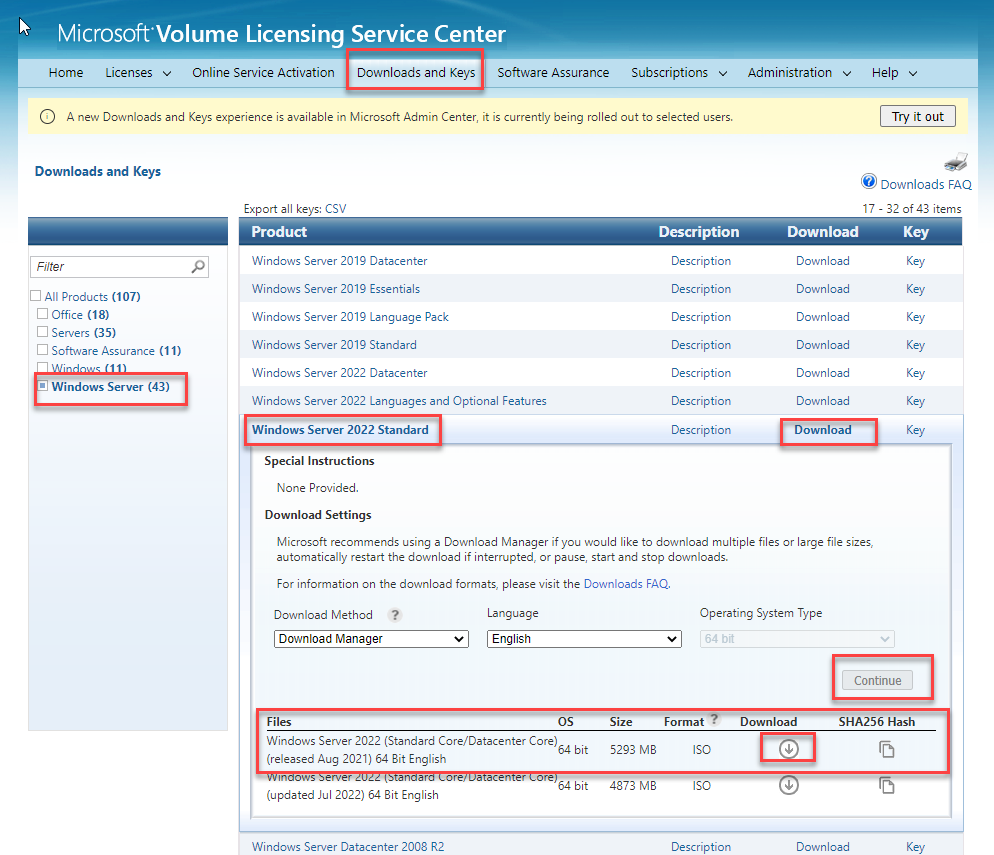
Microsoft Volume Licensing Service Center
Once you are logged in you can go to the Downloads and Keys tab and drill down to Server 2022 Standard (Or whatever version you are trying to get), choose download, continue, and then it will give you the original ISO or the updated one.
Thanks,
I had been reading it and ignoring the Aug release as I had read it thinking they were both this years 2022 release. Downloading the Aug 21 74290.iso now
' cx='32' cy='32' r='32' /%3E%3Ctext x='50%25' y='55%25' dominant-baseline='middle' text-anchor='middle' fill='%23FFF' %3EEK%3C/text%3E%3C/svg%3E)
' cx='32' cy='32' r='32' /%3E%3Ctext x='50%25' y='55%25' dominant-baseline='middle' text-anchor='middle' fill='%23FFF' %3ESA%3C/text%3E%3C/svg%3E)
This is what worked for me!
What i tried before downloading this ISO:
Nothing helped except the ISO from Aug. 2021
' cx='32' cy='32' r='32' /%3E%3Ctext x='50%25' y='55%25' dominant-baseline='middle' text-anchor='middle' fill='%23FFF' %3EHM%3C/text%3E%3C/svg%3E)
Using August 2021 ISO for the Retail Verison worked for me, tried with a newer ISO such as November 2022 at first got me lot of issues. For reference the ISO i used name is:
en-us_windows_server_2022_x64_dvd_620d7eac.iso
' cx='32' cy='32' r='32' /%3E%3Ctext x='50%25' y='55%25' dominant-baseline='middle' text-anchor='middle' fill='%23FFF' %3EMS%3C/text%3E%3C/svg%3E)
On Hosts running VMServer and ShadowProtect (backup solution)
Increasing the number of processors to 2, and turning off Shadow Protect has worked reliably
Once the upgrade is finished I turn Shadow Protect back on (deleting the chain first)
I also was stupidly running the upgrade from a virtual disk mounted within the machine, switched to using the file attached to the virtual drive
Currently I'm failing on HyperV but I'll see how it goes disabling the HyperV virtual adapter, in the end, I succeeded without doing this
Free Space required 20gb
2 Processors
Deleted an old version of Microsoft Endpoint
For HyperV, client I think has to be Gen2
I failed several times on the most recent Server2022 Iso, but just had success with the August 2021 iso
' cx='32' cy='32' r='32' /%3E%3Ctext x='50%25' y='55%25' dominant-baseline='middle' text-anchor='middle' fill='%23FFF' %3ER%3C/text%3E%3C/svg%3E)
after spending days and a lot of try and error, in our Environment (VMware) the following method was finally successful
Our VMs are all equiped with VMware Paravirtual Controller and vmnext3 Network Controller.
Holy smokes. An actual VMware KB article! Nice one. Will try this soon(ish) :)
Thanks for letting us know!
Using ISO from Aug. 2021 was the solution for me.
' cx='32' cy='32' r='32' /%3E%3Ctext x='50%25' y='55%25' dominant-baseline='middle' text-anchor='middle' fill='%23FFF' %3ESU%3C/text%3E%3C/svg%3E)
can you please provide a link to where that can be obtained?