Task Name Unavailable in MS Project Import Wizard Mapping Options

Anonymous
2025-01-03T18:28:59+00:00

Hello,

I have an existing MS Project mpp file.

I have an Excel Spreadsheet with task durations that I want to import into the existing mpp file.

I have both the Task Name and Work field names in the Excel file matching those (native) defaults in the mpp file.

When I try to use the MS Project Import Wizard, I select New Map and then "Merge the data into the active project" since I want to keep everything in the mpp file as is except for updating the Work fields.

I then select Tasks as the type of data for import and specify the import includes headers.

In the Import Wizard Task Mapping dialog I then select the desired worksheet.

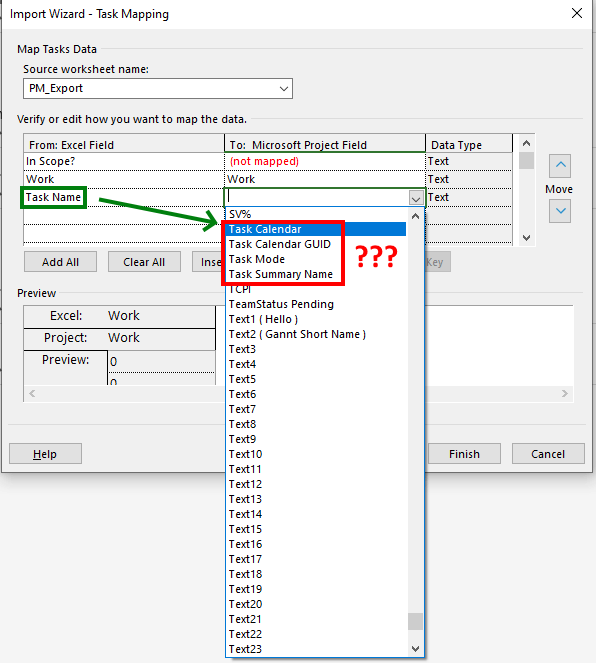
Everything in the "From: Excel Field" shows up correctly.

When I scroll down, I can see that the wizard correctly mapped "Work" in the Excel file to "Work" in the mpp.

However, it does not map the Excel "Task Name" to anything.

This should be mapped to "Task Name" in the mpp.

When I try to manually select "Task Name" in the "To: Microsoft Project Field" the option for "Task Name" is not present.

So, I cannot map the Task Name and hence can't Set Merge Key to Task Name.

What am I doing wrong here?
Thank you in advance!

Chris

Microsoft 365 and Office | Project | For business | Windows

Locked Question. This question was migrated from the Microsoft Support Community. You can vote on whether it's helpful, but you can't add comments or replies or follow the question.

0 comments No comments
Answer accepted by question author
John Project 49,720 Reputation points Volunteer Moderator
2025-01-03T18:46:20+00:00

Chris Minerva,

What you are doing wrong is looking for a field called Task Name. The field you want is simply "Name", the "task" is assumed by Project since you are mapping into a task based view.

I'll caution you on something though. In Project all time related data is in minutes, so you will need to express duration and work as minutes in Excel in order for Project to accept your Excel data as intended.

Hope this helps.

John

Was this answer helpful?

1 person found this answer helpful.
0 comments No comments

6 additional answers

Sort by: Newest
  1. Anonymous
    2025-01-08T05:11:27+00:00

    Chris,

    a field/column has a name (always) and a title (maybe). You can see the title, if there is one, by right clicking on the table header and see field settings.

    If you edit the entry table, by going to tables, more tables, select the entry table and click the edit button you will see that the (by default) name is "Name" and the title is "Task Name". The title is only effective in the particular table. If the field is inserted into any other table then the name is displayed.

    Was this answer helpful?

    0 comments No comments
  2. Anonymous
    2025-01-03T23:38:10+00:00

    Hi John,

    Thank you. Redirecting to the "Name" field instead worked. I'm a bit confused in that there IS a native field called "Task Name" but it doesn't let me map to it. "Task Name" and "Name" appear to be clones of one another in that if I change Task Name then Name automatically updates to match.

    I am not having the minutes to hours translation issue. I think so long as you have Project Options -> Schedule -> "Work is entered in:" set to match the Excel units then it will work correctly.

    Thanks again,

    Chris

    Was this answer helpful?

    0 comments No comments