Outlook | Windows | Classic Outlook for Windows | For business
Using classic Outlook for Windows in business environments

This browser is no longer supported.
Upgrade to Microsoft Edge to take advantage of the latest features, security updates, and technical support.
' cx='32' cy='32' r='32' /%3E%3Ctext x='50%25' y='55%25' dominant-baseline='middle' text-anchor='middle' fill='%23FFF' %3EML%3C/text%3E%3C/svg%3E)
Hi everyone
How can I restore deleted meetings in outlook?
Thanks
Using classic Outlook for Windows in business environments
An API that connects multiple Microsoft services, enabling data access and automation across platforms

' cx='32' cy='32' r='32' /%3E%3Ctext x='50%25' y='55%25' dominant-baseline='middle' text-anchor='middle' fill='%23FFF' %3EJL%3C/text%3E%3C/svg%3E)
Hi @michael lustig ,
How did you delete these meetings(Delete or Permanently delete)?
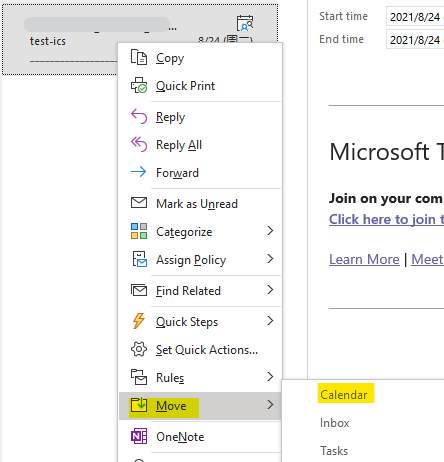
If you delete the meeting via Delete option only, these items would be moved to Deleted item folder and we could move them back to restore it like below(right-click the item>move>calendar):
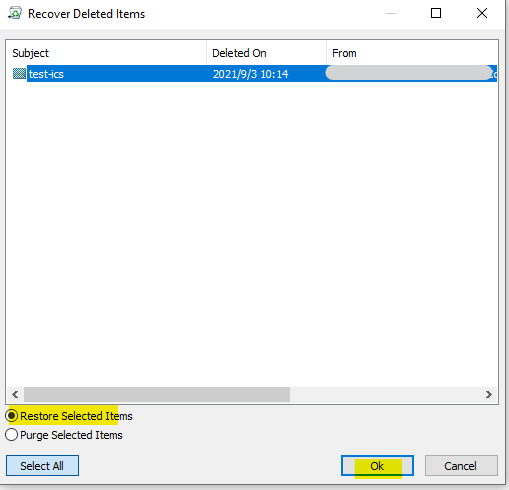
If you have performed a Permanently delete and you are working with exchange account, we could first Recover items recently removed from this folder like below, then continue to move them to calendar as I mentioned above

Hope that would be helpful to you.
If the response is helpful, please click "Accept Answer" and upvote it.
Note: Please follow the steps in our documentation to enable e-mail notifications if you want to receive the related email notification for this thread.
i forget to say.. the meetings was delete in shared mailbox.
i tried your suggestion but i don't find the deleted items.
Hi @michael lustig ,
Thanks for your update.
According to my tests, the deleted meeting from the calendar in shared mailbox is in your own Deleted item folder instead of in shared mailbox, and you could move it from there. please kindly check it, if you still need further assistance, please feel free to post back.
' cx='32' cy='32' r='32' /%3E%3Ctext x='50%25' y='55%25' dominant-baseline='middle' text-anchor='middle' fill='%23FFF' %3ENX%3C/text%3E%3C/svg%3E)
I found a way to replicate a deleted Teams meeting, preserving the Teams meeting ID (so that participants can join using the same URL/Meeting ID+Password. Step by step: