Dear Marianne Tobin,
Good day! Thank you for posting to Microsoft Community. We are happy to help you.
As per your description, please let us cooperate and please don’t worry, we can work together to narrow down and resolve the situation.
Based on my test result (I just tested from my side) and it seems I cannot meet the same behavior as like you described above.
Here are some settings/options, please refer and check:
1.Since you confirmed you have installed Office 365 subscription on your Mac OS. please try go to PowerPoint Menu>Preferences>General> check if the PowerPoint Designer there and is set on.
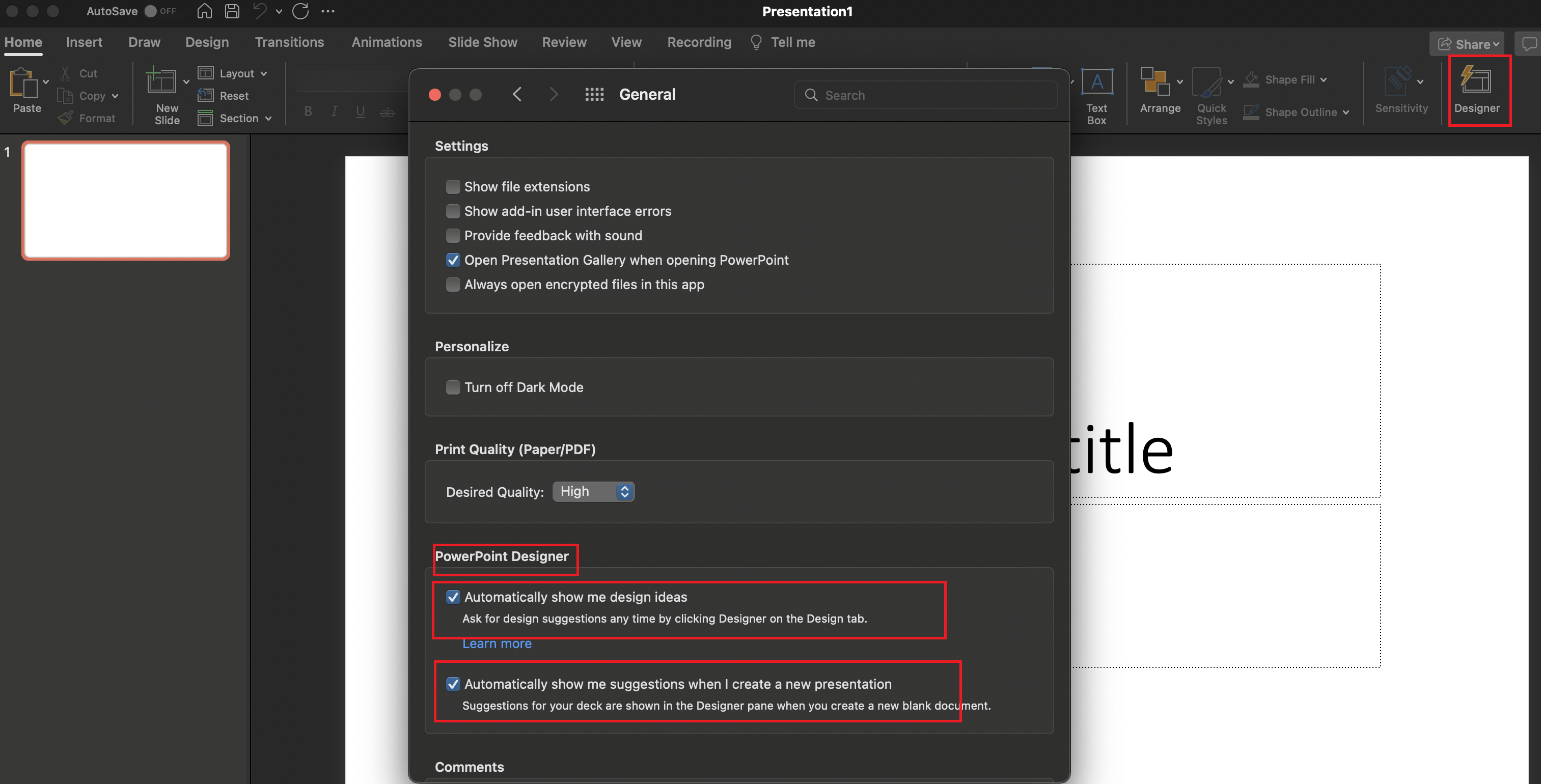
- Also, you must also go to PowerPoint > Preferences > Privacy and be sure the box is checked to enable optional connected experiences.
3.Also, Sometimes the first time start PowerPoint after installing Office 365, the Design Ideas button isn't available. Restarting the app fixes the problem.
4.Have you ever installed any add-ins for PowerPoint? If so, please disable them then check if there is any difference.
5.Go to Ribbon & Toolbar options and if the Design Ideas listed as part of the Design Tab, then try to add a new category to the Home Tab and Hit "+" to add the Design Ideas to that list to check if you access to that tool again.
If above all the setting are correct and the problem is still persist, then I suspect the component is corrupted somehow, in this scenario, you can go to the Applications folder In Finder and drag Microsoft PowerPoint .app to the trash. Then Restart your Mac Download this Install package Install package PowerPoint and use it to reinstall Microsoft PowerPoint (the version 16.67). Then, restart your Mac and test.
If above suggestion does not work, to narrow down your issue, please tell us more information below to let us help you:
1. The version of Mac OS and Office
Find out which macOS your Mac is using
About Office: What version of Office am I using?
2.Can you recall when this behavior starts e.g., after Office update or Mac OS.
Your understanding and patience will be highly appreciated. I hope that you are keeping safe and well!
Sincerely,
Waqas Muhammad
' cx='32' cy='32' r='32' /%3E%3Ctext x='50%25' y='55%25' dominant-baseline='middle' text-anchor='middle' fill='%23FFF' %3EA%3C/text%3E%3C/svg%3E)
