Developer technologies | Visual Basic for Applications
An implementation of Visual Basic that is built into Microsoft products.
This browser is no longer supported.
Upgrade to Microsoft Edge to take advantage of the latest features, security updates, and technical support.
' cx='32' cy='32' r='32' /%3E%3Ctext x='50%25' y='55%25' dominant-baseline='middle' text-anchor='middle' fill='%23FFF' %3ELK%3C/text%3E%3C/svg%3E)
Hello,
I sometimes use the Filter function to filter a 1-dimensional array.
The syntax is:
Filter(sourcearray, match, [ include, [ compare ]])
The "match" argument is used to search the string we want.
It seems that we can only search ONE string, say "cat".
Is it possible to search more than one string, say "cat" and "dog"?
How can this be done? In Excel, we can use filters to do this. I wonder if we can do this in VBA.
I tried using a variable to represent "match", like this:
ElseIf opt_1 = True Then
Dim var As String
var = "cat"
vArray2 = Filter(vArray1, var, True, vbTextCompare)
It works fine!
But how can I add "dog" to var? (so that the filtered rows contain either "cat" or "dog")
Thanks
Leon
An implementation of Visual Basic that is built into Microsoft products.
Locked Question. You can vote on whether it's helpful, but you can't add comments or replies or follow the question.

Here I may have an answer for u finally sorry I just seen this page for some reasons my emails I may have mixed up but here’s my best answer the VBA ? The standard Function VBA does not support multiple criteria directly. It is designed to filter an array based on one condition to filter with multiple conditions you would need to apply the filter multiple times and combine the results or loop through your way to check each element against those criteria individually.

Try something like this:
Dim array1 As Variant
array1 = Array("... cats ...", " ...Dogs ...", " ...Cats and dogs ...", "another text")

Dim array2 As Variant
array2 = Array()
Dim t
For Each t In array1
    If InStr(1, t, "cats", vbTextCompare) > 0 Or InStr(1, t, "dogs", vbTextCompare) > 0 Then
        ReDim Preserve array2(UBound(array2) + 1)
        array2(UBound(array2)) = t
    End If
Next
It is also possible to exclude words like "ducats" or "hotdogs".
Hello, Sagar Singh
Thanks for your reply.
Your code seems to make sense.
However, when I incorporate it in my program, and run it, there is an error here:
- array2(UBound(array2)) = t
The tooltip reads "UBound(array2)) = -1
So, it seems that array2 is not being populated by the filtered data.
Maybe one or two lines of code are missing. What?
Thanks
Leon
Maybe you did not incorporate it correctly. Initially UBound(array2) is -1. After the shown ReDim it becomes 0, 1, 2, etc. Show some details.
Hi Sagar
I spent a lot of time trying to figure out what went wrong.
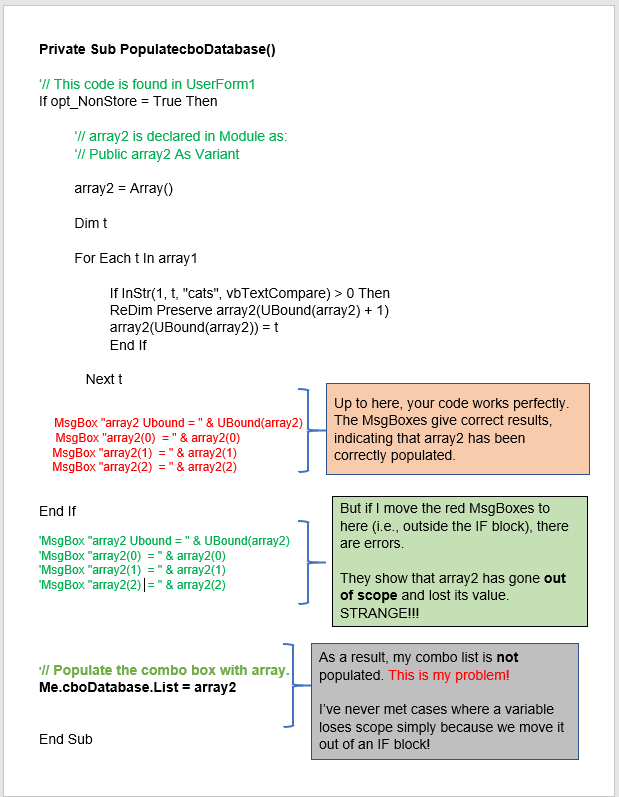
In fact your code is perfect. Array2 is correctly populated.
But I met a curious problem.
See the attached word file which explains everything.
Hope you can help.
Thanks
Leon
Added:
I just moved my last line of code inside the IF block, and it works correctly.
But it still puzzles me why array2 goes out of scope
Hi Sagar
Thanks a lot for all your help.
I feared that so many loopings would slow my program.
Buy looping through half a million rows took less than 2 seconds!
And it's very unlikely that I will ever use more than 20,000 rows.
You have been able to filter by more than one value.
The VBA FILTER function cannot do this!
Best Regards
Leon
This answer has been deleted due to a violation of our Code of Conduct. The answer was manually reported or identified through automated detection before action was taken. Please refer to our Code of Conduct for more information.
Comments have been turned off. Learn more