Microsoft Teams | Microsoft Teams for business | Other
Additional features, settings, or issues not covered by specific Microsoft Teams categories

This browser is no longer supported.
Upgrade to Microsoft Edge to take advantage of the latest features, security updates, and technical support.
' cx='32' cy='32' r='32' /%3E%3Ctext x='50%25' y='55%25' dominant-baseline='middle' text-anchor='middle' fill='%23FFF' %3EA%3C/text%3E%3C/svg%3E)
Hello,
I have created a TEAMS team whose members are external to my company. I want to limit their rights so that they cannot delete folders and files that I add. How can I restrict their rights to read and modify only?
Additional features, settings, or issues not covered by specific Microsoft Teams categories
' cx='32' cy='32' r='32' /%3E%3Ctext x='50%25' y='55%25' dominant-baseline='middle' text-anchor='middle' fill='%23FFF' %3ESV%3C/text%3E%3C/svg%3E)
How to restrict members using teams access through their personal devices
' cx='32' cy='32' r='32' /%3E%3Ctext x='50%25' y='55%25' dominant-baseline='middle' text-anchor='middle' fill='%23FFF' %3EJM%3C/text%3E%3C/svg%3E)
Hi @Anonymous
You could try to follow these steps to restrict these users file permissions for Teams members:
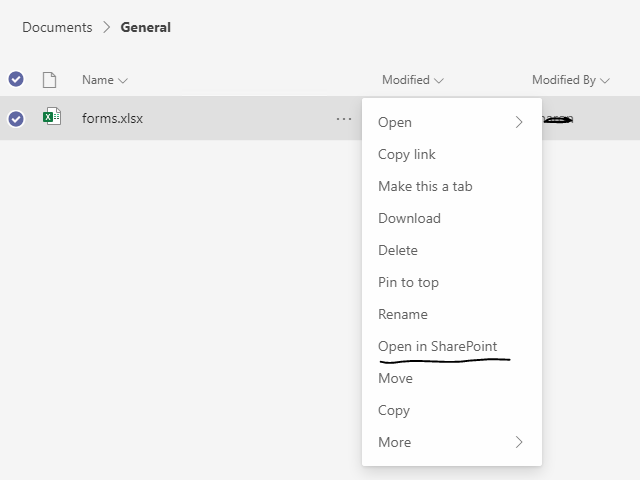
1) Open your Teams app. Go to Teams > Select a specific team and channel > Click Files tab > Click the specific files > Open in SharePoint
2)In the Manage Access pane, click the members and set the permission to only read mode.
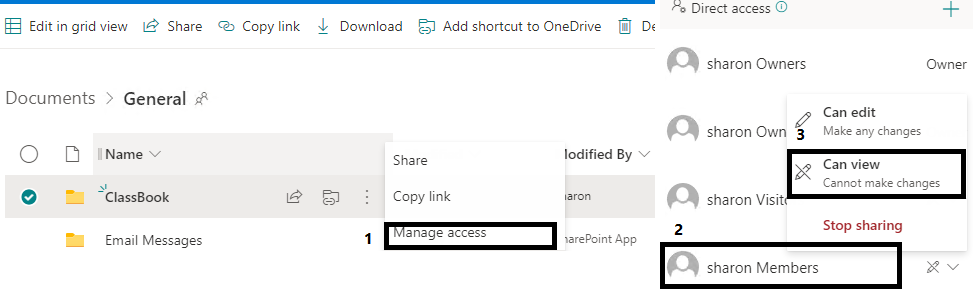
3)Now Teams members cannot remove your Teams files.
If the response is helpful, please click "Accept Answer" and upvote it.
Note: Please follow the steps in our documentation to enable e-mail notifications if you want to receive the related email notification for this thread.
Thank you for your detailed answer, it's great it works very well !