' cx='32' cy='32' r='32' /%3E%3Ctext x='50%25' y='55%25' dominant-baseline='middle' text-anchor='middle' fill='%23FFF' %3EJF%3C/text%3E%3C/svg%3E)


' cx='32' cy='32' r='32' /%3E%3Ctext x='50%25' y='55%25' dominant-baseline='middle' text-anchor='middle' fill='%23FFF' %3EFG%3C/text%3E%3C/svg%3E)


' cx='32' cy='32' r='32' /%3E%3Ctext x='50%25' y='55%25' dominant-baseline='middle' text-anchor='middle' fill='%23FFF' %3EPF%3C/text%3E%3C/svg%3E)
' cx='32' cy='32' r='32' /%3E%3Ctext x='50%25' y='55%25' dominant-baseline='middle' text-anchor='middle' fill='%23FFF' %3EM%3C/text%3E%3C/svg%3E)
' cx='32' cy='32' r='32' /%3E%3Ctext x='50%25' y='55%25' dominant-baseline='middle' text-anchor='middle' fill='%23FFF' %3EZS%3C/text%3E%3C/svg%3E)
' cx='32' cy='32' r='32' /%3E%3Ctext x='50%25' y='55%25' dominant-baseline='middle' text-anchor='middle' fill='%23FFF' %3EI%3C/text%3E%3C/svg%3E)

Hi All,
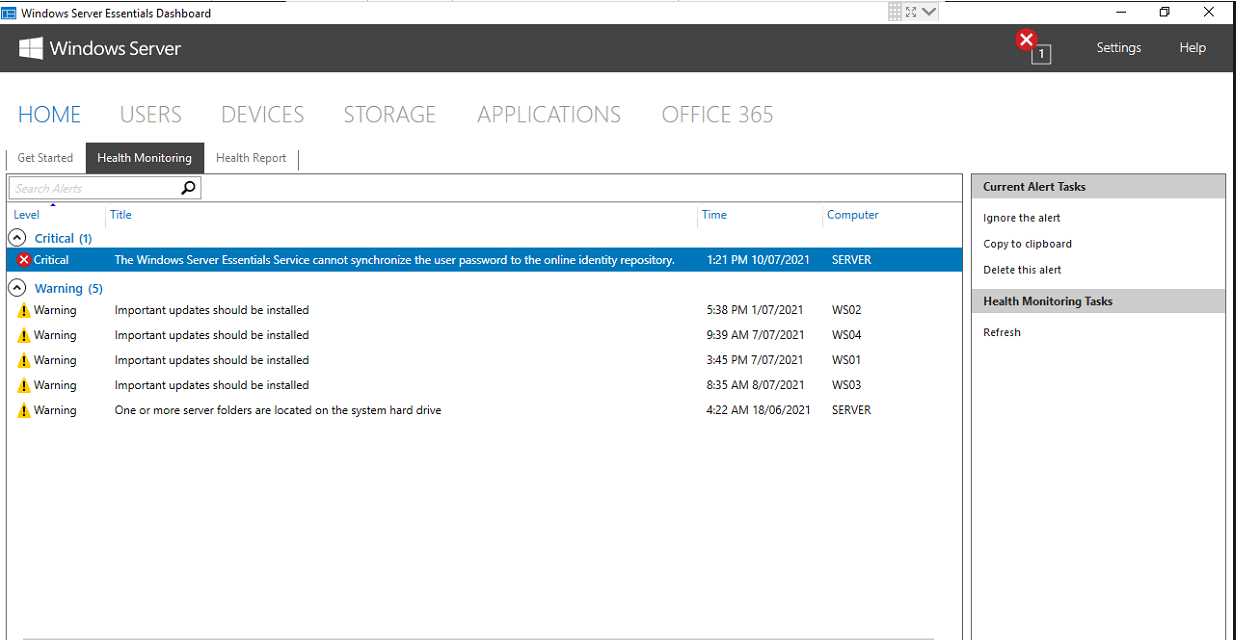
I have been watching this thread for sometime now and ended up also deciding to log support cases with Microsoft across three different customers we support, who are also facing the same issues. My cases are with the Partner support team at the moment trying to get them re-routed has been very difficult and even referencing this thread has still made it challenging to get the support engineers to agree its a Graph API issue not an on-premise server issue. In the last day I think I have made some progress with them however for those watching this thread; I just wanted to provide some further details on my findings.
The log file for the Essentials dashboard consistently records the error on each effected customers server the same. After a password reset is performed via the Dashboard; the following exception is logged. This supports the findings so far in this thread that the Graph API endpoint is broken. The 404 error is clear that the process is trying to hit a non-existent endpoint.
Log File Path: C:\ProgramData\Microsoft\Windows Server\Logs\Dashboard.log
[15504] 210914.233059.5603: O365Manager: TResult : Boolean, args : Microsoft.WindowsServerSolutions.Common.ProviderFramework.OperationInvokeEventArgs1[System.Boolean] [15504] 210914.233059.5603: O365Manager: actualArgs : Microsoft.WindowsServerSolutions.Common.ProviderFramework.OperationInvokeEventArgs1[System.Boolean]
[15504] 210914.233059.5743: OIMUtils: GetO365ConfigurationErrorMessage for Unexpected
[15504] 210914.233059.6323: OIMUserExtension2: Error occurred in [BeginChangePassword], Title : An unknown error occurred, Content: Make sure that the computer is connected to the Internet, and then try again.
If you continue to experience this problem, restart the server and then try again.
[4968] 210914.233059.6363: O365ResetPasswordDialogAddin: Failed to reset password : Microsoft.WindowsServerSolutions.Common.UserExtensionException: Failed to call Graph service with status code 404 and error: {"error":{"code":"ResourceNotFound","message":"Invalid version: v2","innerError":{"date":"2021-09-14T13:30:59","request-id":"cffb90cf-20af-40ac-91c8-49012f755eee","client-request-id":"cffb90cf-20af-40ac-91c8-49012f755eee"}}} ---> Microsoft.WindowsServerSolutions.O365Integration.O365ConfigureException: Failed to call Graph service with status code 404 and error: {"error":{"code":"ResourceNotFound","message":"Invalid version: v2","innerError":{"date":"2021-09-14T13:30:59","request-id":"cffb90cf-20af-40ac-91c8-49012f755eee","client-request-id":"cffb90cf-20af-40ac-91c8-49012f755eee"}}}
at Microsoft.WindowsServerSolutions.O365Integration.GraphAdapter.DefaultHandleGraphServiceError(Int32 statusCode, GraphServiceError error, Int32 retryTimes, Action2 errorHandler) at Microsoft.WindowsServerSolutions.O365Integration.GraphAdapter.<>c__DisplayClass60_11.<InvokeWebServiceWithRetry>b__1(Int32 statusCode, GraphServiceError error)
at Microsoft.WindowsServerSolutions.O365Integration.GraphAdapter.HandleGraphServiceException[TResult](Func1 func, Func3 errorHandler)
at Microsoft.WindowsServerSolutions.O365Integration.GraphAdapter.InvokeWebServiceWithRetry[TResponse](Func2 func, Action2 errorHandler)
at Microsoft.WindowsServerSolutions.O365Integration.O365ManagementCore.ChangePassword(String localUserName, String password)
at Microsoft.WindowsServerSolutions.O365Integration.O365ManagementProvider.<>c__DisplayClass30_0.<ChangePassword>b__0()
at Microsoft.WindowsServerSolutions.Common.ProviderFramework.ProviderBase1.InvokeOperation[TResult](String operationName, Func1 func)
--- End of inner exception stack trace ---
at Microsoft.WindowsServerSolutions.O365Integration.OIMUserExtension2.SyncCallWarpper(Action`2 action)
at Microsoft.WindowsServerSolutions.O365Integration.DashboardTabs.ResetPasswordDialogAdorner.<>c__DisplayClass2_0.<CreatePreExecutionTasks>b__0()
[23348] 210914.233100.7943: FormContentExtension: no tasks found.
[28032] 210914.233222.2273: TestOnlu: O365TabPageCtrlb1d8aaa7-0be9-43d1-a36e-4789f98ea013
Do others in this thread see this kind of error reported in their logs as well?
' cx='32' cy='32' r='32' /%3E%3Ctext x='50%25' y='55%25' dominant-baseline='middle' text-anchor='middle' fill='%23FFF' %3EPC%3C/text%3E%3C/svg%3E)
' cx='32' cy='32' r='32' /%3E%3Ctext x='50%25' y='55%25' dominant-baseline='middle' text-anchor='middle' fill='%23FFF' %3ELH%3C/text%3E%3C/svg%3E)
' cx='32' cy='32' r='32' /%3E%3Ctext x='50%25' y='55%25' dominant-baseline='middle' text-anchor='middle' fill='%23FFF' %3EM%3C/text%3E%3C/svg%3E)
' cx='32' cy='32' r='32' /%3E%3Ctext x='50%25' y='55%25' dominant-baseline='middle' text-anchor='middle' fill='%23FFF' %3ERJ%3C/text%3E%3C/svg%3E)
' cx='32' cy='32' r='32' /%3E%3Ctext x='50%25' y='55%25' dominant-baseline='middle' text-anchor='middle' fill='%23FFF' %3ERB%3C/text%3E%3C/svg%3E)
' cx='32' cy='32' r='32' /%3E%3Ctext x='50%25' y='55%25' dominant-baseline='middle' text-anchor='middle' fill='%23FFF' %3EB7%3C/text%3E%3C/svg%3E)