Microsoft Security | Microsoft Entra | Microsoft Entra ID
A cloud-based identity and access management service for securing user authentication and resource access

This browser is no longer supported.
Upgrade to Microsoft Edge to take advantage of the latest features, security updates, and technical support.
' cx='32' cy='32' r='32' /%3E%3Ctext x='50%25' y='55%25' dominant-baseline='middle' text-anchor='middle' fill='%23FFF' %3EHN%3C/text%3E%3C/svg%3E)
How do we increase timeout settings in a Network policy for MFA users? We use MFA aithentication for our Meraki client VPN. however users often run into issues were authentication times out because their response was not fast enough.
A cloud-based identity and access management service for securing user authentication and resource access
' cx='32' cy='32' r='32' /%3E%3Ctext x='50%25' y='55%25' dominant-baseline='middle' text-anchor='middle' fill='%23FFF' %3EAK%3C/text%3E%3C/svg%3E)
Hi, if the posted answer resolves your question, please mark it as the answer by clicking the check mark. Doing so helps others find answers to their questions.
What is the default timeout threshold? I wonder if it should be changed on the Meraki appliance.
Thanks but we want to change it for 1 network policy only. We do not want it to affect other policies.

Hi @Henry Niekoop · Thank you for reaching out.
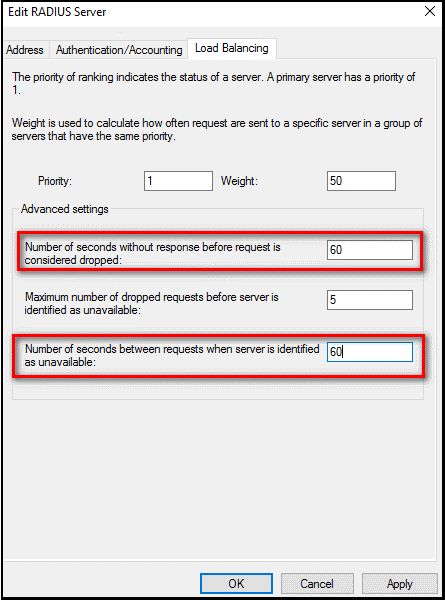
In order to increase timeout settings MFA on NPS server, you need to go to:
Server Manager > Tools > Network Policy Server > In the NPS (Local) console, expand RADIUS Clients and Servers, and select Remote RADIUS Server > In the middle pane, go to SERVER GROUP Properties > Edit > Under the Load Balancing tab, configure below settings:
-----------------------------------------------------------------------------------------------------------
Please "Accept the answer" if the information helped you. This will help us and others in the community as well.