How to remove this outline around UI elements in Windows 11?

Anonymous
2023-03-29T12:49:39+00:00

Hello.

I have exactly the same problem as the user from this thread. How to remove this outline around UI elements in Windows 11?

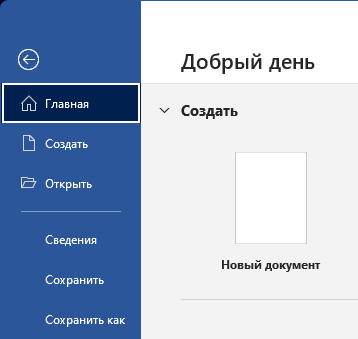
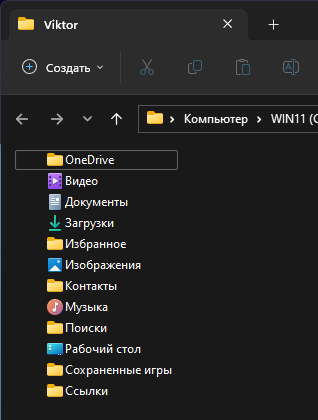
A white border appears around the interface elements, as if I pressed the TAB button. But I don’t press it, the frame is present immediately after opening the application or interface element. If you click on another interface element, the frame disappears.
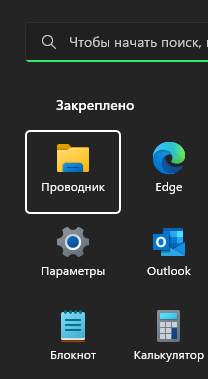
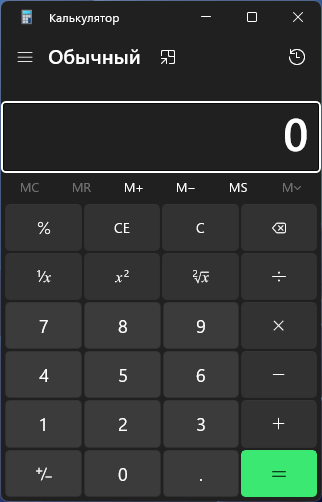
The problem was observed immediately after buying a laptop with Windows 11 installed. I also updated the system and reinstalled on a blank disk. But the problem doesn't go away.

I did all the recommendations that the Moderator wrote in that thread, but it did not help.

What is the problem? This white border is annoying and ruins the user experience.

Windows for home | Windows 11 | Display and graphics

Locked Question. This question was migrated from the Microsoft Support Community. You can vote on whether it's helpful, but you can't add comments or replies or follow the question.

0 comments No comments

12 answers

Sort by: Oldest
  1. Anonymous
    2023-03-29T14:04:55+00:00

    I enabled the option, rebooted the laptop, then turning off the option, rebooted again, but it did not help. The frame still appears.

    At the same time, if you enable the option in one place (Control Panel), then it is enabled in another (Settings App). The same goes for turning off the option.

    Was this answer helpful?

    0 comments No comments
  2. DaveM121 937.5K Reputation points Independent Advisor
    2023-03-29T14:07:29+00:00

    Hi Viktor,

    Bring up the on-screen keyboard, does that indicate any key on your keyboard is pressed, even though you are not pressing a key?

    Was this answer helpful?

    0 comments No comments
  3. Anonymous
    2023-03-29T14:24:51+00:00

    No, the keys are fine. The on-screen keyboard does not show that something is pressed. Also, in the work there are no problems that something would be arbitrarily pressed.

    The white frame does not appear after a while or randomly. The application or UI element already opens with this border. This doesn't seem to be a keyboard issue. In addition, Ubuntu has installed on another SSD, and there are no similar problems at all.

    Was this answer helpful?

    3 people found this answer helpful.
    0 comments No comments
  4. DaveM121 937.5K Reputation points Independent Advisor
    2023-03-29T14:27:59+00:00

    Hi Viktor,

    If none of these options solved this, I think this is a new bug, because those are the only possible causes, I have seen some other people asking the same question for the last couple of days, please report this on the Feedback Hub (Windows Key + F) so the developers can investigate this bug.

    Was this answer helpful?

    1 person found this answer helpful.
    0 comments No comments
  5. Anonymous
    2023-03-29T14:38:19+00:00

    I've had this "bug" for half a year. I don't think this is anything new.

    Was this answer helpful?

    8 people found this answer helpful.
    0 comments No comments