Hi there.
I've recently updated my computer from Windows 10 to Windows 11. Like with many people who have done the same, I'm getting an error when attempting to fix the "Core isolation" errors in the Device Security / Windows Security Dashboard.
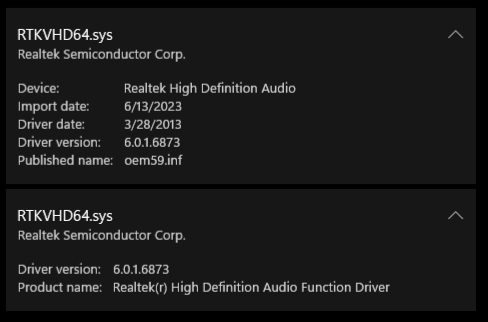
Specifically, I'm having an issue with enabling Memory integrity, due to having some incompatible drivers. They appear to be Realtek High Definition Audio drivers.
Text:
RTKVHD64.sys
Realtek Semiconductor Corp.
Device: Realtek High Definition Audio
Import date: 6/13/2023
Driver date: 3/28/2013
Driver version: 6.0.1.6873
Published name: oem59.inf
RTKVHD64.sys
Realtek Semiconductor Corp.
Driver version: 6.0.1.6873
Product name: Realtek(r) High Definition Audio Function Driver
I've gone to the Realtek website and attempted to download a few files - They just haven't fixed the errors I'm seeing. I've also updated all of my drivers in Device Manager (Enabled hidden drives as well).
A lot of the solutions to other driver errors was to just uninstall them. With that being said, I'm nervous to just randomly uninstall my audio drivers. I would like some confirmation that uninstalling them wouldn't negatively effect my computer, or if there'd be some way to fix it if it did. There was a lot of the disclaimers in these solutions that stated that uninstalling the drivers COULD negatively effect your computer, which is why I'm asking for advice.
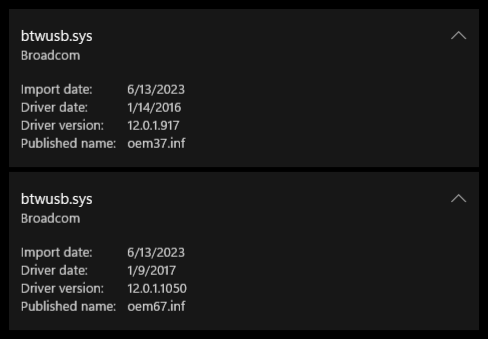
I'm having the same issue with some "Broadcom" drivers, though I have no clue what those are / what they do.
Text:
btwusb.sys
Broadcom
Import date: 6/13/2023
Driver date: 1/14/2016
Driver version: 12.0.1.917
Published name: oem37.inf
btwusb.sys
Broadcom
Import date: 6/13/2023
Driver date: 1/9/2017
Driver version: 12.0.1.1050
Published name: oem67.inf
' cx='32' cy='32' r='32' /%3E%3Ctext x='50%25' y='55%25' dominant-baseline='middle' text-anchor='middle' fill='%23FFF' %3EA%3C/text%3E%3C/svg%3E)
