Cannot install new system voice packages.

Anonymous
2023-07-17T15:28:01+00:00

I am unable to install new voice packages on my system. I have reviewed some similar questions to this, such as this one. But I have not been able to find any recent information on this issue.

There are two related places of concern:

Settings > Time & language > Speech

Under Manage Voices, the Add voices option does not work. Specifically, when I select a new voice there from the list, a message displays instructing me to reopen Settings for the changes to take effect, however nothing actually changes, and no package is installed.

Settings > Time & language > Language & region

Next, I tried adding languages here via the Add a language button. This time, language downloads began, but failed mid-way.

Following this, returning to Settings > Time & language > Speech now displays entries for the languages that failed to install on the Language & region screen, however they show a size of 0 MB and I am unable to remove them, and their voices are not available:
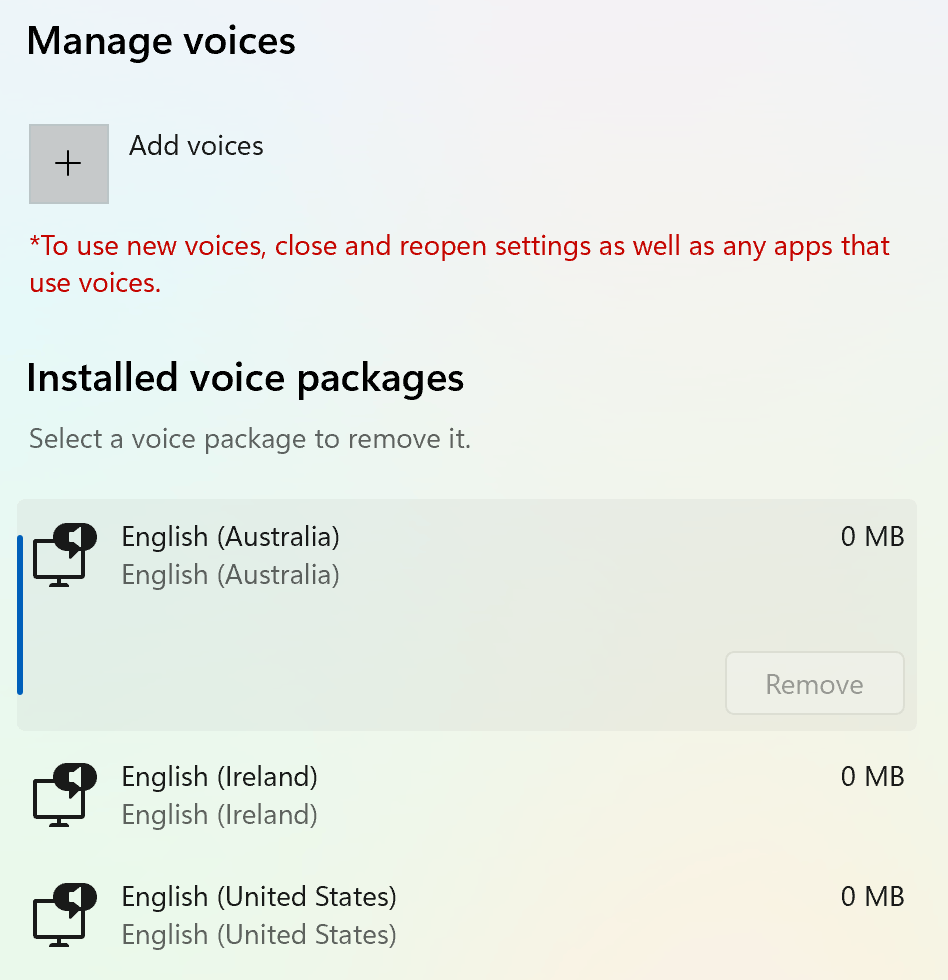
(Curiously, my original system language of "English (United States) also shows a zero size; I'm not sure if that's atypical.)

Thank you in advance for any help you might provide.

Windows for home | Windows 11 | Settings

Locked Question. This question was migrated from the Microsoft Support Community. You can vote on whether it's helpful, but you can't add comments or replies or follow the question.

0 comments No comments
Answer accepted by question author
Anonymous
2023-07-26T01:24:02+00:00

I have voted for your feedback and submitted it to the appropriate team for investigation. It will take some time to investigate and fix this issue, thank you for your patience and understanding.

We appreciate your feedback, please click Yes or No to help us improve the support experience. 

Hope you are keeping safe and well.

Was this answer helpful?

10+ people found this answer helpful.
0 comments No comments

23 additional answers

Sort by: Oldest
  1. Anonymous
    2024-03-02T16:35:49+00:00

    Almost 1 year later: the same bloody problem persists! Exactly the same: 0MB in voice downloaded, TTS is doing nothing. I can't believe nobody really cares when such basic stuff doesn't work!..

    Was this answer helpful?

    10 people found this answer helpful.
    0 comments No comments
  2. Deleted

    This answer has been deleted due to a violation of our Code of Conduct. The answer was manually reported or identified through automated detection before action was taken. Please refer to our Code of Conduct for more information.


    Comments have been turned off. Learn more

  3. Anonymous
    2024-05-06T06:10:57+00:00

    Thank you for posting this. I'm having the exact same problem with mine. 5/6/2024

    Was this answer helpful?

    1 person found this answer helpful.
    0 comments No comments
  4. Anonymous
    2024-05-19T22:30:22+00:00

    I'm having the exact same problem. They all install as 0mb and I can't find anyway to install the data properly. Is there PowerShell code to reinstall them?

    Was this answer helpful?

    0 comments No comments