Cannot install new system voice packages.

Anonymous
2023-07-17T15:28:01+00:00

I am unable to install new voice packages on my system. I have reviewed some similar questions to this, such as this one. But I have not been able to find any recent information on this issue.

There are two related places of concern:

Settings > Time & language > Speech

Under Manage Voices, the Add voices option does not work. Specifically, when I select a new voice there from the list, a message displays instructing me to reopen Settings for the changes to take effect, however nothing actually changes, and no package is installed.

Settings > Time & language > Language & region

Next, I tried adding languages here via the Add a language button. This time, language downloads began, but failed mid-way.

Following this, returning to Settings > Time & language > Speech now displays entries for the languages that failed to install on the Language & region screen, however they show a size of 0 MB and I am unable to remove them, and their voices are not available:
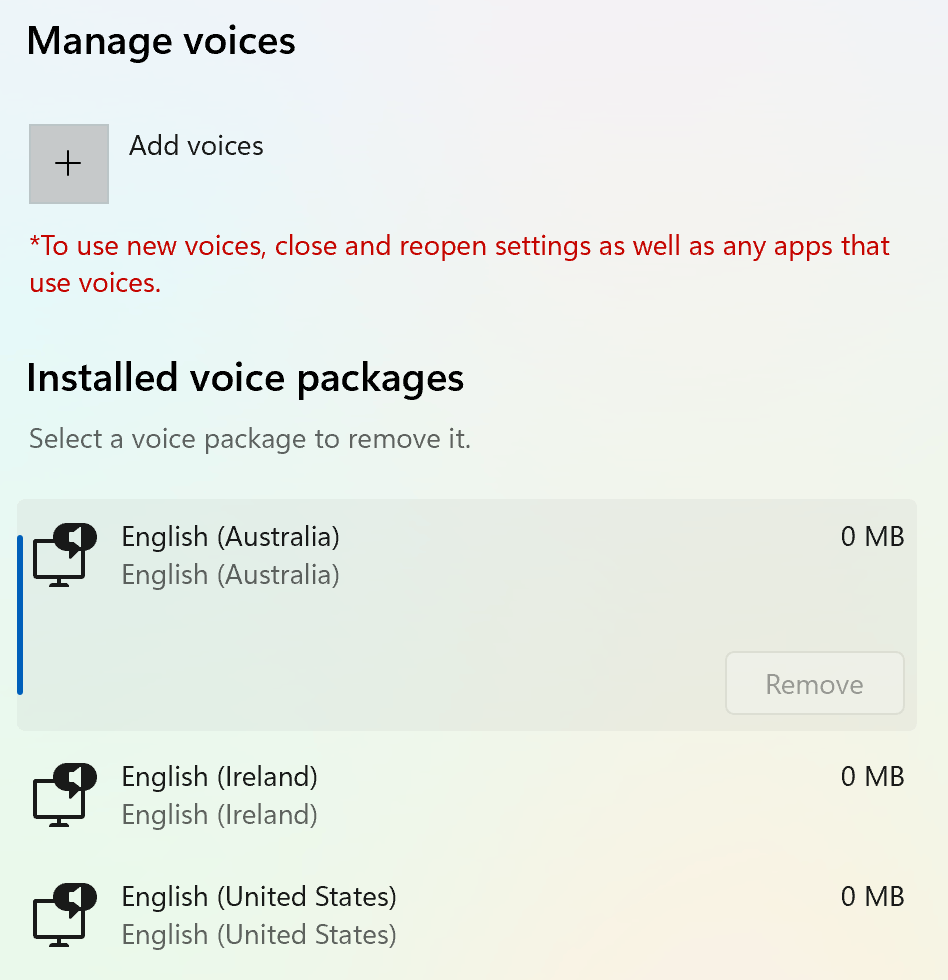
(Curiously, my original system language of "English (United States) also shows a zero size; I'm not sure if that's atypical.)

Thank you in advance for any help you might provide.

Windows for home | Windows 11 | Settings

Locked Question. This question was migrated from the Microsoft Support Community. You can vote on whether it's helpful, but you can't add comments or replies or follow the question.

0 comments No comments
Answer accepted by question author
Anonymous
2023-07-26T01:24:02+00:00

I have voted for your feedback and submitted it to the appropriate team for investigation. It will take some time to investigate and fix this issue, thank you for your patience and understanding.

We appreciate your feedback, please click Yes or No to help us improve the support experience. 

Hope you are keeping safe and well.

Was this answer helpful?

10+ people found this answer helpful.
0 comments No comments

23 additional answers

Sort by: Most helpful
  1. Anonymous
    2023-07-23T03:31:35+00:00

    Thank you for your thorough response and sharing the test results with me.

    I noticed that in the latest KB5028185 update, changes were made to the Voice Access feature and it is possible that this update is causing the issue. So, I installed this update and tested it again and found that I was able to reproduce your issue.

    July 11, 2023—KB5028185 (OS Build 22621.1992) - Microsoft Support

    Image

    Currently I would like to know what specific version of Windows you have. Have you recently installed the KB5028185 update, you can confirm you in the Windows Update History. If you did install this update and the issue appeared after installing this update, then currently I would like to suggest you report this issue in the Feedback Hub, where the development team will review the submitted feedback regularly. If convenient, please provide as much detail as possible, including pictures, repro videos, etc. Please share the feedback link after submitting, I will submit your feedback to the relevant team for investigation through internal channels. 

    Send feedback to Microsoft with the Feedback Hub app - Microsoft Support

    Alternatively, you can try uninstalling this update to see if the issue exists. If the issue does not reappear after uninstalling the update, then you can follow the steps below to hide the update. However, it is important to note that sometimes the update installed on your computer cannot be uninstalled and you may only be able to wait for a later update to fix it.

    1. Visit Download **Windows Showhide.diagcab** **** updates to download and run the "Show or hide updates" troubleshooter package.
    2. Click "Hide updates" > "Next", then select the KB**** update, indicating that you want to hide it, then click "Next".
    3. Follow the troubleshooter to the end. Then open Windows settings and "Check for updates", now the KB5028166 update will no longer appear as an error.

    If you cannot download the "Show or hide updates" troubleshooter package, you can click the home page to access the private message. In the private message, I have shared this installation package directly with you.

    Image

    Your understanding is highly appreciated! Looking forward to hearing back from you.

    Was this answer helpful?

    2 people found this answer helpful.
    0 comments No comments
  2. Anonymous
    2023-07-19T18:57:30+00:00

    Thanks for the detailed response. Unfortunately, I was not able to rectify the problem(s).

    Here are some additional details of what I've tried, including the results of the advice you provided in your preceding reply. When possible, I attempted these fixes under a clean boot:

    1. I've seen it remarked in several places to try deleting the /SoftwareDistriution folder, however I cannot remove this folder because another process is always accessing its contents.
    2. Adding a language's TTS to the Preferred languages list as described here does indeed add that language to Time & Language > Speech > Manage voices list as well, however these show a 0 MB size, and the voices are unavailable (as described previously).
    3. Running the DSIM command with the ScanHealth or CheckHealth options indicated there was a repairable issue. But a subsequent call with RestoreHealth froze part-way through:

    At this point, the Windows Update troubleshooter was still reporting no problems.

    1. Running sfc /scannow reported that corrupt files were located and repaired:

    1. I then reattempted a call to DISM with the /Restorehealth option. This time, the operation completed, but with issues:

    1. After this, I tried the Windows Update troubleshooter yet again, and this time it found an installation issue. It redownloaded the service pack in question and installed it successfully. Unfortunately, this didn't have any observable effects. So, it's possible that this only corrected part of the problem, or that there was an entirely unrelated issue I wasn't aware of. No more issues are reported by the troubleshooter nor any of the aforementioned commands issued at the command prompt at this time.
    2. Finally, it may be relevant that the dism.log only has entries regarding my original (en-US) language, as does querying the system for its installed languages from the shell:

    All-in-all, I'm apparently in the same situation as I started in.

    Please let me know if there's anything else I can provide or attempt. Thanks so much for your assistance!

    Was this answer helpful?

    2 people found this answer helpful.
    0 comments No comments
  3. Anonymous
    2024-02-15T17:54:32+00:00

    I as well am having this issue as of 2/15/2024 This issue just started for me within the last 3 weeks....I did a full re-install of windows no added drivers just completely clean and I am still having the issue. 0mb on Voice packs, and crashes to desktop from faults of ucrtbase.dll, particularly when using MSFS2020 both windows and msfs clean installs no addons

    i9-13900

    4090 GPU

    Was this answer helpful?

    1 person found this answer helpful.
    0 comments No comments
  4. Anonymous
    2023-07-24T14:07:15+00:00

    I am having all the same issues and it appears I am looking at a clean boot. I have done all of these steps twice and did a minimal reset on the OS. Have not pulled the plug on a clean install yet. Hope windows can fix this with a future update. We cannot be the only people having this issue.

    Was this answer helpful?

    1 person found this answer helpful.
    0 comments No comments