Right click a picture in file explorer, no print dialog, immediately prints.
I have tried everything:
updating and repairing windows installation.
Removing print drivers and reinstalling with the full package.
Installing the XPS viewer feature:
  Command line:

        Install-WindowsFeature XPS-Viewer
Registry key for default 32 print dialog:
  [HKEY\_CURRENT\_USER\Software\Microsoft\Print\UnifiedPrintDialog]

  "PreferLegacyPrintDialog"=dword:00000001
Registry key for Edge default dialog:
  [HKEY\_LOCAL\_MACHINE\SOFTWARE\Policies\Microsoft\Edge]

  "UseSystemPrintDialog"=dword:00000001
I can enable the print vendors print preview if I go into the legacy print settings but it has none of the options / features of the Microsoft Print dialog.
How can I restore the beloved WIndows Print preview?
The one that lets us zoom in or print multiple images on one page by selecting multiple in file explorer.
Did they think we wouldn't notice.
How can I restore?
Remember the wonderful Print Dialog?
Gone on all my machines.
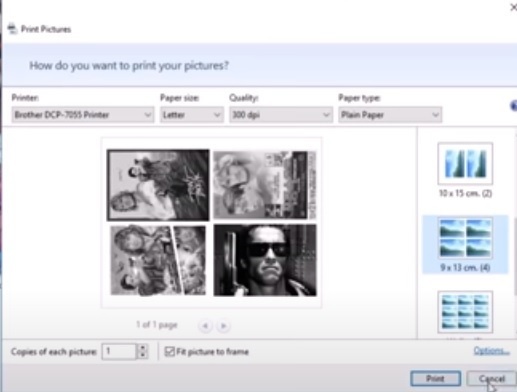 https://www.youtube.com/watch?v=XbzSr74qfIc
' cx='32' cy='32' r='32' /%3E%3Ctext x='50%25' y='55%25' dominant-baseline='middle' text-anchor='middle' fill='%23FFF' %3EA%3C/text%3E%3C/svg%3E)
