I cannot name a new folders, recover files from a bin.

Anonymous
2024-04-08T02:52:41+00:00

Every new folder creates with standart name.

The problems began after I accidentally deleted a Desctop folder. It was in OneDrive folder.

I Tried to name folder in another windows account but same thing happened

Help me please

Windows for home | Windows 10 | Files, folders, and storage

Locked Question. This question was migrated from the Microsoft Support Community. You can vote on whether it's helpful, but you can't add comments or replies or follow the question.

0 comments No comments
Answer accepted by question author
Ramesh 184.2K Reputation points Volunteer Moderator
2024-04-08T11:25:08+00:00

Thanks for the additional details. The "FolderDescriptions" registry fix in the following article should resolve the issue.

Fix: Cannot Rename or Move Folders - The File or folder does not exist » Winhelponline:

https://www.winhelponline.com/blog/error-rename-move-folder-not-exist/

Detailed steps:


  1. Please create a Restore Point.
  2. Download the following file:

→ W10_folder_descriptions.zip → for Windows 10 22H2.
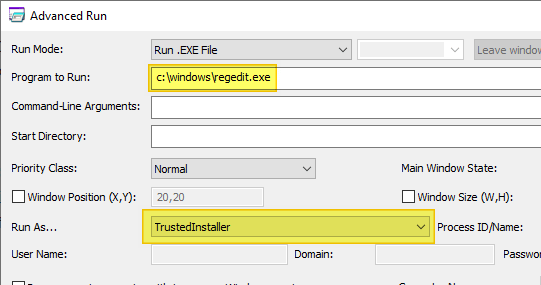
→ W11_folder_descriptions.zip → for Windows 11 24H2. 3. Open the zip file and extract "folderdescriptions.reg" to your desktop. 4. Move "folderdescriptions.reg" to the *C:* drive's root. 5. Download AdvancedRun from Nirsoft (https://www.nirsoft.net/utils/advanced_run.html) and run it. 6. Using AdvancedRun, launch c:\windows\regedit.exe as TrustedInstaller (see this screenshot.) 7. In the Regedit window, click File, and click Import... 8. Dismiss the "Location is not available" message box by clicking OK. 9. In the "Import Registry File" window, in the "File name" text box, type C:\folderdescriptions.reg and press Enter. 10. After the import is successful, exit Regedit. 11. Restart Windows.
Ignore the error when importing the REG file. "Not all data was successfully written to the registry. Some keys are open by the system or other processes, or you have insufficient privileges to perform this operation."

Was this answer helpful?

2 people found this answer helpful.
0 comments No comments

5 additional answers

Sort by: Newest
  1. Ramesh 184.2K Reputation points Volunteer Moderator
    2024-04-08T12:06:49+00:00

    Glad to have helped.

    Regards,

    Was this answer helpful?

    0 comments No comments
  2. Anonymous
    2024-04-08T12:04:55+00:00

    Thanks So Much!!!

    Was this answer helpful?

    1 person found this answer helpful.
    0 comments No comments
  3. Anonymous
    2024-04-08T11:14:38+00:00

    Yeah, firstly after this I get an error "Can't find the specified file. Make sure you specify the correct path and file name" When hit the button "Try again" on this error - it sends me another one "The file or folder does not exist". So it keeps an old folder name. It works for older files as well.

    Was this answer helpful?

    0 comments No comments
  4. Ramesh 184.2K Reputation points Volunteer Moderator
    2024-04-08T03:48:13+00:00

    What happens when you right-click on the folder, click Rename, type a new name, and press Enter?

    Do you get any errors?

    Was this answer helpful?

    0 comments No comments