' cx='32' cy='32' r='32' /%3E%3Ctext x='50%25' y='55%25' dominant-baseline='middle' text-anchor='middle' fill='%23FFF' %3EA%3C/text%3E%3C/svg%3E)



Thanks for the additional details. The "FolderDescriptions" registry fix in the following article should resolve the issue.
Fix: Cannot Rename or Move Folders - The File or folder does not exist » Winhelponline:
https://www.winhelponline.com/blog/error-rename-move-folder-not-exist/
Detailed steps:
- Please create a Restore Point.
- Download the following file:
→ W10_folder_descriptions.zip → for Windows 10 22H2.
→ W11_folder_descriptions.zip → for Windows 11 24H2.
3. Open the zip file and extract "folderdescriptions.reg" to your desktop.
4. Move "folderdescriptions.reg" to the *C:* drive's root.
5. Download AdvancedRun from Nirsoft (https://www.nirsoft.net/utils/advanced_run.html) and run it.
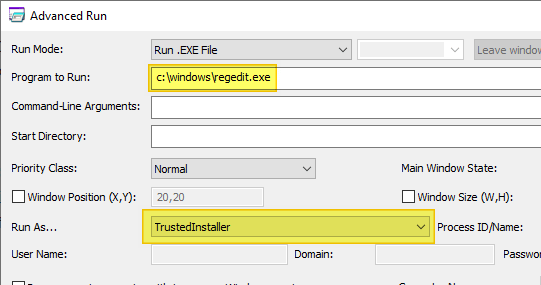
6. Using AdvancedRun, launch c:\windows\regedit.exe as TrustedInstaller (see this screenshot.)
7. In the Regedit window, click File, and click Import...
8. Dismiss the "Location is not available" message box by clicking OK.
9. In the "Import Registry File" window, in the "File name" text box, type C:\folderdescriptions.reg and press Enter.
10. After the import is successful, exit Regedit.
11. Restart Windows.
Ignore the error when importing the REG file. "Not all data was successfully written to the registry. Some keys are open by the system or other processes, or you have insufficient privileges to perform this operation."