Install Error 0x80070103 with New Drivers on Lenovo ThinkPad

Anonymous
2024-11-13T10:09:45+00:00

Dear Microsoft Support Team,

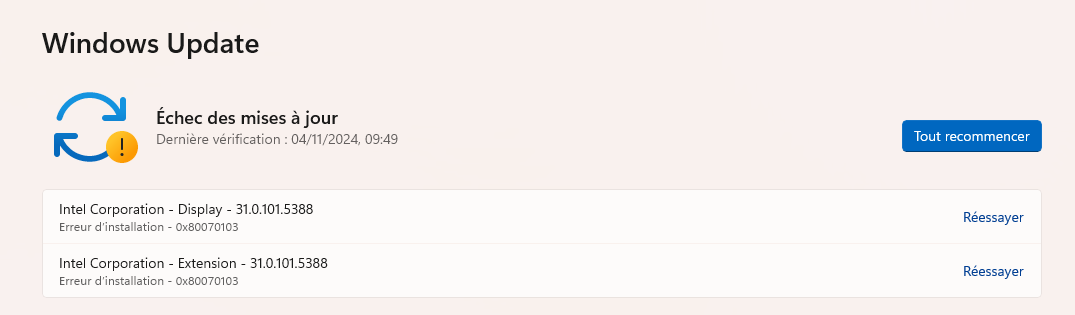
I am experiencing the Windows Update Install Error 0x80070103 on my Lenovo ThinkPad when attempting to install new drivers. This issue seems similar to a problem discussed in a thread from early last year on the Microsoft Community forums, which can be found here: https://answers.microsoft.com/en-us/windows/forum/all/resolve-install-error-0x80070103-windows-11-pro/b17acff1-30ef-4417-99b4-df8f1cea92b9 (Resolve Install Error - 0x80070103 Windows 11 Pro)

https://i.ibb.co/RPj2FyK/screenshot.png

As noted in that thread, the problem was resolved by the Windows Update team. I believe my current issue is related, and I am hoping it can be addressed in the same manner.

I am available to provide any additional information that might assist in resolving this bug. I have attached a screenshot of the error message for your reference.

Thank you for your attention to this matter. I look forward to your response.

Best regards,

Fabien

Windows for home | Windows 11 | Windows update

Locked Question. This question was migrated from the Microsoft Support Community. You can vote on whether it's helpful, but you can't add comments or replies or follow the question.

0 comments No comments
Answer accepted by question author
DaveM121 946.1K Reputation points Independent Advisor
2024-11-13T10:43:46+00:00

Hi, I am Dave, I will help you with this.

This is a problem man people report with the drivers offered in Windows updates, that is an old thread you have linked to and in reality the problem has never been resolved.

If your hardware is all working correctly, you do not need to install those optional driver updates, you can get the latest drivers from the support page for your laptop on the Lenovo website.

The best option is to hide those drivers on the updates page using the official Microsoft Show/Hide Tool to stop Windows continually trying to install the drivers.

http://download.microsoft.com/download/F/2/2/F2...

Was this answer helpful?

1 person found this answer helpful.
0 comments No comments

0 additional answers

Sort by: Newest