Exchange | Exchange Server | Management
The administration and maintenance of Microsoft Exchange Server to ensure secure, reliable, and efficient email and collaboration services across an organization.
This browser is no longer supported.
Upgrade to Microsoft Edge to take advantage of the latest features, security updates, and technical support.

Hi,
We have a problem that we can’t log in to OWA and the mobile app a few times a day, but the error always goes away after a few minutes. We have Exchange 2019 CU7 and Windows Server 2019 servers.
You receive the following error message:
Invalid username or password, please try again later
During this time, the installed outlook works fine.
The error started about 1 month ago.
My question would be, where could the error be? In which log should we search?
(IIS log, AD log,? Log)
The administration and maintenance of Microsoft Exchange Server to ensure secure, reliable, and efficient email and collaboration services across an organization.

Hi, I changed the tag to office-exchange-server-administration, the reason why we recommend posting appropriately is you will get the most qualified pool of respondents, and other partners who read the forums regularly can either share their knowledge or learn from your interaction with us. Thank you for your understanding.
Thanks for your answer.
i installed cu9 a few days ago and the error has not occurred since.
' cx='32' cy='32' r='32' /%3E%3Ctext x='50%25' y='55%25' dominant-baseline='middle' text-anchor='middle' fill='%23FFF' %3EYS%3C/text%3E%3C/svg%3E)
Hi @ivan.csaba ,
Great to know that the error stopped after upgrading to CU9 and thanks for your sharing! You can accepct your solution as answer so that it can help others in the community looking for help on similar topics :)

For this type of intermittent OWA authentication issue, I would check the IIS and Exchange HTTP Proxy logs together and correlate them by timestamp.
Main locations:
For the failed request, check the HTTP status, substatus, username, client IP and request URL.
The LogoffReason=NoCookiesGetOrE14AuthPost entry alone does not show the root cause. The thread also shows that the same entry can appear when OWA is working normally.
I documented how I correlate IIS and Exchange HTTP Proxy logs for OWA authentication troubleshooting here: https://ceyhunkirmizitas.net/exchange-owa-authentication-troubleshooting-iis-logs-part-4/
In this case, the problem stopped after upgrading from CU7 to CU9, so I would also make sure Exchange is on a current supported build.
Thank you for your help!
Thanks for your prompt answer, but unfortunatelly it doesnt work.
But I found a lof of interesting event, error in IIS log at the time of the problem.
2021-05-05 05:51:34 IPAddress POST /owa/auth.owa &ClientId=4809F2416145409F88FA9010AB24C203&CorrelationID=<empty>;&cafeReqId=84939961-e9a3-4fae-a083-f8eec0db2b16;&LogoffReason=NoCookiesGetOrE14AuthPost&encoding=; 80 username@keyman UserIPaddress Mozilla/5.0+(Windows+NT+10.0;+Win64;+x64;+rv:88.0)+Gecko/20100101+Firefox/88.0 https://exchange.domain/owa/auth/logon.aspx?replaceCurrent=1&reason=2&url=https%3a%2f%2fexchange.domain%2fowa%2f 302 0 0 38
2021-05-05 05:51:34 IPAddress GET /owa/auth/logon.aspx url=https%3a%2f%2fexchange.domain%2fowa%2f&reason=2&ClientId=4809F2416145409F88FA9010AB24C203&CorrelationID=<empty>;&cafeReqId=1cf460bb-884d-4201-b7db-47463eb4d6bd;&encoding=; 80 - UserIPaddress Mozilla/5.0+(Windows+NT+10.0;+Win64;+x64;+rv:88.0)+Gecko/20100101+Firefox/88.0 https://exchange.domain/owa/auth/logon.aspx?replaceCurrent=1&reason=2&url=https%3a%2f%2fexchange.domain%2fowa%2f 200 0 0 4
how should this message be interpreted?
How can i fix this problem?
LogoffReason=NoCookiesGetOrE14AuthPost&encoding
Hi @ivan.csaba ,
I tied searching the IIS log in my test environment and can also see the "LogoffReason=NoCookiesGetOrE14AuthPost&encoding":
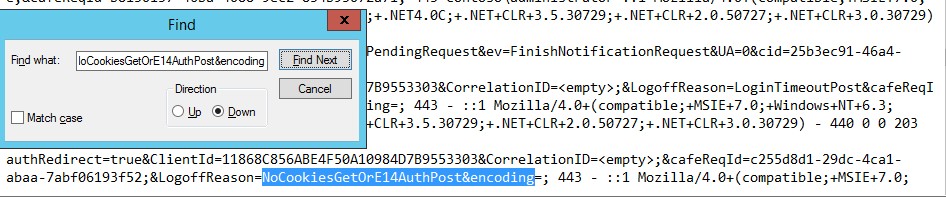
But owa works fine at my end and I haven't seen the error "Invalid username or password, please try again later". So it seems to me that probably it's not the problem.
As regards to the Event Viewer mentioned earlier, any relevant errors there?
Furthermore, if there are any firewall or anti-virus software running in your environment, please try temporarily disabling them and check the result.
If an Answer is helpful, please click "Accept Answer" and upvote it.
Note: Please follow the steps in our documentation to enable e-mail notifications if you want to receive the related email notification for this thread.
Hi @ivan.csaba ,
I am writing to see if there is any progress on the issue. Please let me know if you need further assistance.
Hi @ivan.csaba ,
Is this issue affecting all users in your organization?
Any changes were made in the environment right before the error started around 1 month ago?
Based on my experience, please run the following command to check the authentication settings for OWA and Exchange ActiveSync:
Get-OwaVirtualDirectory -Server <ServerName> | fl *auth*
Get-ActiveSyncVirtualDirectory -Server <ServerName> | fl *auth*
Below is the output returned in my Exchange 2019 test lab, you may compare it with your result and see they look the same:
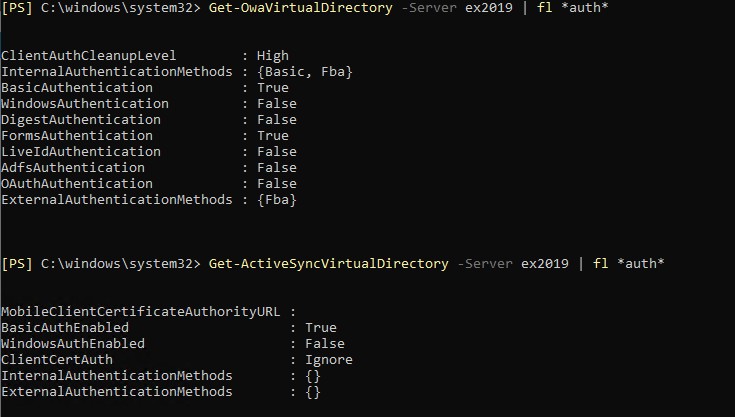
With the above confirmed, it's suggested to try resetting FormsAuthentication for OWA virtual directory and restarting IIS to check the result:
Get-OWAVirtualDirectory | Set-OWAVirtualDirectory -FormsAuthentication $False -BasicAuthentication $True
Get-OWAVirtualDirectory | Set-OWAVirtualDirectory -FormsAuthentication $True -BasicAuthentication $True
Followed by IISreset and also to recycle the app pools for OWA and ECP in IIS.
Reference: Invalid username and password accessing OWA and ECP
In case the above doesn't work, I'd recommend have a look at the Event Viewer on the Exchange server for any relevant events. Furthermore, you can go through the IIS logs which by default located at %SystemDrive%\inetpub\logs\LogFiles and see if any clues can be found.
If an Answer is helpful, please click "Accept Answer" and upvote it.
Note: Please follow the steps in our documentation to enable e-mail notifications if you want to receive the related email notification for this thread.