Trying to re-register Microsoft Store along with error code 0x80073CFE.

Anonymous
2025-01-11T02:07:59+00:00

After cloning my HDD to an SSD, I keep getting the error code 0x80073CFE when trying to download apps from the Microsoft Store. I've checked dism and there are no system errors found. There was a recommendation to try and re-register the Microsoft Store app but once I paste this command into PowerShell:

Get-AppXPackage -AllUsers -Name "Microsoft.WindowsStore" | Foreach {Add-AppxPackage -DisableDevelopmentMode -Register "($_.InstallLocation)\AppxManifest.xml"}

It returns this error:

Add-AppxPackage : Cannot find path

'C:\WINDOWS\system32(Microsoft.WindowsStore_22410.1401.2.0_x64__8wekyb3d8bbwe.InstallLocation)\AppxManifest.xml'

because it does not exist.

At line:1 char:77

  • ... | Foreach {Add-AppxPackage -DisableDevelopmentMode -Register "($_.In ...
  •             ~~~~~~~~~~~~~~~~~~~~~~~~~~~~~~~~~~~~~~~~~~~~~~~~~~~~~~~~~ 
    
    • CategoryInfo : ObjectNotFound: (C:\WINDOWS\syst...ppxManifest.xml:String) [Add-AppxPackage], ItemNotFou
    ndException
    • FullyQualifiedErrorId : PathNotFound,Microsoft.Windows.Appx.PackageManager.Commands.AddAppxPackageCommand

I have tried numerous "fixes" but nothing has worked. My system finds no corruptions with files and everything works except for the Microsoft store. It may be important to note that I can access and use the Microsoft Store but cannot download apps and in my system settings it is not showing up in Apps and Features.

Any help with this would be greatly appreciated!

Windows for home | Windows 10 | Microsoft Store

Locked Question. This question was migrated from the Microsoft Support Community. You can vote on whether it's helpful, but you can't add comments or replies or follow the question.

0 comments No comments
Answer accepted by question author
Ramesh Srinivasan 90,560 Reputation points Independent Advisor
2025-01-11T09:41:08+00:00

Please reset the app repository database.

Note: The following procedure will make your Start menu and settings inoperable. Your existing Store apps will be gone. After doing the procedure below, a repair installation is required.

Download "reset_staterepository.bat" from this temporary download link:

https://1drv.ms/u/s!AjVYLGw0OBWU5Ap7RvIn84UWg3l...

Move the file to the C:\ root.

Download AdvancedRun from Nirsoft

https://www.nirsoft.net/utils/advanced_run.html

Launch AdvancedRun and start "c:\windows\system32\cmd.exe" as TrustedInstaller. See this screenshot - https://www.winhelponline.com/blog/wp-content/u...
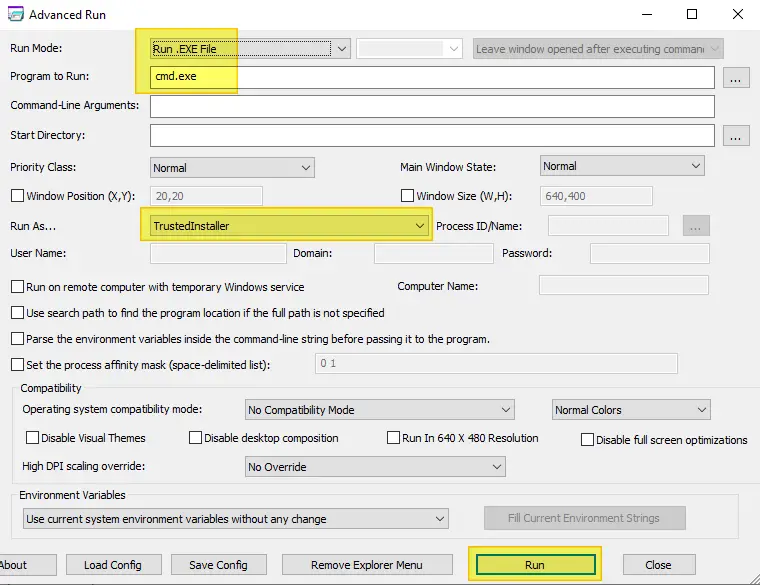
In the TrustedInstaller Command Prompt, run: "C:\Reset_StateRepository.bat"

Post the screenshot here.

Once done, redo the repair installation using the Media Creation Tool.

Standard Disclaimer: There is a link to a non-Microsoft website. The page appears to provide accurate, safe information. Watch out for ads on the site that may advertise products frequently classified as PUPs (Potentially Unwanted Products). Thoroughly research any product advertised on the site before you decide to download and install it.

Was this answer helpful?

1 person found this answer helpful.
0 comments No comments

22 additional answers

Sort by: Newest
  1. Anonymous
    2025-01-11T10:03:24+00:00

    After pressing Y this is what follows

    Was this answer helpful?

    0 comments No comments
  2. Ramesh Srinivasan 90,560 Reputation points Independent Advisor
    2025-01-11T09:56:12+00:00

    Press "Y" to proceed.

    Was this answer helpful?

    0 comments No comments
  3. Anonymous
    2025-01-11T09:52:31+00:00

    Is this what I needed to screenshot?

    Was this answer helpful?

    0 comments No comments
  4. Anonymous
    2025-01-11T09:29:32+00:00

    I just finished the repair installation and I am still having the same problem with the store and receiving the same error code.

    Was this answer helpful?

    0 comments No comments