' cx='32' cy='32' r='32' /%3E%3Ctext x='50%25' y='55%25' dominant-baseline='middle' text-anchor='middle' fill='%23FFF' %3EA%3C/text%3E%3C/svg%3E)

' cx='32' cy='32' r='32' /%3E%3Ctext x='50%25' y='55%25' dominant-baseline='middle' text-anchor='middle' fill='%23FFF' %3ERS%3C/text%3E%3C/svg%3E)
Please reset the app repository database.
Note: The following procedure will make your Start menu and settings inoperable. Your existing Store apps will be gone. After doing the procedure below, a repair installation is required.
Download "reset_staterepository.bat" from this temporary download link:
https://1drv.ms/u/s!AjVYLGw0OBWU5Ap7RvIn84UWg3l...
Move the file to the C:\ root.
Download AdvancedRun from Nirsoft
https://www.nirsoft.net/utils/advanced_run.html
Launch AdvancedRun and start "c:\windows\system32\cmd.exe" as TrustedInstaller. See this screenshot - https://www.winhelponline.com/blog/wp-content/u...
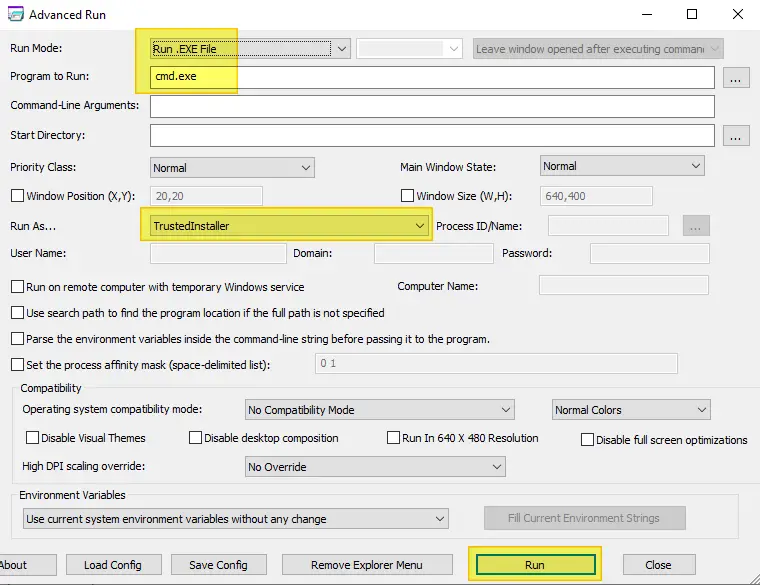
In the TrustedInstaller Command Prompt, run: "C:\Reset_StateRepository.bat"
Post the screenshot here.
Once done, redo the repair installation using the Media Creation Tool.
Standard Disclaimer: There is a link to a non-Microsoft website. The page appears to provide accurate, safe information. Watch out for ads on the site that may advertise products frequently classified as PUPs (Potentially Unwanted Products). Thoroughly research any product advertised on the site before you decide to download and install it.