rename folder says folder dosent exist.

Anonymous
2025-03-19T11:37:40+00:00

At First When I tries To Rename First It Shows This :

They After Clicking Try Again It Shows This :

But I can rename folders using WinRar And 7zip Even I can do via cmd also but the thing is i cant rename them via Windows File Explorer Please Help Me!

Individual files aren't a problem, just folders.

All folders are affected, including folders on external drives.


I've done a bit off checking online and have currently:

  • Run scf /scannow
  • Run Dsip /Online /Cleanup-Image /ScannHealth (no errors found)
  • Run a chkdisk on my C drive.
  • Tried renaming some registry entries in HKEY_LOCAL_MACHONE\SOFTWARE\Microsoft\Windows\CurrentVersion\Explorer\FolderDescriptions as suggested on a few threads online (I've restored them since then because it didn't do a thing)
  • Installed iso via media creation tool but its still doesnt fixed
Windows for home | Windows 11 | Files, folders, and storage

Locked Question. This question was migrated from the Microsoft Support Community. You can vote on whether it's helpful, but you can't add comments or replies or follow the question.

0 comments No comments
Answer accepted by question author
Ramesh Srinivasan 90,560 Reputation points Independent Advisor
2025-03-19T13:22:27+00:00

Please create a Restore Point.

Download

https://www.winhelponline.com/blog/wp-content/u...

Extract "folderdescriptions.reg" to the desktop.

Move "folderdescriptions.reg" to the C:\ drive's root.

Download AdvancedRun from Nirsoft and run it.

Using AdvancedRun, launch c:\windows\regedit.exe as TrustedInstaller (see Screenshot: https://www.winhelponline.com/blog/wp-content/u...)
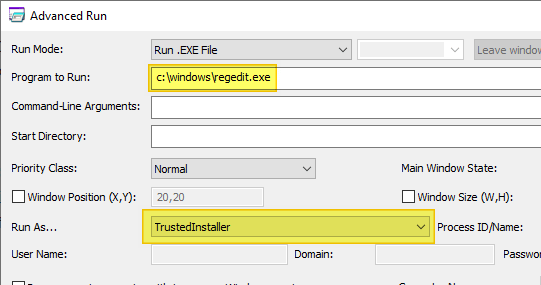
In the Regedit window, click File, and click Import...

Dismiss the "Location is not available" message box by clicking OK.

In the "Import Registry File" window, in the "File name" text box, type C:\folderdescriptions.reg and press Enter.

After the import is successful, exit Regedit.

Restart Windows.

Standard Disclaimer: There is a link to a non-Microsoft website. The page appears to provide accurate, safe information. Watch out for ads on the site that may advertise products frequently classified as PUPs (Potentially Unwanted Products). Thoroughly research any product advertised on the site before you decide to download and install it.

Was this answer helpful?

3 people found this answer helpful.
0 comments No comments
Answer accepted by question author
Ramesh Srinivasan 90,560 Reputation points Independent Advisor
2025-03-19T13:37:25+00:00

Open Regedit.exe as TrustedInstaller and go to the FolderDescriptions key. Delete it.

Then, import the REG file you downloaded.

Restart Windows.

Does that help?

Was this answer helpful?

2 people found this answer helpful.
0 comments No comments

31 additional answers

Sort by: Newest
  1. Anonymous
    2025-03-19T13:36:25+00:00

    Did It But Its Also Not Working, sir now i am thinking

    that maybe its can't be fixed though!

    Was this answer helpful?

    0 comments No comments
  2. Anonymous
    2025-03-19T13:08:14+00:00

    Was this answer helpful?

    0 comments No comments
  3. Ramesh Srinivasan 90,560 Reputation points Independent Advisor
    2025-03-19T12:19:46+00:00

    Hi Soumyadeep,

    What were the changes made to "FolderDescriptions"? If possible, export the "FolderDescriptions" registry key to a REG file and share the file on gofile.io or OneDrive.

    Was this answer helpful?

    0 comments No comments