' cx='32' cy='32' r='32' /%3E%3Ctext x='50%25' y='55%25' dominant-baseline='middle' text-anchor='middle' fill='%23FFF' %3EA%3C/text%3E%3C/svg%3E)

' cx='32' cy='32' r='32' /%3E%3Ctext x='50%25' y='55%25' dominant-baseline='middle' text-anchor='middle' fill='%23FFF' %3ERS%3C/text%3E%3C/svg%3E)
Please create a Restore Point.
Download
https://www.winhelponline.com/blog/wp-content/u...
Extract "folderdescriptions.reg" to the desktop.
Move "folderdescriptions.reg" to the C:\ drive's root.
Download AdvancedRun from Nirsoft and run it.
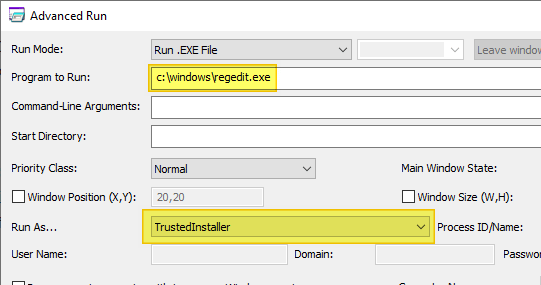
Using AdvancedRun, launch c:\windows\regedit.exe as TrustedInstaller (see Screenshot: https://www.winhelponline.com/blog/wp-content/u...)
In the Regedit window, click File, and click Import...
Dismiss the "Location is not available" message box by clicking OK.
In the "Import Registry File" window, in the "File name" text box, type C:\folderdescriptions.reg and press Enter.
After the import is successful, exit Regedit.
Restart Windows.
Standard Disclaimer: There is a link to a non-Microsoft website. The page appears to provide accurate, safe information. Watch out for ads on the site that may advertise products frequently classified as PUPs (Potentially Unwanted Products). Thoroughly research any product advertised on the site before you decide to download and install it.