Microsoft 365 and Office | Excel | For business | Windows
A family of Microsoft spreadsheet software with tools for analyzing, charting, and communicating data

This browser is no longer supported.
Upgrade to Microsoft Edge to take advantage of the latest features, security updates, and technical support.
' cx='32' cy='32' r='32' /%3E%3Ctext x='50%25' y='55%25' dominant-baseline='middle' text-anchor='middle' fill='%23FFF' %3EAF%3C/text%3E%3C/svg%3E)
I installed an excel add-in two months ago which has been working fine. I am using Microsoft 365
Today I opened a worksheet that uses the add-in, but it is no longer available
I have gone to 'Manage Add-ins' (from the 'Developer' tab and then from File>Options>addins, and the add-in is listed but is not enabled.
I check the box next to it and press 'OK'
However, the add-in is not re-enabled and remains disabled.
I have conducted a quick repair of office but this does not solve the problem
I could think of two ways forward but all suggestions welcome
(1) re-install the add-in from a different location. But then there would be two 'versions' of the add-in known to excel, which could create problems
(2) remove the add-in and re-install. But I can find no way to remove the add-in
Help on either of these, or a further suggestion, would be welcome.
A family of Microsoft spreadsheet software with tools for analyzing, charting, and communicating data

Hi, sorry @Emi Zhang-MSFT I don't see the button that allows me to accept the answer. Is this enabled in settings, or have I missed something?
Hi and thanks
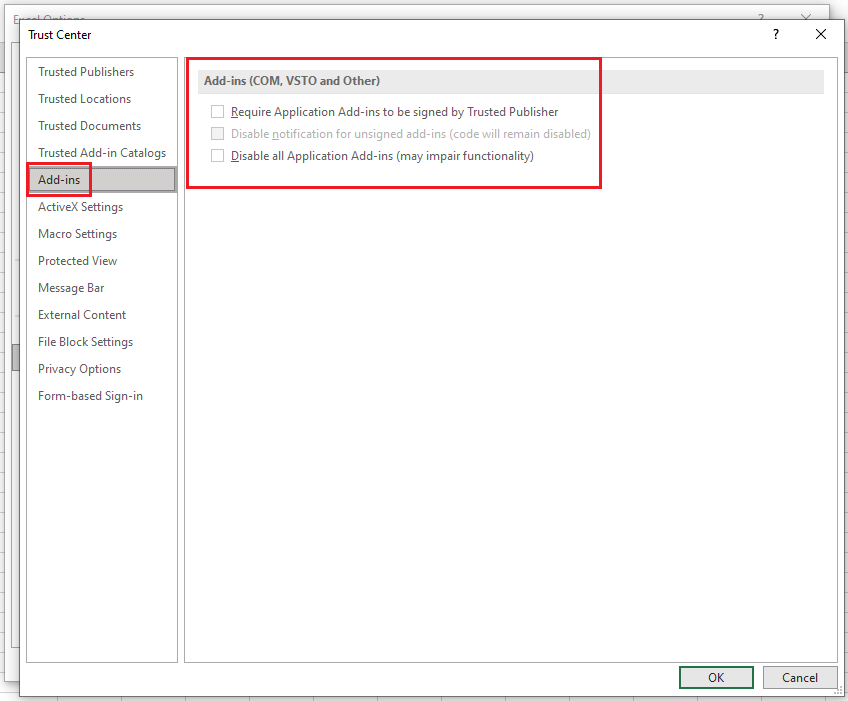
In the trust centre, the settings were already as indicated in the shot above
However I then noticed that the location of the add-in was not included in 'Trusted Locations'. Puzzled by this because I thought I had added it.
So I moved the add-in to a new location.
I added this location to Trusted locations
I installed the addin from the new location
It can now be enabled and disabled and appears to work
So the issue is resolved, not quite in the way proposed, but it gave me the clue
Should I accept the answer? Happy to play this as you recommend

Hi @Alan Freeman ,
Thanks for sharing solution here! Please click "Accept Answer" and upvote it. :)
Hi @Alan Freeman ,
If you try to enable the add-in, did you get any messages?
I suggest you go to File- Options- Trust Center- Trust Center settings...- Add-ins, please confirm if you checked the options as shown in the following picture, uncheck all options:
Just checking in to see if the information was helpful. Please let us know if you would like further assistance.
If the response is helpful, please click "Accept Answer" and upvote it.
Note: Please follow the steps in our documentation to enable e-mail notifications if you want to receive the related email notification for this thread.
' cx='32' cy='32' r='32' /%3E%3Ctext x='50%25' y='55%25' dominant-baseline='middle' text-anchor='middle' fill='%23FFF' %3EA%3C/text%3E%3C/svg%3E)
I think this is at best a partial answer. Excel is not always correct in its disablement choices and it wipes out Paid-For add-ins which is often unacceptable.
The better answer (for Office 365) is go to Excel Options, go to Add-Ins, then at the bottom select Disabled Add-ins from the list and click GO. Then select the Disabled Add-In in the popup list and click the Enable button below. Then Close and Re-Open Excel. Again, that works for Office 365.