SQL Server | Other
Additional SQL Server features and topics not covered by specific categories
This browser is no longer supported.
Upgrade to Microsoft Edge to take advantage of the latest features, security updates, and technical support.
' cx='32' cy='32' r='32' /%3E%3Ctext x='50%25' y='55%25' dominant-baseline='middle' text-anchor='middle' fill='%23FFF' %3ER%3C/text%3E%3C/svg%3E)
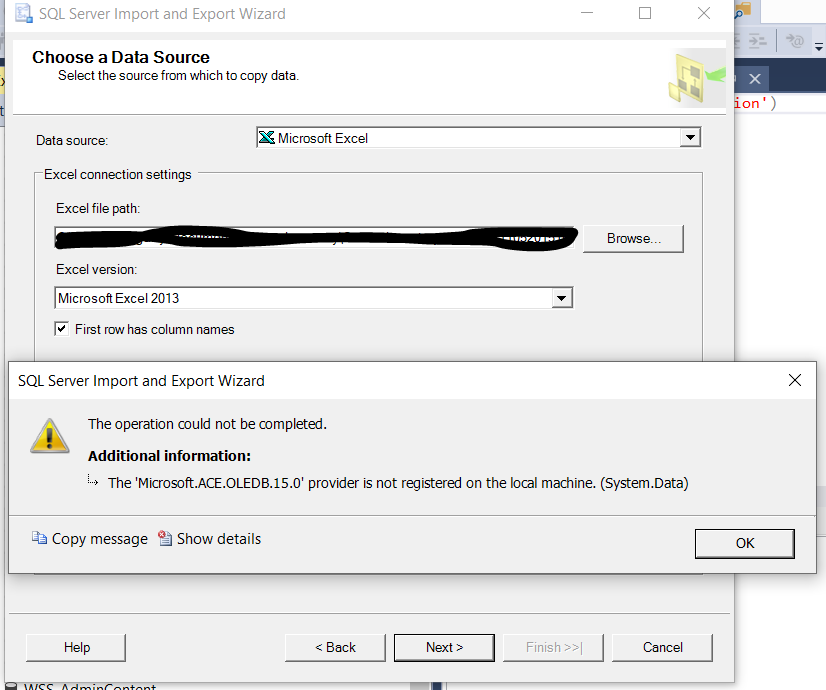
I am getting the error in SSMS 18 when trying to import an excel file to a database:
The operation could not be completed.


ADDITIONAL INFORMATION:


The 'Microsoft.ACE.OLEDB.15.0' provider is not registered on the local machine. (System.Data)
When googling around for solutions, everyone seemed to have conflicting versions (64 vs. 32) but everything I am using is 64-bit.
System details:
Windows 10 x64-bit
Microsoft SQL Server Management Studio 18 (Standard Edition (64-bit))
Microsoft Excel 2013 64-bit
Additional SQL Server features and topics not covered by specific categories

So do you believe that you have installed this provider? The ACE provider is a separate install, I believe.
' cx='32' cy='32' r='32' /%3E%3Ctext x='50%25' y='55%25' dominant-baseline='middle' text-anchor='middle' fill='%23FFF' %3EAM%3C/text%3E%3C/svg%3E)
Hi @RyM_3 ,,
How are things going? Did the answers help you?
Please feel free to let us know if you have any other question.
If you find any post in the thread is helpful, you could kindly accept it as answer.
Best Regards,
Amelia
' cx='32' cy='32' r='32' /%3E%3Ctext x='50%25' y='55%25' dominant-baseline='middle' text-anchor='middle' fill='%23FFF' %3EJL%3C/text%3E%3C/svg%3E)
Add an entry from SSMS:
Tools>>External tools to point to this 64-bit version:
Add:
Type a meaningful name for Title , like ImportExcel for example;
Type the following path (default install of SQL Server 2019) for Command:
C:\Program Files\Microsoft SQL Server\150\DTS\Binn\DTSWizard.exe
You will see the new entry ImportExcel when you need to import Excel file from SSMS now.
' cx='32' cy='32' r='32' /%3E%3Ctext x='50%25' y='55%25' dominant-baseline='middle' text-anchor='middle' fill='%23FFF' %3ED8%3C/text%3E%3C/svg%3E)
With reference to the proposed solution, if someone is trying to run SSMS 18 on their local workstation to do a SQL import via SSMS 18, where a 64-bit version of Office is installed,
a) You will not have the 64-bit SQL Server 20xx Import and Export wizard installed since it is not part of the SSMS 18 install
and
b) You will not be able to install the 32-bit version of the ACE 15, because it will detect the 64-bit install of Office and prevent the installation of 32-bit ACE in any flavor
I suspect the only way around this would be to install the SQL Server 20xx tools or run this wizard on another machine. Given how common this scenario is - i.e. a developer on a new workstation with SSMS 18/Office development tools, it seems like there should be a better solution than having to install SQL Server 2019 tools or uninstalling 64-bit Office (which I can't do).
Hi @RyM_3 ,
Welcome to Microsoft Q&A.
This warning message appears when the SQL Server Import and Export Wizard is launched via SSMS which is a 32-bit application and the 32-bit version of the SQL Server Import and Export Wizard is launched, but you have installed the Microsoft Access Database Engine 2016 Redistributable (Microsoft.ACE.OLEDB.15.0) 64-bit version.
To resolve it, you can launch 64-bit version of the SQL Server Import and Export Wizard via the Start menu, then find and expand Microsoft SQL Server 20xx.

Or you can install the Microsoft.ACE.OLEDB.15.0 32-bit version, then you can continue using the SQL Server Import and Export Wizard via SSMS.
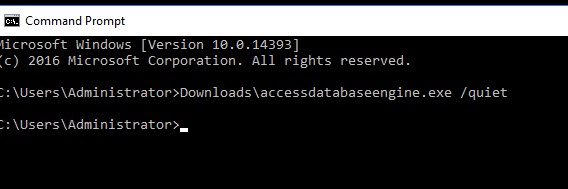
(Edit) You can install Microsoft.ACE.OLEDB.15.0 32-bit using with the file path and file name of the 32-bit Access Database Engine install file, followed ‘/quiet’. In this way, you can install 32-bit without uninstalling 64-bit first.
Please refer to this article which might help.
Best Regards,
Amelia
If the answer is helpful, please click "Accept Answer" and upvote it.
Note: Please follow the steps in our documentation to enable e-mail notifications if you want to receive the related email notification for this thread.
' cx='32' cy='32' r='32' /%3E%3Ctext x='50%25' y='55%25' dominant-baseline='middle' text-anchor='middle' fill='%23FFF' %3EJW%3C/text%3E%3C/svg%3E)
You do not have to uninstall the x64 bit version of the driver first - you can install the 32-bit version side-by-side by installing using the command line and the /quiet parameter.
Hi JeffreyWilliams-3310,
Thanks for your correction.
You’re right, and I have edited my answer.
Best Regards,
Amelia