You generally do not need drivers for mice or keyboards. You should be able to just plug in the USB transceiver and turn on the keyboard. If it doesn't work:
- Are you sure that you have the correct USB transceiver for this particular keyboard? They have to be matched.
- What happened when you plugged in the USB transceiver? Did you hear the USB connection sound and get a pop-up that a driver was being installed? If not, try another USB port.
- With the USB transceiver plugged into your computer, open Device Manager (click Start Orb, type Device Manager into the Search box, press Enter). You should see a number of entries as shown below (all of these entries were created upon the connection of
a USB transceiver for a Microsoft wireless mouse; a wireless keyboard is NOT present):
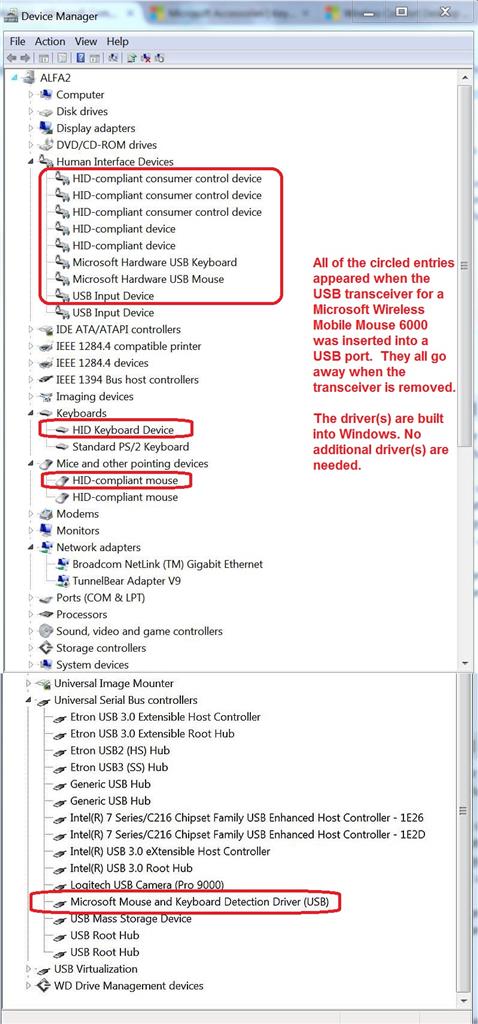
If you do NOT see entries like these, then the USB transceiver you have is broken. Or, far less likely, the USB port is not functioning.
Although wireless mice and keyboards should work upon connection, Microsoft does offer additional drivers/management software that enable the "extra" functions of its hardware devices. You can, for example, create macros and assign hot keys to perform various
functions. See, e.g.,
https://www.microsoft.com/accessories/en-us/support/how-to/keyboard/reassign-keys
https://www.microsoft.com/accessories/en-us/support/how-to
As near as I can tell, the "wireless comfort keyboard 5000" was part of keyboard/mouse set: the Wireless Comfort Desktop 5000. You can find download links for the current versions of the Mouse & Keyboard Center, IntelliType, and IntelliPoint here:
https://www.microsoft.com/accessories/en-us/d/wireless-comfort-desktop-5000
AFAIK, the Mouse & Keyboard Center combines the functions of IntelliType (keyboard driver) and IntelliPoint (mouse driver). If you only have a Microsoft wireless keyboard, you could just use IntelliType.
This Microsoft software will NOT detect or work with your Logitech wireless mouse. And you'll need a separate USB transceiver for that. You'll have to decide if the lack of wires is worth losing 2 USB ports.
' cx='32' cy='32' r='32' /%3E%3Ctext x='50%25' y='55%25' dominant-baseline='middle' text-anchor='middle' fill='%23FFF' %3EA%3C/text%3E%3C/svg%3E)

' cx='32' cy='32' r='32' /%3E%3Ctext x='50%25' y='55%25' dominant-baseline='middle' text-anchor='middle' fill='%23FFF' %3EL%3C/text%3E%3C/svg%3E)