Microsoft Teams | Microsoft Teams for business | Other
Additional features, settings, or issues not covered by specific Microsoft Teams categories

This browser is no longer supported.
Upgrade to Microsoft Edge to take advantage of the latest features, security updates, and technical support.
' cx='32' cy='32' r='32' /%3E%3Ctext x='50%25' y='55%25' dominant-baseline='middle' text-anchor='middle' fill='%23FFF' %3ETE%3C/text%3E%3C/svg%3E)
My company uses Microsoft Teams for chats, video calls, meetings, etc. The users status doesn't always update and stay updated for the status you pick. It may show correct for your viewing but not your team members. At times it doesn't hold my status on my end. It auto-changes status, for example, it may say I am away but I am really available. I didn't select away as my status. I change to available but it still shows away to my team members. Is this a known issue? How can it be resolved? It is causing communication issues for my company and our work flow.
Additional features, settings, or issues not covered by specific Microsoft Teams categories
' cx='32' cy='32' r='32' /%3E%3Ctext x='50%25' y='55%25' dominant-baseline='middle' text-anchor='middle' fill='%23FFF' %3ECM%3C/text%3E%3C/svg%3E)
I have found with people who have had this issue, removing Outlook profile and re-adding it has resolved this issue on at least 2 occasions I have come across it, if this helps.

As a side note, why did Microsoft trash people's histories, points and reputation in this forum? I logged in with my MSDN @Microsoft Corporation .com account and Microsoft created a new account for me here named: "ShawnEary-4718". Why couldn't Microsoft have used my regular MSDN Id or my GitHub or StackOverflow identities...
I'm getting tired of Microsoft suppressing user feedback and minimizing their customers' concerns. Attitudes like this only drive people back to the GNU\Linux crowd. Even though Richard Stallman is likely still an atheist, I don't ever remember him treating any of his users this way...
BTW: I do not condone the GNU\Linux naming convention of using the term "daemon" for background drivers.

Hi, @Tracey Edwards ,
Maybe you could check this setting In Teams as well, your Outlook might be interfering with the availability according to the calendar.
Teams could be set as the default conversation app in Outlook
In Teams, click on your User Account Icon, Click Settings. Un check the "Register Teams as the chat app for Office" checkbox. Restart Outlook, or machine if needed.
' cx='32' cy='32' r='32' /%3E%3Ctext x='50%25' y='55%25' dominant-baseline='middle' text-anchor='middle' fill='%23FFF' %3ETE%3C/text%3E%3C/svg%3E)
Thank you! I checked this setting and mine was not checked. Keep the suggestions coming.
' cx='32' cy='32' r='32' /%3E%3Ctext x='50%25' y='55%25' dominant-baseline='middle' text-anchor='middle' fill='%23FFF' %3EJM%3C/text%3E%3C/svg%3E)
Hi @Tracey Edwards ,
Does this issue persist all the time?
In this case, please try to “Reset status” in Teams profile settings. Also, you can try to set the status manually and the status duration time.
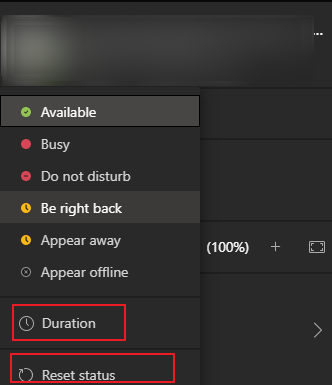
In addition, please make sure the client is the newest version.
If the response is helpful, please click "Accept Answer" and upvote it.
Note: Please follow the steps in our documentation to enable e-mail notifications if you want to receive the related email notification for this thread.
Thank you for this information. This does happen all the time. I did the reset and uninstall and install as you suggested. I had my teams status set as Available. I was not in teams but I was at my desk working. After 45 mins, it switched to away. Sometimes it doesn't take 45 mins to switch it takes 5. I am not away, I am at my desk working. My boss thinks I am away and not working and I am. I need if I set it to Available for it to remain Available until I am in a call or change it manually. Any help is appreciated.
I have tried this before but will try again. Any more suggestions is greatly welcomed.
In addition, I also interested if this issue is reproduced on Teams web client.
Thank you for this suggestion. Yes same issue is on the TEAMS web client as well. Thanks!
