SQL Server | Other
Additional SQL Server features and topics not covered by specific categories
This browser is no longer supported.
Upgrade to Microsoft Edge to take advantage of the latest features, security updates, and technical support.
' cx='32' cy='32' r='32' /%3E%3Ctext x='50%25' y='55%25' dominant-baseline='middle' text-anchor='middle' fill='%23FFF' %3EYV%3C/text%3E%3C/svg%3E)
Hi Folks,
I am facing an issue on one of our Always On SQL Server
Log backups are configured on secondary node
I am trying to shrink the log files on primary server but it is not shrinking.
when i checked log_reuse_wait_desc then it is showing AVAILABILTY_REPLICA, estimated recovery time it is showing approx 27000 seconds and keep on increasing.
Always On is configured with Asynchronous Mode
Any thought how to resolve this issue quickly, This server is hosted on AWS cloud
Additional SQL Server features and topics not covered by specific categories
Locked Question. You can vote on whether it's helpful, but you can't add comments or replies or follow the question.

Is CDC enabled on this AG ? Does the dashboard shows green or you see any issue between primary and secondary replica connection? What is output of select @@version
Thanks Shashank,
CDC is not enabled
below is the output of select @@version, replica dashboard is green the only issue is i am not able to shrink the log as availability_replica is there is log_reuse_wait_desc column
Microsoft SQL Server 2017 (RTM-CU13) (KB4466404) - 14.0.3048.4 (X64) Nov 30 2018 12:57:58 Copyright (C) 2017 Microsoft Corporation Enterprise Edition: Core-based Licensing (64-bit) on Windows Server 2016 Datacenter 10.0 <X64> (Build 14393: ) (Hypervisor)

' cx='32' cy='32' r='32' /%3E%3Ctext x='50%25' y='55%25' dominant-baseline='middle' text-anchor='middle' fill='%23FFF' %3EAA%3C/text%3E%3C/svg%3E)
I have something similar after cutting over from SQL2016 to SQL2022 and then setting up a secondary replica as MI via the link.
all shows healthy, LSNs match etc but for some reason still seeing log hold for AVAILABILITY_REPLICA

Please don't piggyback on old threads, but ask a new Question, if the answers in this thread do not help you.
' cx='32' cy='32' r='32' /%3E%3Ctext x='50%25' y='55%25' dominant-baseline='middle' text-anchor='middle' fill='%23FFF' %3EAM%3C/text%3E%3C/svg%3E)
Hi YashwantVishwakarma-9317,
Sorry for delay.
You can check the following things to troubleshoot this issue:
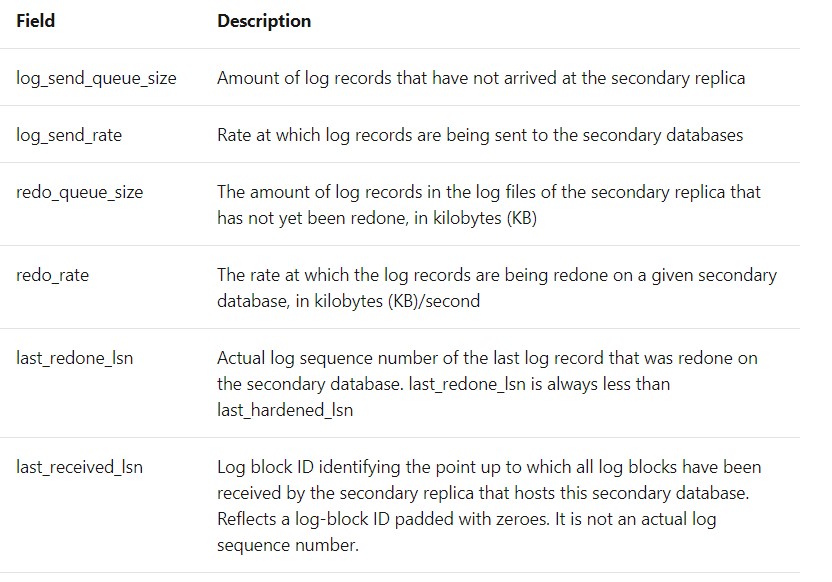
Best Regards,
Amelia
Many Thanks Amelia,
I will try to find out with your suggestions.
when i checked log_reuse_wait_desc then it is showing AVAILABILTY_REPLICA.
The log_reuse_wait_desc showing "AVAILABILITY_REPLICA" occurs when the logged changes at the primary replica are not yet hardened on the secondary replica, or the primary replica is waiting for a secondary replica to complete the processing of log records for a REDO.
There are many reasons for this to happen, such as slow network, long running transactions, etc. Please ensure that there are no problems with the network and no long-running transactions on the primary replica.
You can try to remove the database from AG, shrink log file and re-add it to the AG.
Please refer to this article which might help.
Best Regards,
Amelia
If the answer is helpful, please click "Accept Answer" and upvote it.
Note: Please follow the steps in our documentation to enable e-mail notifications if you want to receive the related email notification for this thread.
Hi Amelia,
True but if database size is of 6TB then it will take too long to remove and add in AG group as whole process, do we have any quicker solution?
Your prime concern at this point is not to shrink the logs. The prime concern is why the secondary is always behind so that you get this state and the log keeps growing. Only when you have the secondary running, you can start to think about shrinking logs.
Hi Erland,
I checked the growth and as per our application team there was a huge load on that DB in terms of transactions but I am still wondering the t-log backup size is still in range of 3-4 GB while before issue it was in range of 300 MB
earlier the log backup schedule was at every 15 minutes and now I am doing log backup at every two minutes and t-log backup size is still in range of 3-4 GB, in non business hours it is below 1GB
I am not getting clue what is happening, the size of DB is 8.0 TB
First you talk about shrinking the transaction log. Now you are talking about the size of the log backups?
The size of the transaction-log backups obviously reflect the workload, and if you are the DBA, your task is to serve that workload.
You say that the log backups have increased so much in size, and of course, there is no one here who can answer this, since we know zero about your system. But some possible reasons: