' cx='32' cy='32' r='32' /%3E%3Ctext x='50%25' y='55%25' dominant-baseline='middle' text-anchor='middle' fill='%23FFF' %3ETE%3C/text%3E%3C/svg%3E)

' cx='32' cy='32' r='32' /%3E%3Ctext x='50%25' y='55%25' dominant-baseline='middle' text-anchor='middle' fill='%23FFF' %3EC%3C/text%3E%3C/svg%3E)
' cx='32' cy='32' r='32' /%3E%3Ctext x='50%25' y='55%25' dominant-baseline='middle' text-anchor='middle' fill='%23FFF' %3EMG%3C/text%3E%3C/svg%3E)
Hi, I've found some steps to accomplish this after having the same problems of "This computer name is invalid." & "Access denied'.
Instead of trying to initiate the rdp session from your remote computer, what you need to do is first rdp to an admin account on the box having the session you wish to shadow, then execute the shadow command from there e.g.
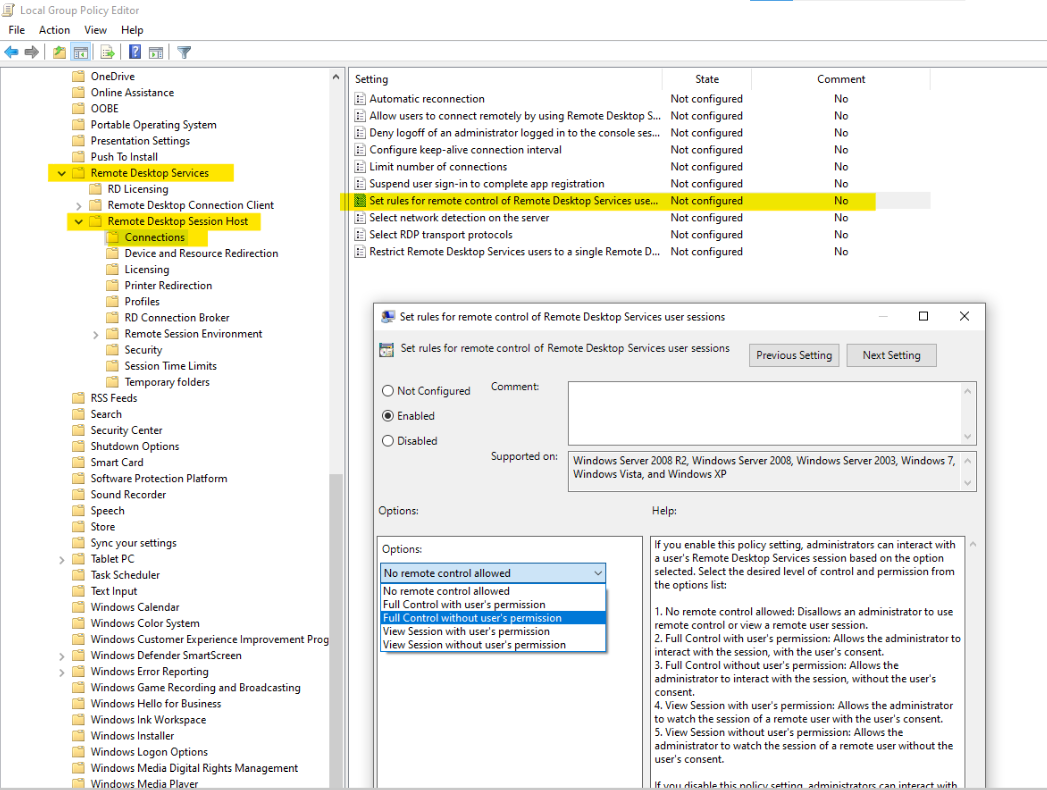
- Follow directions above re: group policy and file sharing
- RDP to remote IP with admin account credentials
- Start a command prompt as administrator
- Run "mstsc /shadow:1 /noconsentprompt /control"
- note: you no longer need the computer name/ip since it's now local execution)
' cx='32' cy='32' r='32' /%3E%3Ctext x='50%25' y='55%25' dominant-baseline='middle' text-anchor='middle' fill='%23FFF' %3EA%3C/text%3E%3C/svg%3E)
' cx='32' cy='32' r='32' /%3E%3Ctext x='50%25' y='55%25' dominant-baseline='middle' text-anchor='middle' fill='%23FFF' %3EZ%3C/text%3E%3C/svg%3E)