Microsoft Security | Microsoft Entra | Microsoft Entra ID
A cloud-based identity and access management service for securing user authentication and resource access

This browser is no longer supported.
Upgrade to Microsoft Edge to take advantage of the latest features, security updates, and technical support.
' cx='32' cy='32' r='32' /%3E%3Ctext x='50%25' y='55%25' dominant-baseline='middle' text-anchor='middle' fill='%23FFF' %3EEH%3C/text%3E%3C/svg%3E)
Hi, Currently, I have my Flutter app with a custom policy (Azure B2C). When the user successfully authenticates, the policy returns a token, which is then stored in the app user preferences. I would like to know how it is possible to fetch the token from somewhere (I presume Azure server) to verify if the saved token in the app is still valid. Thanks in advance.
A cloud-based identity and access management service for securing user authentication and resource access

@emmanuel hdz
To extract the token issued to a Flutter app, you try using the flutter_appauth package. This package provides a set of Flutter widgets and functions that make it easy to implement the OAuth 2.0 and OpenID Connect protocols in your app.
import 'package:flutter_appauth/flutter_appauth.dart';

final FlutterAppAuth appAuth = FlutterAppAuth();

final AuthorizationTokenResponse result =
    await appAuth.authorizeAndExchangeCode(
  AuthorizationTokenRequest(
    '<client_id>',
    '<redirect_uri>',
    issuer: '<authority>',
    scopes: ['openid', 'profile', 'email'],
  ),
);

final String accessToken = result.accessToken;
The authorizeAndExchangeCode() method is used to obtain an access token from Azure AD B2C. The method takes an AuthorizationTokenRequest object that specifies the client ID, redirect URI, authority, and scopes for the request. The method returns an AuthorizationTokenResponse object that contains the access token. You can extract the access token from the AuthorizationTokenResponse object by accessing the accessToken property. Another conceptual workaround could be referred here.
---Please "Accept the answer (Yes)" and "share your feedback ". This will help us and others in the community as well. Thanks, Akshay Kaushik
This comment has been deleted due to a violation of our Code of Conduct. The comment was manually reported or identified through automated detection before action was taken. Please refer to our Code of Conduct for more information.
This comment has been deleted due to a violation of our Code of Conduct. The comment was manually reported or identified through automated detection before action was taken. Please refer to our Code of Conduct for more information.
Thanks for your response and shedding light on the ask.
To validate a token, your application should check both the signature and claims of the token.
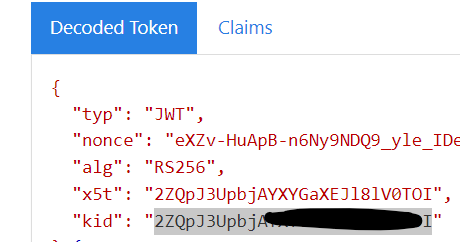
The header of the token contains information about the key and encryption method used to sign the token:
{
        "typ": "JWT",
        "alg": "RS256",
        "kid": "GvnPApfWMdLRi8PDmisFn7bprKg"
}
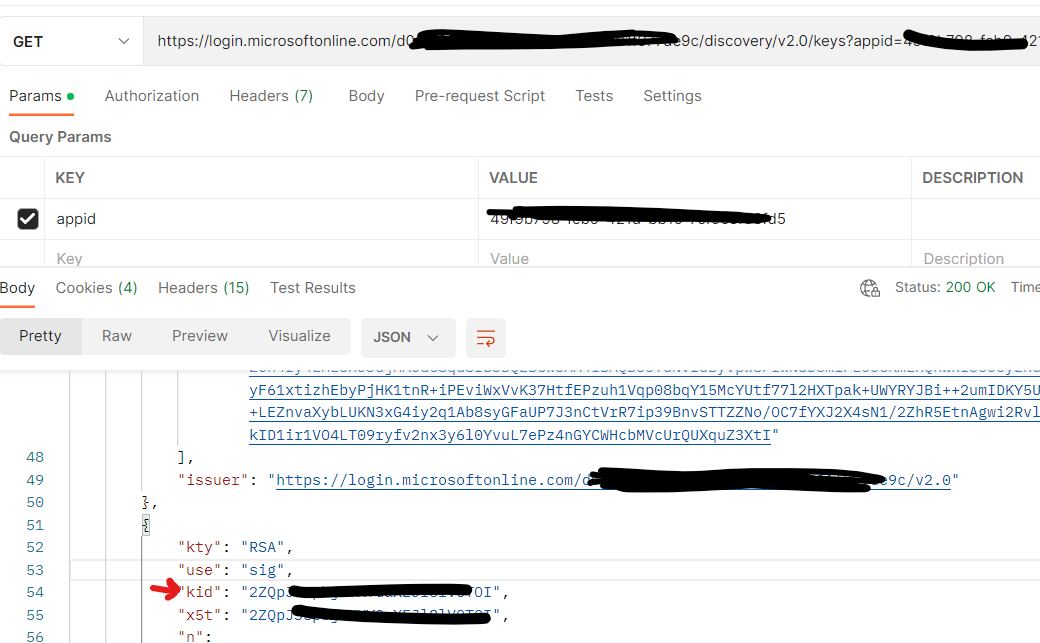
The value of the kid claim is the public key that was used to sign the token. At any given time, Azure AD B2C can sign a token by using any one of a set of public-private key pairs. Azure AD B2C rotates the possible set of keys periodically. Your application should be written to handle those key changes automatically. A reasonable frequency to check for updates to the public keys used by Azure AD B2C is every 24 hours. To handle unexpected key changes, your application should be written to re-retrieve the public keys if it receives an unexpected kid value. The metadata contains jwks_uri, which gives the location of the set of public keys that are used to sign tokens. That location is provided here, but it's best to fetch the location dynamically by using the metadata document and parsing jwks_uri: https://contoso.b2clogin.com/contoso.onmicrosoft.com/b2c_1_signupsignin1/discovery/v2.0/keys The JSON document located at this URL contains all the public key information in use at a particular moment. Your app can use the kid claim in the JWT header to select the public key in the JSON document that is used to sign a particular token. It can then perform signature validation by using the correct public key and the indicated algorithm.
You need to decode your access token using jwt.ms and extract the "kid" from the header and need to match that kid should exist with the public keys.
Please "Accept the answer (Yes)" and "share your feedback ". This will help us and others in the community as well. Thanks, Akshay Kaushik