Good morning,
I have set up a Parallels RAS farm leveraging two Remote Desktop Session hosts. These session hosts are both running Windows Server 2016 (due to incompatibility issues with a feature we required, we must stay on 2016 for now). These 2016 session hosts reach out to a Server 2019 Domain Controller for their per-user CALs, and on that 2019 domain controller, I have installed Server 2019 Per User CALs. I have also set up the group policies to point these session hosts to the correct server using Per User mode.
The problem is that instead of issuing the Server 2019 Per User CALs that I have purchased and installed, the session hosts are issuing Server 2016 Per User CALs, with License Program "Built-in OverUsed"; i believe this category was added by the system as i did not add 2016 CALs. I understand that the 2019 server CALs are backward compatible, so in my mind, this should all work.
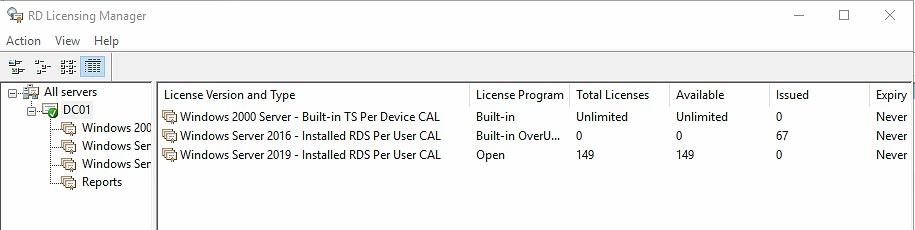
You can see in this screenshot that the issued CALs are coming from the wrong license. How can I force these session hosts to pull the correct licenses? do i need to downgrade the 2019 licenses to 2016 somehow? I am getting notifications stating that we have 30 days left in our grace period.
When I run the Licensing Diagnoser from a session host, I see the following: 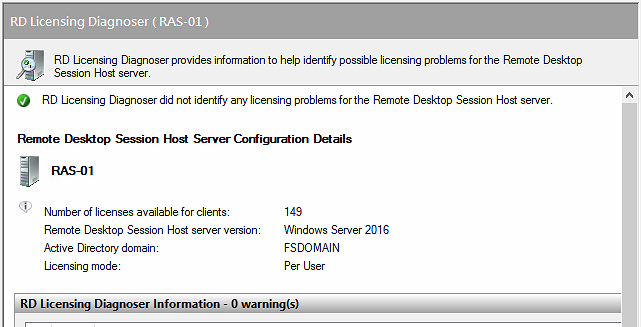
Any help you can provide would be greatly appreciated!
thanks,
Kev
' cx='32' cy='32' r='32' /%3E%3Ctext x='50%25' y='55%25' dominant-baseline='middle' text-anchor='middle' fill='%23FFF' %3EKS%3C/text%3E%3C/svg%3E)

' cx='32' cy='32' r='32' /%3E%3Ctext x='50%25' y='55%25' dominant-baseline='middle' text-anchor='middle' fill='%23FFF' %3ETC%3C/text%3E%3C/svg%3E)
' cx='32' cy='32' r='32' /%3E%3Ctext x='50%25' y='55%25' dominant-baseline='middle' text-anchor='middle' fill='%23FFF' %3ELT%3C/text%3E%3C/svg%3E)
' cx='32' cy='32' r='32' /%3E%3Ctext x='50%25' y='55%25' dominant-baseline='middle' text-anchor='middle' fill='%23FFF' %3EDP%3C/text%3E%3C/svg%3E)