Microsoft Teams | Microsoft Teams for business | Other
Additional features, settings, or issues not covered by specific Microsoft Teams categories

This browser is no longer supported.
Upgrade to Microsoft Edge to take advantage of the latest features, security updates, and technical support.
' cx='32' cy='32' r='32' /%3E%3Ctext x='50%25' y='55%25' dominant-baseline='middle' text-anchor='middle' fill='%23FFF' %3ETR%3C/text%3E%3C/svg%3E)
My calendar has disappeared and the below advice doesn't do the trick, any other options/suggestions? Everybody else in our organisation does have the calendar app in their account, mine disappeared a few days ago for no apparent reason...
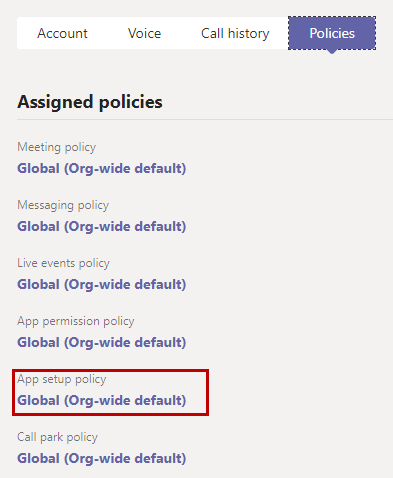
Someone from your organization might have changed the settings and accidentally removed the calendar app for your team.To fix the issue, you need to have an admin access for your team. Follow this guide to turn on the MS Teams calendar again.
*
*
Additional features, settings, or issues not covered by specific Microsoft Teams categories
' cx='32' cy='32' r='32' /%3E%3Ctext x='50%25' y='55%25' dominant-baseline='middle' text-anchor='middle' fill='%23FFF' %3EAN%3C/text%3E%3C/svg%3E)
If you turn off Exchange Web Services in the Account settings, it will not only remove the Calendar App from your MS Teams accounts, but also your out-of-office option will not work.
' cx='32' cy='32' r='32' /%3E%3Ctext x='50%25' y='55%25' dominant-baseline='middle' text-anchor='middle' fill='%23FFF' %3ESM%3C/text%3E%3C/svg%3E)
Hi @Tom Ruijs
The Calendar Tab in Teams requires access to an Exchange mailbox via Exchange Web Services. The Exchange mailbox can be Online, or On-Premises. For Online users who do not see the Calendar Tab, make sure they are licensed for an Exchange Online mailbox and the mailbox is enabled. If your users are homed On-Premises, you need to confirm that your Hybrid configuration is healthy. Use the Hybrid Configuration Wizard to troubleshoot. Note that Teams requires Exchange 2016 CU3 or higher.
For more information and troubleshooting steps, see Troubleshoot Microsoft Teams and Exchange Server interaction issues. Also, please run the following tests to resolve other troubleshooting issues.
Run Test: Microsoft Teams Calendar Tab Test.
If the answer is helpful, please click "Accept Answer" and kindly upvote it. If you have extra questions about this answer, please click "Comment".
Note: Please follow the steps in our documentation to enable e-mail notifications if you want to receive the related email notification for this thread.
' cx='32' cy='32' r='32' /%3E%3Ctext x='50%25' y='55%25' dominant-baseline='middle' text-anchor='middle' fill='%23FFF' %3EKY%3C/text%3E%3C/svg%3E)
Hi @Tom Ruijs
Just checking in to see if above information was helpful. Please let us know if you would like further assistance.
' cx='32' cy='32' r='32' /%3E%3Ctext x='50%25' y='55%25' dominant-baseline='middle' text-anchor='middle' fill='%23FFF' %3ERH%3C/text%3E%3C/svg%3E)
https://aka.ms/TeamsCalendarAppTest link is dead
' cx='32' cy='32' r='32' /%3E%3Ctext x='50%25' y='55%25' dominant-baseline='middle' text-anchor='middle' fill='%23FFF' %3ES%3C/text%3E%3C/svg%3E)
Is the below statement True? Teams Quick meeting and Calendar feature works only if the user mailbox hosted in Office365 cloud. Currently all our company users mailboxes are hosted in on-premise and not integrated with Office 365 completely.
' cx='32' cy='32' r='32' /%3E%3Ctext x='50%25' y='55%25' dominant-baseline='middle' text-anchor='middle' fill='%23FFF' %3EA%3C/text%3E%3C/svg%3E)
+1
Is this statement true?
' cx='32' cy='32' r='32' /%3E%3Ctext x='50%25' y='55%25' dominant-baseline='middle' text-anchor='middle' fill='%23FFF' %3EAP%3C/text%3E%3C/svg%3E)
Teams Quick meeting and Calendar feature works only if the user mailbox hosted in Office365 cloud is a FALSE statement.
The Calendar Tab in Teams requires access to an Exchange mailbox via Exchange Web Services. The Exchange mailbox could either be Online, or On-Premises. In both cases you should have access to Calendar and Quick meeting.
' cx='32' cy='32' r='32' /%3E%3Ctext x='50%25' y='55%25' dominant-baseline='middle' text-anchor='middle' fill='%23FFF' %3EL%3C/text%3E%3C/svg%3E)
Hi all,
Had the same problem with only one user in my company (we use Microsoft 365) and dug for about 2 hrs to find the solution.
I had a user that left the company, kept him in the system for a while to allow others to use his account on behalf of (but with changed password and all Exchange/pop/imap/login/.. diabled). Then it just happened that the user returned and had activated back his account, all in good order except for the pesky calendar button in teams.
I have followed the instructions from various posts (eg https://answers.microsoft.com/en-us/msteams/forum/all/microsoft-teams-essential-calendar-is-missing/13ac3076-0d26-4546-af78-6041bc07efff https://answers.microsoft.com/en-us/msteams/forum/all/calendar-icon-not-showing-in-teams/a3b49446-c1f9-4a12-b3f7-6c2e7b65e062 , this post and few others), which can be summarized to:
However, it wasn't sufficient, the user still had no calendar appearing in Teams, be it via the browser or in the app.
Then I discovered that the user was not part of the default "all@..." group that is created when creating the Microsoft 365 tenant (you cand find this in both Microsoft 365 Admin center and the Exchange admin center).
Adding the user back to this group, followed by a logout/login in teams, solved the issue.
(Not sure if I removed him from this group when he left -- I would say no, because I found him still in other groups -- or the system removed him automatically from it when cutting Exchange/pop/imap/disabling login/...)
Anyway, hope this helps someone.
' cx='32' cy='32' r='32' /%3E%3Ctext x='50%25' y='55%25' dominant-baseline='middle' text-anchor='middle' fill='%23FFF' %3EGP%3C/text%3E%3C/svg%3E)
I am also having the same issue. I have followed the following steps below:
And had the end user clear their teams cache.
This particular end user is using a samsung zfold 3 mobile device.
Still no luck
' cx='32' cy='32' r='32' /%3E%3Ctext x='50%25' y='55%25' dominant-baseline='middle' text-anchor='middle' fill='%23FFF' %3EJR%3C/text%3E%3C/svg%3E)
Hi!
Try to create a new item in the calendar, sometimes the service starts with the first appointment,
Rgds