
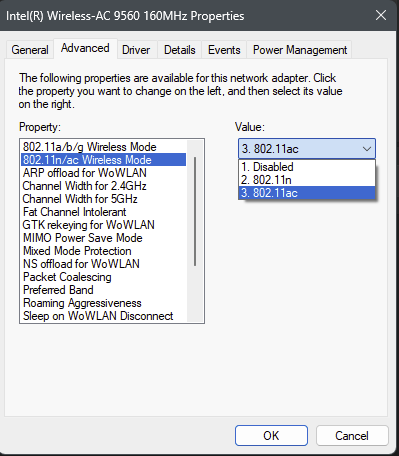
The whole problem with the suggestion, a good one, is that when you look at the properties for an AX choice, there is no AX listed. In other words, I can't select AX as this is not offered in the list shown.
This browser is no longer supported.
Upgrade to Microsoft Edge to take advantage of the latest features, security updates, and technical support.
' cx='32' cy='32' r='32' /%3E%3Ctext x='50%25' y='55%25' dominant-baseline='middle' text-anchor='middle' fill='%23FFF' %3EYY%3C/text%3E%3C/svg%3E)
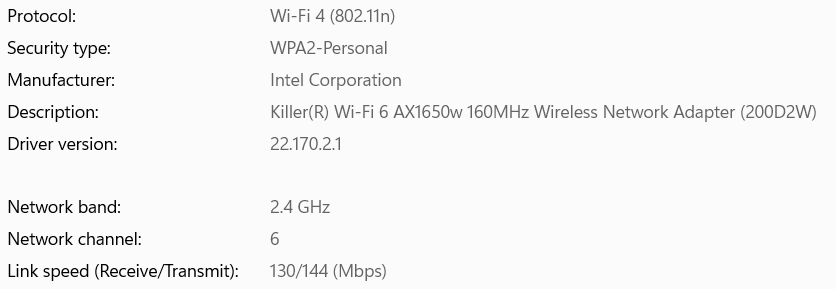
I have both access point and wireless adaptor support WiFi 6.
Every time I connect to that access point, I always connect with WiFi 4 protocol while my smartphone always connect with WiFi 6.
I tried to uninstall and install WLAN driver and it can connect to WiFi 6. But, after some time, it will revert back to WiFi 4.
How to always connect with WiFi 6? Thank you.
I am on Win 11 latest build.
' cx='32' cy='32' r='32' /%3E%3Ctext x='50%25' y='55%25' dominant-baseline='middle' text-anchor='middle' fill='%23FFF' %3EG%3C/text%3E%3C/svg%3E)
Even though I have an WIFI 6 card installed, it never goes to AX, always AC. PS: The Advanced dropdown goes not contain a list with AX as a choice ( AC is the highest presented as a choice) so I can't choose that as the instructor suggested?
The whole problem with the suggestion, a good one, is that when you look at the properties for an AX choice, there is no AX listed. In other words, I can't select AX as this is not offered in the list shown.
' cx='32' cy='32' r='32' /%3E%3Ctext x='50%25' y='55%25' dominant-baseline='middle' text-anchor='middle' fill='%23FFF' %3ESO%3C/text%3E%3C/svg%3E)
Hello,
This is because the Wifi6 protocol (802.11ax) doesnt allow a mixed mode with previous protocols. You will need to configure it to use specifically 802.11ax. By default many WLAN devices are configured with the "Auto" value, which would prioritize up to 802.11an in order to ensure wider compatibility with broadcasting devices.
In Windows, you can change the setting through: Device Manager> Open "Network Adapters" group > go to Properties of your WLAN card then in the Advanced tab change the value "Wireless Mode" to 802.11ax. Just bear in mind that when you want to connect to other networks, it may cause compatibility issue as not all emitters are Wifi6.
-------------------------------------------------------------------------------------------------------------------------------------
--If the reply is helpful, please Upvote and Accept as answer--
Please, what does "doesn't allow a mixed mode with previous protocols" mean exactly?
Thank you @Rafael da Rocha for your input.
Actually, access point is located only 2 meter away from my laptop and no obstacle/wall in between,
so coverage is not problem here.
I will check the preferred connetion as you mentioned. Get back to this forum again after checking.

On the device properties for the wireless card, you should be able to choose the preferred mode. WiFi 6 will be listed as 802.11ax
The card is probably also auto selecting the band. You can force 5GHz, but if it is selecting the 2.4GHz band, it might not have enough coverage to maintain a stable connection on 5GHz and WiFi6.