Microsoft Security | Intune | Configuration Manager | Deployment
Deploying software and updates using Configuration Manager

This browser is no longer supported.
Upgrade to Microsoft Edge to take advantage of the latest features, security updates, and technical support.
' cx='32' cy='32' r='32' /%3E%3Ctext x='50%25' y='55%25' dominant-baseline='middle' text-anchor='middle' fill='%23FFF' %3ETK%3C/text%3E%3C/svg%3E)
Hi All,
I am getting errors while connecting to SCCM Console. I cannot connect to the Site.
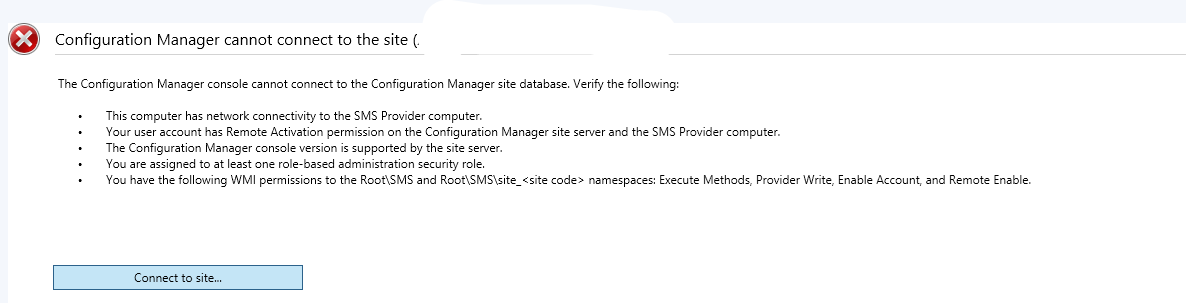
I have checked everything and all logs, all the logs show same error
* [28000][18456][Microsoft][SQL Server Native Client 11.0][SQL Server]Login failed for user '. SMS_SITE_COMPONENT_MANAGER 12/14/2022 8:41:39 AM 4528 (0x11B0)
* [28000][18456][Microsoft][SQL Server Native Client 11.0][SQL Server]Login failed for user '. SMS_SITE_COMPONENT_MANAGER 12/14/2022 8:41:39 AM 4528 (0x11B0)
*** Failed to connect to the SQL Server, connection type: SMS ACCESS. SMS_SITE_COMPONENT_MANAGER 12/14/2022 8:41:39 AM 4528 (0x11B0)
I have reset the site server also, I have checked SQL and SCCM Permission also, all looks good.
Kindly suggest.
Thank You.
Regards,
Trinadh Kola.
Deploying software and updates using Configuration Manager
Locked Question. You can vote on whether it's helpful, but you can't add comments or replies or follow the question.

Hi,
Thanks very much for your feedback and sharing. We're glad that the issue is gone now. It's appreciated that you could click "Accept Answer" to the helpful reply, this will help other users to search for useful information more quickly. Here's a short summary for the problem.
Problem/Symptom:
Configuration Manager console cannot connect to Site
Solution/Workaround:
Someone Removed the ConfigMgr installation folder permission.
Added it back and started working.
Best regards,
Simon
If the response is helpful, please click "Accept Answer" and upvote it.
Note: Please follow the steps in our documentation to enable e-mail notifications if you want to receive the related email notification for this thread.
' cx='32' cy='32' r='32' /%3E%3Ctext x='50%25' y='55%25' dominant-baseline='middle' text-anchor='middle' fill='%23FFF' %3EJM%3C/text%3E%3C/svg%3E)
For those coming to this thread in 2026, check your ODBC Driver version. I had this same issue occur when I downloaded the version 18.7.1.1 of ODBC Driver 18. Rolling back to 18.6.2.1 resolved my issue. Here's an article link that explains the issue: https://techcommunity.microsoft.com/discussions/configurationmanager/latest-odbc-driver-18-for-sql-18-7-1-1-breaks-sccm-site-server--sql-connectivity/4555392
' cx='32' cy='32' r='32' /%3E%3Ctext x='50%25' y='55%25' dominant-baseline='middle' text-anchor='middle' fill='%23FFF' %3ESP%3C/text%3E%3C/svg%3E)
I had the same problem
The above did not work, but the fix was easy. Repair the Configuration Manager Console by going to :
Control Panel/Programs and Features/Microsoft Endpoint Configuration Manager Console
and choose Repair.