Microsoft Teams | Microsoft Teams for business | Other
Additional features, settings, or issues not covered by specific Microsoft Teams categories

This browser is no longer supported.
Upgrade to Microsoft Edge to take advantage of the latest features, security updates, and technical support.
' cx='32' cy='32' r='32' /%3E%3Ctext x='50%25' y='55%25' dominant-baseline='middle' text-anchor='middle' fill='%23FFF' %3EI%3C/text%3E%3C/svg%3E)
Hello
Please i need your help on this issue.
We have become aware that Students in our school have been trying to setup Microsoft Teams meetings between themselves.
As a Secondary Education School, we need to be absolutely certain that we have just now correctly set Microsoft Teams to stop Students creating meetings between themselves and also creating teams between themselves.
We have set the Teams Admin wizard (we think) correctly but need to be sure.
Additional features, settings, or issues not covered by specific Microsoft Teams categories
' cx='32' cy='32' r='32' /%3E%3Ctext x='50%25' y='55%25' dominant-baseline='middle' text-anchor='middle' fill='%23FFF' %3EJM%3C/text%3E%3C/svg%3E)
Hi @IBN
You could try to follow these steps to restrict users to create Teams using their Office365 accounts:
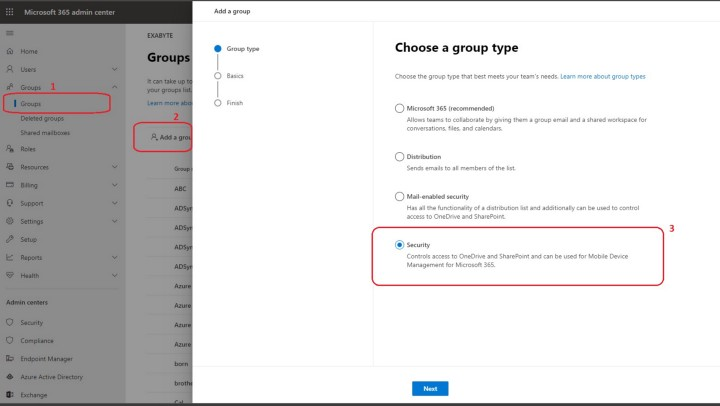
If the answer is helpful, please click "Accept Answer" and kindly upvote it. If you have extra questions about this answer, please click "Comment".
Note: Please follow the steps in our documentation to enable e-mail notifications if you want to receive the related email notification for this thread.
' cx='32' cy='32' r='32' /%3E%3Ctext x='50%25' y='55%25' dominant-baseline='middle' text-anchor='middle' fill='%23FFF' %3EAD%3C/text%3E%3C/svg%3E)
Hi, in the new Microsoft365, I dont see this option of secuirty under the group section in admin.
Can you please let me know how do I restrict the students to create new groups among themselves?